A subdomain is a separate section of your website that lives under your main domain, such as shop.yourdomain.com or blog.yourdomain.com. When a subdomain is no longer needed, removing it in DirectAdmin tidies up your account, frees the disk space its files were using and removes the DNS records that pointed it at your hosting.
This guide shows you how to remove a subdomain from your Noiz DirectAdmin hosting account, and explains exactly what gets deleted along with it, because the removal can take your files with it.
Last reviewed: 27 July 2026, against the current DirectAdmin release and its Evolution interface. This guide is written for Noiz hosting and is kept current against DirectAdmin. It complements, and does not replace, the official DirectAdmin documentation linked below.
Official Documentation Reference
- DirectAdmin Documentation (product documentation home)
- DirectAdmin DNS Documentation (how DirectAdmin manages the DNS records a subdomain relies on)
Before You Start
- Your DirectAdmin login details for your Noiz hosting account.
- Confirmation that nothing live still depends on the subdomain: no published pages, no application installed in its folder, no links or adverts pointing at it, and no scripts or integrations calling it.
- A current backup if the subdomain contains anything you might want back. See How to Generate and Download a Full Backup of Your Account in DirectAdmin.
Important: Removing a Subdomain Can Delete Its Files
DirectAdmin offers a Remove Directory Content option during the deletion. Read this before you tick it:
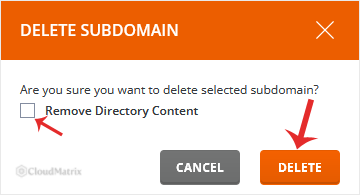
- With Remove Directory Content ticked, DirectAdmin deletes the subdomain and permanently erases its document root and everything inside it: web pages, images, uploads and application files.
- With Remove Directory Content left unticked, DirectAdmin removes the subdomain configuration and its DNS records, but leaves the folder and its files sitting on your account. Nothing serves from that address any more, but the data is still there and still counts against your disk quota.
There is no undo and no recycle bin. Deleted content is not recoverable from within DirectAdmin, and restoring it afterwards depends entirely on having a backup you made beforehand. If you are even slightly unsure, leave the option unticked, confirm over the following days that nothing broke, then delete the leftover folder from File Manager at your leisure.
How to Remove a Subdomain in DirectAdmin
Step 1: Log In to DirectAdmin
Log in to your DirectAdmin account using the details supplied when your Noiz hosting was set up.
Step 2: Open Subdomain Management
In the Account Manager section, click Subdomain Management. If you cannot see it, type Subdomain into the navigation filter box at the top of the menu and the option will appear. Click it.

Step 3: Select the Subdomain to Remove
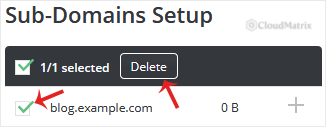
Under Subdomain Name, tick the subdomain you want to remove. Check the spelling carefully before you continue, particularly if you have several similarly named subdomains such as dev.yourdomain.com and demo.yourdomain.com.
Step 4: Confirm the Deletion
Click Delete. If you also want the subdomain's files erased at the same time, tick Remove Directory Content before clicking Delete to confirm. Leave it unticked to keep the files on your account.
DirectAdmin removes the subdomain and returns you to Subdomain Management, where it no longer appears in the list.
What Happens When a Subdomain Is Removed
- DNS records go with it. DirectAdmin deletes the subdomain's record from your domain's DNS zone. Visitors will start seeing a failure to resolve, rather than your site, once the change reaches them.
- The web server stops answering for that hostname. Requests to the address either fail or fall through to your main domain, depending on how your account is configured.
- SSL coverage lapses. If the subdomain was included in an SSL certificate for your account, it drops out at the next certificate renewal. Nothing needs doing on your side.
- Email addresses on that subdomain stop working. If you created mailboxes at the subdomain, their mail routing goes away with the DNS records. Move any mail you need out first.
- FTP accounts pointed at the folder break. An FTP account whose home directory was inside the removed subdomain's folder will fail to reach anything useful once the folder is gone. See How to Remove an FTP Account in DirectAdmin to clean those up.
- Databases are not deleted. A database an application on the subdomain was using survives the removal and keeps consuming space. Remove it separately if it is no longer wanted, using How to Delete a Database in DirectAdmin.
Troubleshooting
Symptom: the subdomain still loads in your browser after removal. This is almost always caching rather than a failed deletion. DNS changes take time to reach resolvers worldwide, and your browser caches both the DNS answer and the page itself. Try a private or incognito window, a different network such as mobile data, or wait a few hours and check again. If Subdomain Management no longer lists the subdomain, the removal succeeded.
Symptom: the files are still there after deletion. You left Remove Directory Content unticked, which is the safe default behaviour. Open File Manager and delete the folder manually when you are satisfied nothing needs it.
Symptom: you cannot find the address you want to remove under Subdomain Management. It may not be a subdomain at all. Additional domain names attached to your account appear elsewhere in DirectAdmin as domain pointers or domain aliases. See How to Remove a Domain Pointer in DirectAdmin or How to Remove a Domain Alias in DirectAdmin.
Symptom: you removed the wrong subdomain. If you left the directory content in place, simply recreate the subdomain with the same name and the existing folder is picked up again. If you ticked Remove Directory Content, the files are gone and you will need to restore them from a backup. See How to Restore a Previously Generated Backup in DirectAdmin.
Related Guides
- How to Add a Subdomain in DirectAdmin
- How to Redirect Your Website Using DirectAdmin
- How to Generate and Download a Full Backup of Your Account in DirectAdmin
Need Help?
If you are not certain whether a subdomain is still in use, or you removed one and need the files back, open a support ticket from your Noiz client area before making further changes. The sooner Noiz support hears about an accidental deletion, the better the chances of recovering something useful from a backup.






