This guide shows you how to permanently remove a MySQL or MariaDB database from your hosting account using the DirectAdmin control panel. It is written for the account (user) level of DirectAdmin, which is the level Noiz hosting customers log in to.
Deleting a database is immediate and permanent. DirectAdmin does not move the database to a recycle bin and there is no undo button. Take a backup first, every time, even when you are certain the database is unused.
Last reviewed: 27 July 2026, against the current DirectAdmin release and its Evolution interface. This guide is written for Noiz hosting and is kept current against DirectAdmin. It complements, and does not replace, the official DirectAdmin documentation linked below.
Official Documentation Reference
- DirectAdmin Docs: MariaDB and MySQL
- DirectAdmin Docs: MySQL backup, restore and recovery
- DirectAdmin Docs: the Evolution interface
Prerequisites
- Your DirectAdmin login details, from your Noiz welcome email or the Noiz client area.
- A current backup of the database. See How to Download a Database Backup from DirectAdmin.
- Confirmation that no live website or application still points at the database.
Before You Delete Anything
Two minutes of checking here saves hours of recovery later.
- Download a fresh backup. Existing account backups may be days old, and they are not a substitute for a dump taken right before deletion. Follow How to Download a Database Backup from DirectAdmin and keep the
.sqlor.gzfile somewhere off the server. - Check the exact database name. DirectAdmin prefixes every database with your account username, so your databases look like
username_wp1,username_wp2andusername_shop. The names are similar by design, and deleting the wrong one is the single most common mistake on this screen. - Confirm nothing is using it. Open the application's configuration file and read the database name it actually uses:
wp-config.phpfor WordPress,configuration.phpfor Joomla,app/etc/env.phpfor Magento, or.envfor Laravel. Match that name against the one you are about to delete. - Note the database users. Deleting a database does not necessarily tidy up the MySQL users that were created to access it. Make a note of which users are attached, so you can clean up afterwards.
Delete the Database
Step 1: Log in to DirectAdmin
Log in to your DirectAdmin account using the URL and credentials supplied by Noiz. If you cannot find them, they are available in the Noiz client area or from Noiz support.
Step 2: Open MySQL Management
In the Account Manager section, click MySQL Management. If you cannot see the tile, type MySQL Management into the navigation filter box at the top of the sidebar and click the result.

Step 3: Select the Database
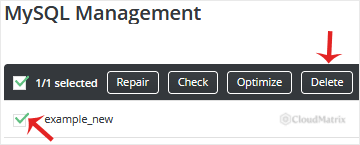
The page lists every database on the account, along with its size and the users assigned to it. Tick the checkbox next to the database you want to remove. You can tick more than one, but be careful: the deletion applies to everything you have selected, and a single confirmation covers the whole selection.
Read the full name once more before continuing, including the username_ prefix.
Step 4: Confirm the Deletion
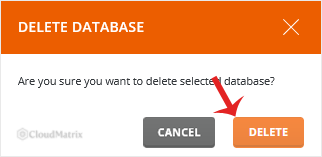
Click Delete. DirectAdmin asks you to confirm, so click Delete again on the confirmation prompt. This second click is the point of no return.
Step 5: Verify and Tidy Up
The database disappears from the list and the storage it used is released back to your account quota. The database also stops counting against the database limit on your hosting plan, which frees a slot if you were at the ceiling.
Now review the remaining entries in MySQL Management. If a database user existed only to serve the database you just deleted, remove it as well so that no unused credentials are left active on the account. Leave any user that is still attached to another database.
Troubleshooting
Symptom: your website shows "Error establishing a database connection" or a similar database error after the deletion. The site was still using that database. Recreate a database with the same name, recreate the database user with the same username and password, then import the .sql dump you took beforehand. See How to Create a Database in DirectAdmin, and note that passwords are not stored inside a dump file, so the application's configuration file may also need updating.
Symptom: the Delete button does nothing. No database is selected. Tick the checkbox in the left-hand column of the row first, then click Delete.
Symptom: the database still appears in the list after deleting it. Refresh the page with a hard reload to clear the cached view. If it genuinely persists, contact Noiz support.
Symptom: MySQL Management is not present in Account Manager. Your hosting package may not include database access, or the feature may be disabled on the account. Contact Noiz support to check.
Symptom: you deleted the database and have no backup. Noiz keeps server-level backups on managed hosting, and a restore may be possible depending on the age of the loss. Open a support ticket immediately and stop making further changes to the account, because continued activity reduces what can be recovered.
Getting Help
If you are unsure which database an application uses, or you need a deletion reversed, Noiz support can help. On managed Noiz hosting plans, support will identify the correct database, take a verified backup and perform the deletion for you. Open a ticket from the Noiz client area with the account username and the database name involved.






