A domain pointer in DirectAdmin lets a second domain name serve the same website as one of the domains already on your Noiz hosting account. When that second domain is no longer needed, or you want to move it somewhere else, you remove the pointer. This guide shows you how, and explains what actually changes on the server once the pointer is gone.
Other control panels use different words for the same idea. cPanel calls them parked domains or aliases, and Plesk calls them domain aliases. In DirectAdmin the feature is called Domain Pointers, and it is separate from DirectAdmin's own Domain Aliases feature, so make sure you are removing the right one.
Last reviewed: 27 July 2026, against the current DirectAdmin release and its Evolution interface. This guide is written for Noiz hosting and is kept current against DirectAdmin. It complements, and does not replace, the official DirectAdmin documentation linked below.
Official Documentation Reference
- DirectAdmin documentation (product reference and release notes)
- DirectAdmin: "Domain already exists" and how domains are held on the server (useful background when a removed pointer still blocks a new domain)
Prerequisites
- Your DirectAdmin login details for your Noiz hosting account. These were issued in your welcome email.
- The pointer must already exist on the account. If you are adding one instead, see How to Create a Domain Pointer in DirectAdmin.
- Confirmation that nothing live still depends on the pointed domain. Removing a pointer takes that domain's website offline immediately.
Remove the Domain Pointer
Step 1: Log in to DirectAdmin
Log in to your DirectAdmin account. If you have both a user account and a reseller or admin account, make sure you are at User Level, because domain pointers are managed there.
Step 2: Open Domain Pointers
In the Account Manager section, click Domain Pointers. If you cannot see it, type Pointers into the navigation filter box at the top of the sidebar and the option will appear. Click it.

Step 3: Check you are on the right parent domain
If your account holds more than one domain, DirectAdmin shows pointers for the domain currently selected in the domain selector at the top of the page. Switch to the parent domain that owns the pointer you want to remove, otherwise the list will look empty even though the pointer still exists.
Step 4: Select the pointer
Under Domain Pointers, tick the checkbox next to the domain pointer you want to remove. You can tick more than one to remove several at once.
Step 5: Delete
Click Delete and confirm the action when prompted.
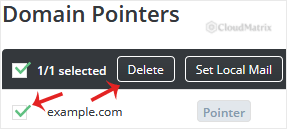
The pointer is removed straight away and disappears from the list. There is no undo, so if you remove the wrong one you will need to create it again.
What Changes on the Server
Removing a pointer does more than tidy up a list, so it is worth knowing what has just happened:
- The website stops answering on that domain. The web server configuration that made the pointed domain serve the parent domain's site is rebuilt without it. Visitors to the pointed domain will no longer reach your site.
- Redirect behaviour ends too. If the pointer was created as a redirect rather than a straight alias, that redirect stops working as well.
- DNS may or may not be removed. Depending on how the pointer was originally created, DirectAdmin may also drop the DNS zone for the pointed domain. Open DNS Management afterwards and confirm the state matches what you intended. If the domain is going to be hosted elsewhere, leaving a stale zone behind on the old server is untidy but harmless once the nameservers are changed at the registrar.
- Email routing for that domain ends. If mail addressed to the pointed domain was being delivered into the parent domain's mailboxes, that stops. Mail sent to the pointed domain after removal will bounce until the domain is set up somewhere else.
- SSL certificates go stale, not broken. If the pointed domain was included in the parent domain's certificate, that name simply drops out at the next issue or renewal. The parent domain's own certificate keeps working.
Troubleshooting
Symptom: The pointer is gone from DirectAdmin, but the old site still loads on that domain. This is almost always caching rather than a failed removal. Your browser, your operating system's DNS resolver, and any CDN or proxy in front of the site can all hold the previous answer for a while. Test in a private browsing window, on a different network or on mobile data, before assuming something went wrong.
Symptom: You cannot find the pointer in the list. Check three things. First, that you are on the correct parent domain in the domain selector. Second, that you are looking at Domain Pointers and not Domain Aliases, which is a different feature with a separate list. Third, that the entry is not actually a full domain on the account rather than a pointer, in which case you would remove it under Domain Setup instead.
Symptom: Adding the domain to another account fails with a "domain already exists" style error. A domain can only be held once on a DirectAdmin server. Remove the pointer first, then add the domain to the other account. If the error persists after removal, the domain may still be attached elsewhere on the server, and Noiz support can clear it for you.
Symptom: The Delete button does nothing. Confirm at least one checkbox is ticked. DirectAdmin will not act on an empty selection, and the lack of feedback makes it look like the button is broken.
Before You Remove: A Short Sanity Check
Removing a pointer is a small click with a real-world effect. Before you delete, confirm that the domain is not still printed on business cards, signage or advertising, that no third party is linking to it in a way that matters to you, and that no email addresses at that domain are still in use. If the domain is being retired but you want links to keep working, a redirect at the DNS or web server level is a gentler option than removing the pointer outright.
Related Articles
- How to Create a Domain Pointer in DirectAdmin
- How to Create a Domain Alias in DirectAdmin
- How to Remove a Domain Alias in DirectAdmin
Need a Hand?
If you are unsure whether an entry is a pointer, an alias or a full domain, or you want a domain moved to its own hosting account without downtime, open a support ticket from your Noiz client area and the Noiz team will take care of it for you.






