An FTP account is a login, not a folder. Removing one withdraws a set of credentials from the server so that nobody can use them to reach your files again. This guide shows you how to delete an additional FTP user in DirectAdmin on Noiz hosting, and, just as importantly, what deleting one does not do.
You cannot delete the main FTP account. That login shares its username with your DirectAdmin account and belongs to the hosting account itself, so DirectAdmin offers no Delete option for it. If you want to stop the main login being used, change its password instead: see How to Change an FTP Account Password in DirectAdmin. Every additional FTP user you created afterwards can be removed freely.
Last reviewed: 27 July 2026, against the current DirectAdmin release and its Evolution interface. This guide is written for Noiz hosting and is kept current against DirectAdmin. It complements, and does not replace, the official DirectAdmin documentation linked below.
Official Documentation Reference
- DirectAdmin Docs: FTP (the FTP service itself, including login troubleshooting).
- DirectAdmin Docs: Evolution (the interface the screenshots below were taken in).
- DirectAdmin Docs: File Manager (for tidying up the files an old FTP user left behind).
Prerequisites
- A Noiz hosting plan on DirectAdmin, plus the sign-in URL and credentials from your Noiz welcome email. DirectAdmin normally answers on port
2222, for examplehttps://yourdomain.com:2222(replaceyourdomain.comwith your own domain). - At least one additional FTP account to remove. If you are still deciding whether you need one at all, see How to Create an FTP Account in DirectAdmin.
- A moment's thought about what currently uses the login. See the warning immediately below.
Before You Delete: What Removal Does and Does Not Do
This is the part that catches people out, so it is worth being blunt about it.
- Deleting the account does not delete the files it could reach. The credentials disappear; the directory, and everything inside it, stays exactly where it is. If that FTP user was pointed at
public_html, your website keeps serving from those files as normal. If you also want the content gone, remove it separately in File Manager before or after deleting the login. - Anything using those credentials stops working immediately. Deployment scripts, backup jobs that push to or pull from the server, a designer's FileZilla profile, an IDE with a saved connection, a CMS plugin configured with FTP details: all of them will start failing at the next run, usually with a login error rather than an obvious "the account was deleted" message. Check what is using the login before you remove it.
- A client that is already connected may stay connected. New logins are refused from the moment you delete the account, but a session that is already open can survive until it finishes or times out. If you are removing a login urgently because it has been compromised, delete it and then contact Noiz support so any live session can be closed too.
- Deletion is not reversible from the panel. There is no undo and no recycle bin for FTP users. Recreating a login with the same username is easy enough, but you set the password and the directory again from scratch; DirectAdmin does not remember the old settings.
Delete, or Suspend?
If the login is only being paused, for example a contractor who will be back next month, or a login you suspect is being abused but have not finished investigating, suspending is the better move. A suspended account keeps its username, password and directory settings and simply refuses to log in until you re-enable it, which spares you rebuilding the account later. See How to Suspend an FTP Account in DirectAdmin.
Delete when the login is genuinely finished with: a project that has ended, a supplier you no longer work with, or a leftover account nobody can account for. Unused FTP logins are one of the quieter security risks on a hosting account, because their passwords are rarely rotated and are often stored in plain text in somebody's old client software.
Removing an FTP Account
Step 1: Sign in to DirectAdmin
Sign in to your DirectAdmin account using the address and credentials from your Noiz welcome email.
Step 2: Open FTP Management
In the Account Manager section, click FTP Management. If you cannot see the section, type FTP Management into the navigation filter box at the top of the sidebar and the item will appear. Click it.

Step 3: Select the account to remove
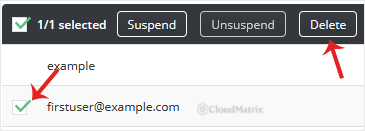
The FTP Accounts list shows every FTP login on the currently selected domain, along with the directory each one can reach. Tick the account you want to remove. You can tick more than one if you are clearing out several at once.
Check the directory column before you tick anything. Two FTP users often have similar names and very different reach, and the path is the only reliable way to tell which login is which.
Step 4: Delete and confirm
Click Delete. DirectAdmin asks for confirmation so that a stray click cannot remove a working login. Click Delete again to confirm.
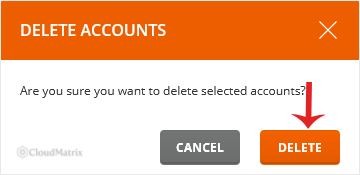
The account disappears from the list and the credentials stop working straight away. Repeat for any other logins you are retiring, then take a last look down the remaining list and ask whether each one still has a reason to exist.
Troubleshooting
Symptom: one account has no Delete option, or the option is greyed out. That is the main FTP account, which shares its username with your DirectAdmin login and cannot be removed. Change its password instead if you need to lock it down.
Symptom: the account you want is not in the list. Check the domain selector at the top of DirectAdmin. FTP accounts belong to a specific domain, so on hosting accounts holding several domains the list only shows the logins for whichever domain is currently selected.
Symptom: the files are still there after deleting the account. That is intended behaviour, not a failed deletion. Removing an FTP login never removes content. Delete the files in File Manager if you want them gone.
Symptom: your website broke shortly after you deleted an FTP account. The deletion did not remove any files, so look at what else used those credentials. A deployment pipeline, a backup task or a CMS plugin configured with the old FTP details is the usual cause, and the fix is to repoint it rather than to recreate the login.
Symptom: someone still appears to be connected after you deleted the login. An FTP session opened before the deletion can persist until it ends. Contact Noiz support if you need it cut immediately.
Symptom: you deleted the wrong account. Recreate it with the same username and the same directory, then set a new password and update whoever or whatever uses it. Nothing inside the directory was touched, so no data is lost.
Need a Hand?
If an FTP login will not delete, if you are not sure which of several accounts is safe to remove, or if you are removing a login because you think it has been compromised, open a ticket with Noiz support from the client area. Include the domain and the exact FTP username, and the Noiz team will check the account on the server directly and close any session still open on it.






