A subdomain is an extra name in front of a domain you already host, separated by a dot. If your site is yourdomain.com, then blog.yourdomain.com, shop.yourdomain.com and staging.yourdomain.com are all subdomains of it. They cost nothing extra, they do not have to be registered anywhere, and they are the standard way to run a second site, a test copy or a separate application alongside your main website. Read yourdomain.com throughout as your own domain name.
This guide shows you how to create one on your Noiz DirectAdmin hosting account, where DirectAdmin puts the files, and the two things that catch people out afterwards: the certificate and the wait.
Last reviewed: 27 July 2026, against the current DirectAdmin release and its Evolution interface. This guide is written for Noiz hosting and is kept current against DirectAdmin. It complements, and does not replace, the official DirectAdmin documentation linked below.
Official Documentation Reference
- DirectAdmin Docs: the Evolution skin
- DirectAdmin Docs: DNS
- DirectAdmin Docs: ACME and SSL certificates for domains
- DirectAdmin changelog 1.648: choosing a document root when adding a subdomain
Prerequisites
- An active Noiz DirectAdmin hosting account, and your DirectAdmin username and password.
- The parent domain already set up on the account. A subdomain attaches to a domain that exists, it does not create one.
- The parent domain resolving to your hosting, normally through the Noiz nameservers
ns1.noiz.co.zaandns2.noiz.co.za. - A free subdomain allowance on your hosting package. Most packages allow a generous number, some allow unlimited, and a few are capped.
Create the Subdomain
-
Log in to your DirectAdmin account.
-
In the Account Manager section, click Subdomain Management. If you cannot see it in the menu, type
Subdomaininto the navigation filter box at the top of the sidebar and the option appears. Click it.
-
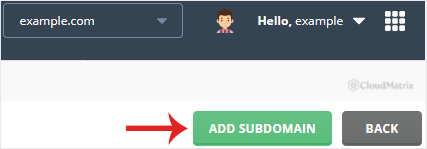
Click Add Subdomain, at the top right of the page.
-
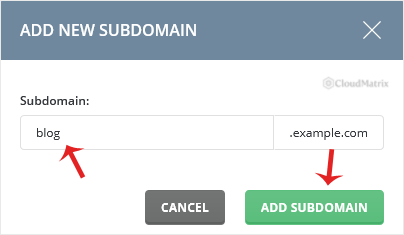
Under Subdomain, type the prefix only. To create
blog.yourdomain.com, enterblog, not the whole address. The parent domain is shown beside the field and is added for you.If your account holds more than one domain, check the domain selector at the top of the page before you type. The subdomain is created under whichever domain is currently selected.
-
Leave the document root at its default unless you have a reason to change it. DirectAdmin offers a choice here: the traditional location inside the parent domain's web folder, or a separate folder of your own. The default is the safe answer for almost everyone, and the section below explains what the difference means in practice.
-
Click Add Subdomain.
A success message confirms the subdomain has been created, and it appears in the list on the Subdomain Management page. Allow a few minutes before it responds in a browser.
Where the Files Go
With the default document root, DirectAdmin creates a folder named after the subdomain inside your main web folder. For blog.yourdomain.com that is:
domains/yourdomain.com/public_html/blog/Upload the subdomain's site into that folder using the DirectAdmin File Manager or FTP. Anything already sitting in a folder of that name is picked up immediately, which is why an existing folder can make a brand new subdomain load unexpected content.
One consequence of the default layout surprises people: the same files are reachable by two addresses. blog.yourdomain.com and yourdomain.com/blog both serve that folder. That is usually harmless, but if the subdomain is a real site rather than a section of the main one, search engines seeing two addresses for identical content is untidy. Either set a canonical address inside the application, or choose a document root outside public_html when you create the subdomain so only the subdomain name reaches it.
Things Worth Knowing
- The DNS record is created for you. Because Noiz hosts the parent domain's DNS zone, DirectAdmin adds the record for the new name automatically. You do not need to touch DNS at your registrar for a subdomain. The exception is if you have moved the domain's DNS to a third party such as Cloudflare, in which case the zone that counts lives there and you must add an
Arecord for the subdomain yourself, pointing at your hosting IP address. - Give it five minutes. A newly created subdomain is not instant. The web server configuration has to be written and reloaded, and DNS caches need a moment. If it does not answer straight away, that is normal rather than a fault.
- HTTPS is a separate step. A certificate issued for
yourdomain.comandwww.yourdomain.comdoes not coverblog.yourdomain.com. Visitors reaching the subdomain overhttps://will see a certificate name mismatch warning until you reissue. Go to SSL Certificates under Account Manager, select the parent domain, and tick the new subdomain in the list of names to include before requesting the certificate. The subdomain must already resolve for validation to succeed, so create it first and issue the certificate afterwards. - Nested subdomains work. DirectAdmin accepts multiple levels, such as
dev.blog.yourdomain.com. Enter the whole prefix,dev.blog, in the Subdomain field. Bear in mind that a standard certificate covering*.yourdomain.comdoes not cover a second level, because a wildcard matches one label only. - Email is not affected. Creating a subdomain does not create mailboxes on it and does not change mail for the parent domain. Subdomains are a web feature.
- Prefix rules. Use letters, numbers and hyphens. No underscores, no spaces, no leading or trailing hyphen. Avoid names already used as system hosts, such as
mail,ftp,webmailandns1, because those already exist in the zone and creating a subdomain with the same name will collide with the service. - Deleting is not automatic housekeeping. Removing a subdomain later gives you the choice of deleting its folder or keeping it. Leaving the files behind is useful when you are only taking a site offline, but they still count against your disk quota.
Troubleshooting
- Symptom: the subdomain shows the main website instead of its own content. The folder is empty, so the server has fallen back to the parent site or to a default page. Upload the subdomain's files into
public_html/subdomain-name/and it will serve them. - Symptom: the browser reports "server not found". Either the subdomain has not finished being set up, or the domain's DNS is hosted somewhere other than Noiz. Wait five minutes first. If it still fails and you use an external DNS provider, add the
Arecord for the subdomain there. - Symptom: a certificate warning naming the wrong site. Expected until the certificate is reissued to include the subdomain. Reissue it from SSL Certificates with the subdomain ticked.
- Symptom: DirectAdmin refuses to create it and reports that the subdomain already exists. The name is already present in the DNS zone or as a subdomain on the account. Check the Subdomain Management list, and check the DNS records for the parent domain for an existing entry with that name.
- Symptom: the Add Subdomain button is missing, or creation fails on a limit message. The package allowance for subdomains is used up. Open a ticket with Noiz support about raising it, or remove a subdomain you no longer need.
- Symptom: a content management system on the subdomain redirects to the main domain. The application stores its own site address and rewrites requests to it. Update the site address inside the application, not in DirectAdmin.
Related Guides
- How to Remove Subdomain in DirectAdmin
- How to Create a Domain Alias in DirectAdmin
- How to Create a Domain Pointer in DirectAdmin
Need a Hand?
If the subdomain is created but will not load, or you need the certificate reissued to cover it, open a ticket from your Noiz client area. Include the full subdomain name and what you expect to see, and the support team will check the zone, the web server configuration and the certificate for you.






