A domain alias makes a second domain name serve the exact same website as your main domain, without a second set of files and without a redirect. When you no longer own that extra domain, or you want it to point somewhere else entirely, you remove the alias. This guide shows you how to do that from your DirectAdmin control panel on Noiz hosting, and explains what removal actually changes so you are not caught out afterwards.
DirectAdmin manages aliases and redirect-style pointers in the same place, under Domain Pointers. An alias is simply a pointer that was created with the alias option enabled, so both appear in the same list and both are removed the same way.
Last reviewed: 27 July 2026, against the current DirectAdmin release and its Evolution interface. This guide is written for Noiz hosting and is kept current against DirectAdmin. It complements, and does not replace, the official DirectAdmin documentation linked below.
Official Documentation Reference
- DirectAdmin Docs: Domains, Users and Resellers
- DirectAdmin Docs: Evolution skin
- DirectAdmin Docs: Maintaining DNS records
Prerequisites
- Your DirectAdmin login details, available from your Noiz client area.
- At least one existing domain alias on the account. If you need to add one instead, see How to Create a Domain Alias in DirectAdmin.
- Confirmation that nothing still depends on the alias name: live links, email addresses on the alias domain, or an SSL certificate that lists it.
Remove the Domain Alias
1. Log in to DirectAdmin
Sign in to your DirectAdmin account. If the account holds several domains, use the domain selector at the top of the panel to switch to the domain that owns the alias, because pointers belong to a specific parent domain.
2. Open Domain Pointers
In the Account Manager section, click Domain Pointers. If you cannot see it, type Pointers into the navigation filter box at the top of the sidebar and the option will appear. Click it.

3. Select the alias you want to remove
The Domain Pointers page lists every pointer attached to the current domain and shows whether each one is an alias or a redirect. Tick the checkbox next to the domain alias you want to remove, and check the name carefully before you continue.
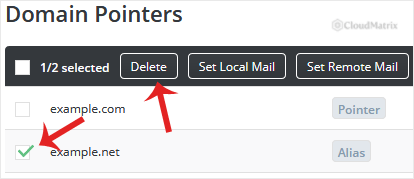
4. Click Delete
Click Delete and confirm if you are prompted. DirectAdmin removes the alias immediately and it disappears from the list. There is no undo and no recycle bin, so if you remove the wrong entry you will need to create it again.
What Removal Actually Changes
- Your website files are untouched. An alias never had its own document root, so nothing under
public_htmlis deleted. Only the mapping from the alias name to your main site is removed. - The alias stops serving your site. Visitors who reach the old alias name will see whatever the server falls back to, usually a default page or an error, rather than your website.
- Email on the alias domain stops. If mail addressed to the alias domain, for example
[email protected], was being accepted because of the alias, it will no longer be delivered once the alias is gone. Move any live addresses to your main domain first. - The domain registration is not affected. Removing an alias in DirectAdmin does nothing to your ownership of that domain name. You still own it and can point it elsewhere.
- DNS records created for the alias are removed with it. If the alias name is meant to keep working somewhere else, set up its DNS at whichever service will host it next.
Troubleshooting
Symptom: the alias still loads your website after removal. This is almost always caching. Browsers and recursive DNS resolvers hold the previous answer until the record's time to live expires. Clear your browser cache, or test from a different network or device, and allow the usual propagation window.
Symptom: SSL certificate renewals start failing after the alias is removed. A certificate issued while the alias existed still lists that name, and validation for it now fails. Regenerate the certificate from SSL Certificates for the parent domain, with only the names you still use selected.
Symptom: the alias is not in the list. Pointers are per domain. Use the domain selector at the top of DirectAdmin to switch to the correct parent domain, then reopen Domain Pointers.
Symptom: the entry is listed as a redirect rather than an alias. It is removed in exactly the same way, so tick it and click Delete.
Need a Hand?
If you are unsure which entry to remove, or the alias domain still needs to keep working somewhere else, open a support ticket from your Noiz client area before you delete anything. The Noiz support team can confirm what the alias is doing and make the change with you.






