A domain alias lets a second domain name serve the same website as your main domain, while keeping its own name in the browser address bar. If your main site is example.com and you add example.net as an alias, a visitor who types example.net sees the same site and the address bar still reads example.net. DirectAdmin creates aliases through the Domain Pointers tool, so the two names are often confused. This guide shows you how to create one on your Noiz DirectAdmin hosting, and explains what the alias does and does not share with the main domain.
Last reviewed: 27 July 2026, against the current DirectAdmin release and its Evolution interface. This guide is written for Noiz hosting and is kept current against DirectAdmin. It complements, and does not replace, the official DirectAdmin documentation linked below.
Official Documentation Reference
- DirectAdmin Docs: general panel usage
- DirectAdmin Docs: DNS
- DirectAdmin Forums: the difference between an alias and a pointer
Alias or Pointer: Decide Before You Click
Both are created from the same screen, and the single Create as an Alias tick box is what separates them. Choose deliberately, because the visitor experience is different.
- Alias (tick box ticked): the second domain keeps its own name in the address bar and behaves as a full alternative name for the account. Mail, FTP and the website all answer on the alias name.
- Pointer (tick box left clear): the second domain redirects the visitor to your main domain, and the address bar changes to the main domain. Use this when you have bought a misspelling or an old trading name and want everyone funnelled to one canonical address. That procedure is covered in How to Create a Domain Pointer in DirectAdmin.
A useful rule of thumb: if you care about the second domain being visible as a brand, create an alias. If you only want the traffic and do not want the second name showing anywhere, create a pointer.
Prerequisites
- An active Noiz DirectAdmin hosting account, with a main domain already set up.
- The alias domain registered and under your control.
- The alias domain delegated to the Noiz nameservers
ns1.noiz.co.zaandns2.noiz.co.zaat its registrar, or its DNS pointed at your hosting IP address if you keep DNS elsewhere. - A free domain pointer allowance on your hosting package. Each alias consumes one pointer slot.
- The alias domain must not already exist as a full domain anywhere on the server, including under another account.
Create the Domain Alias
-
Log in to your DirectAdmin account.
-
In the Account Manager section, click Domain Pointers. If you cannot see it, type
Pointersinto the navigation filter box at the top of the sidebar and the option appears.
-
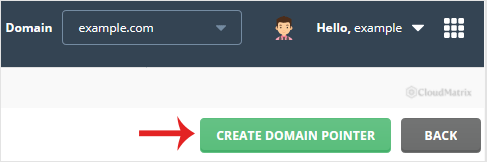
Click Create Domain Pointer at the top right of the page.
-
Under Source Domain, enter the domain you want to add as an alias, for example
yourdomain.com. Enter it withoutwww.and withouthttp://. DirectAdmin adds thewwwvariant for you.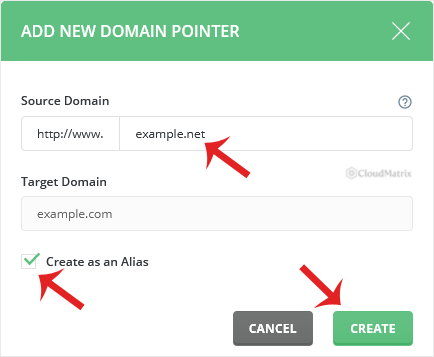
-
Tick Create as an Alias. This is the step that makes the difference between an alias and a redirect, and it cannot be changed afterwards. To switch later you have to remove the entry and create it again.
-
Click Create.
The alias appears in the pointer list against your main domain and starts working as soon as DNS for the alias domain resolves to your hosting.
What the Alias Shares With Your Main Domain
An alias is not a second hosting account. It is a second name for the one you already have, and that has practical consequences worth knowing before you rely on it.
- Website files: shared. Both names serve the same document root, so there is one website to update, not two. You cannot give the alias its own separate content.
- Email: shared. Mail sent to
[email protected]is delivered to thesales@mailbox on the main domain. You do not create separate mailboxes for the alias, and you cannot give the same local part two different destinations across the two names. - Databases, FTP and cron: shared, because they belong to the account rather than to the domain name.
- DNS: DirectAdmin creates a DNS zone for the alias so it resolves to your hosting. If you manage the alias domain's DNS at a third party such as Cloudflare, the records there are what count, and you need an A record pointing at your hosting IP address.
- SSL: not automatic. A certificate issued for your main domain does not cover the alias. You need to reissue the certificate with the alias name included, otherwise visitors on the alias see a certificate name mismatch warning.
If you need the second domain to have its own website content, its own mailboxes or its own statistics, do not use an alias. Add it as a separate domain under Domain Setup instead, assuming your package allows more than one domain.
Troubleshooting
Symptom: the alias domain shows a browser security warning about the certificate name. The certificate covers the main domain only. Reissue it with the alias included, using SSL Certificates under Account Manager and selecting the alias in the list of names to include. The alias must already resolve to your hosting before validation will succeed.
Symptom: the alias still loads the old site, or does not load at all. DNS has not caught up. Confirm the alias domain is delegated to ns1.noiz.co.za and ns2.noiz.co.za at its registrar, then allow for propagation. Changes are usually visible within a few hours and can take up to 48 hours worldwide.
Symptom: DirectAdmin refuses to create the pointer and reports that the domain already exists. The name is already present on the server, either as a full domain under your account or under a different account. Remove it from wherever it lives first, or contact Noiz support if it is not under your control.
Symptom: the address bar changes to your main domain when you visit the alias. The Create as an Alias tick box was not ticked, so a redirecting pointer was created instead. Remove the entry and create it again with the box ticked.
Symptom: the site loads on the alias but internal links and images still use the main domain. That is the application, not DirectAdmin. Content management systems such as WordPress store an absolute site address and rewrite links to it. Aliases are best suited to sites that use relative links, or to cases where a single canonical address is acceptable.
Related Articles
- How to Remove a Domain Alias in DirectAdmin
- How to Create a Domain Pointer in DirectAdmin
- How to Remove a Domain Pointer in DirectAdmin
- How to Add a Subdomain in DirectAdmin
If you are not sure whether an alias or a separate domain is the right fit, or you need the SSL certificate reissued to cover the new name, open a ticket from your Noiz client area and the support team will set it up for you.






