A domain pointer lets a second domain name send visitors to a site you already host. If your primary domain is yourdomain.com and you create a pointer for yourdomain.net, anyone who types yourdomain.net lands on the yourdomain.com site. This is the usual way to catch spelling variants, an old domain you have replaced, or the other extension of a name you have registered twice. Both names above are examples, so read them as your own two domains throughout.
DirectAdmin handles pointers and aliases on the same screen, separated by a single tick box, and the two behave quite differently. This guide shows you how to create a pointer on your Noiz hosting account, explains exactly how a pointer differs from an alias so you pick the right one, and covers the DNS step that catches most people out.
Last reviewed: 27 July 2026, against the current DirectAdmin release and its Evolution interface. This guide is written for Noiz hosting and is kept current against DirectAdmin. It complements, and does not replace, the official DirectAdmin documentation linked below.
Official Documentation Reference
- DirectAdmin: DNS
- DirectAdmin: maintaining DNS records
- DirectAdmin: ACME and SSL certificates for domains
Prerequisites
- An active Noiz hosting account with DirectAdmin access, and your DirectAdmin username and password.
- The primary domain already set up and working on the account. The pointer attaches to an existing site, it does not create one.
- A second domain name that you have registered and can change nameservers or DNS records for.
- The second domain must not already exist as a full domain on the server, on your account or anyone else's. DirectAdmin will refuse to create a pointer for a name that is already hosted.
Create the Domain Pointer
1. Log in to DirectAdmin
Sign in to your DirectAdmin account with the username and password on your Noiz welcome email.
2. Open Domain Pointers
In the Account Manager section, click Domain Pointers. If you cannot see it, type Pointers into the navigation filter box at the top of the menu and the option will appear. Click it.

3. Start a new pointer
Click Create Domain Pointer, at the top right of the page.
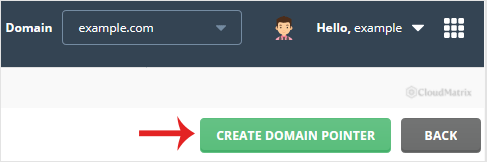
4. Enter the source domain
Under Source Domain, type the second domain name, the one you want visitors to arrive on. Enter it as the bare name, such as yourdomain.net, with no www. and no http://. Replace yourdomain.net with your own domain.
If your account holds more than one site, check the domain selector at the top of the page first. The pointer is created against whichever domain is currently selected, and that is the site visitors will end up on.
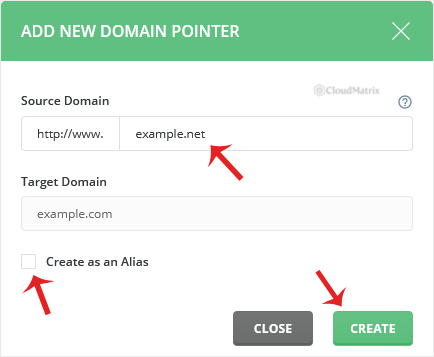
5. Leave Create as an Alias unticked
Make sure Create as an Alias is not ticked. That box is what turns a pointer into an alias, and the two are not the same thing. Then click Create.
The new pointer appears in the list on the Domain Pointers page straight away. The web side of the job is now done, and the DNS side is next.
Point the Domain's DNS at Noiz
Creating the pointer only tells the server what to do with requests for that domain once they arrive. It does nothing at the domain's registrar, so the domain still needs to be sent to the server before anything happens in a browser.
The straightforward way is to set the pointer domain to the same nameservers as the site it points to. At the registrar for the pointer domain, set the nameservers to the Noiz client nameservers:
ns1.noiz.co.za
ns2.noiz.co.za
DirectAdmin creates a DNS zone for the pointer domain automatically when you create the pointer, so once the delegation is in place there is nothing further to configure.
If you would rather leave the pointer domain's DNS with a third party, that also works. In that case do not change the nameservers, and instead create an A record at the current DNS host for the bare domain and for www, both aimed at your hosting account's IP address. You will find that address on the DirectAdmin home page or in your Noiz welcome email.
Nameserver changes propagate at their own pace. Allow up to 24 hours, and up to 48 in the worst cases, before deciding something is wrong.
Pointer or Alias: Which Do You Want?
Both are created from the same screen. The Create as an Alias tick box is the only difference, and it changes the behaviour completely.
- Pointer (box unticked). The second domain redirects. A visitor who types
yourdomain.netis sent on toyourdomain.com, and the address bar changes to showyourdomain.com. The site has one address as far as the visitor and search engines are concerned. Under the bonnet DirectAdmin gives the pointer domain its own web server entry that does nothing but issue the redirect. Choose this for old domains, misspellings, and alternative extensions you own defensively. - Alias (box ticked). The second domain serves the same site under its own name. A visitor who types
yourdomain.netsees your site withyourdomain.netstill in the address bar, because the alias is added as an extra name on the primary domain's existing web server entry rather than as a separate redirecting one. Some panels and hosts call this a parked domain. Choose this when both names need to be genuinely usable, for example a brand trading under two names.
To create an alias instead, follow How to Create a Domain Alias in DirectAdmin.
Things Worth Knowing
- A pointer is a web redirect, not a mailbox. Creating a pointer does not give you email addresses on the second domain, and mail sent to that domain is not aliased across to the primary domain's mailboxes. Aliases do mirror email in that way. If you need working email on the second name and nothing else about the alias behaviour suits you, add it as a full domain under Domain Setup instead of pointing it.
- HTTPS still needs a certificate. If visitors reach the pointer domain over
https://, the certificate presented has to cover that name, otherwise the browser shows a security warning before the redirect ever happens. Include the pointer domain when you request or renew the certificate in SSL Certificates. A certificate issued only for the primary domain will not silently cover the pointer. - The www version is included. DirectAdmin sets up both the bare name and the
wwwhost for a pointer, so you do not need a second pointer forwww.yourdomain.net. - Force Redirect applies to pointers too. The
wwwor non-wwwpreference you set under Domain Setup for the primary domain is applied to its pointers as well. If you have forced one form on the main site, expect the same behaviour on the pointer. - Pointers are counted by your package. Hosting packages carry a limit on how many domain pointers an account may hold. If the Create Domain Pointer button is missing or the creation fails on a limit message, the allowance is used up. Contact Noiz support about raising it.
- Redirect, not duplicate content. Because a pointer sends visitors on to the primary domain, search engines see one site rather than two copies. That is usually what you want. If you specifically need the second name to stay in the address bar, you want an alias, and you should then decide how to handle canonical tags on the site itself.
Troubleshooting
- Symptom: the pointer domain shows a "server not found" or registrar parking page. DNS has not been changed or has not propagated yet. Confirm the nameservers at the registrar are
ns1.noiz.co.zaandns2.noiz.co.za, then wait. Nothing on the hosting side can speed this up. - Symptom: DirectAdmin refuses the pointer and says the domain already exists. The name is already set up as a full domain, either on your account under Domain Setup or on another account on the server. Remove it as a full domain first, or contact Noiz support if it is not on your account.
- Symptom: the browser warns about the certificate before redirecting. The certificate does not cover the pointer domain. Reissue it from SSL Certificates with the pointer domain included.
- Symptom: the address bar keeps showing the primary domain when you wanted the second name visible. That is a pointer working exactly as designed. You need an alias instead. Remove the pointer, then create it again with Create as an Alias ticked.
- Symptom: a redirect loop, or the page never finishes loading. Check for a competing redirect in the site's own
.htaccessfile or in a content management system's site address setting. An application that rewrites every request to its configured domain can fight with the panel level redirect. - Symptom: email to the pointer domain bounces. Expected. A pointer does not carry mail. Add the domain properly under Domain Setup if it needs mailboxes.
Related Guides
Need a Hand?
If the pointer is created but the domain still will not resolve, or you are not sure whether your situation calls for a pointer, an alias or a full second domain, open a ticket with Noiz support. Include the domain name and what you expect visitors to see, and the support team will check the DNS delegation and the account configuration for you.






