This guide explains how to change the hostname of a VPS from the SolusVM control panel, what that field actually controls, and the two steps almost everyone forgets afterwards: setting the name inside the operating system as well, and getting reverse DNS to match. A hostname looks like a cosmetic label, and for a web server it very nearly is. For a mail server it is the opposite: it is the identity your server presents to every other mail server on the internet, and if it does not line up with DNS in both directions, your mail starts landing in spam folders or getting refused outright. This article is for anyone with access to a VPS managed through SolusVM, whether that is an end user working in the client area or an administrator changing a name on a customer's virtual server.
Last reviewed: 27 July 2026, against the current SolusVM release. This guide is maintained by Noiz and is kept current against SolusVM. It complements, and does not replace, the official SolusVM documentation linked below.
Official Documentation Reference
- SolusVM Documentation: Introduction to SolusVM, Common Notation and Glossary, the entry point for the legacy SolusVM 1 documentation set that the classic client area belongs to
- SolusVM Documentation: Change Hostname (
vserver-hostname), the API definition of the same action the panel button performs, useful if you need to rename servers in bulk or from a provisioning script - SolusVM Documentation: Improving Deliverability of Users' Emails Using Reverse DNS, the administrator-side view of how PTR records are managed for virtual servers
- Linux manual page:
hostnamectl(1), the supported way to set the hostname on a systemd-based Linux distribution - Linux manual page:
hostname(5), what the/etc/hostnamefile may and may not contain - Linux manual page:
hosts(5), the format of/etc/hosts, which is what makeshostname -fresolve locally - RFC 5321, section 4.1.4: Order of Commands, the requirement that an SMTP client identifies itself with a fully qualified domain name
- cloud-init: Module Reference, covering the
set_hostnameandupdate_hostnamemodules that silently overwrite a hostname on cloud images
Prerequisites
- Access to log in to the SolusVM control panel. The address you log in at is given in the welcome email for your VPS.
- Root or
sudoaccess on the VPS over SSH, or console access, so you can set the name inside the operating system too. - A hostname you have actually decided on, and control of the domain it sits under, so you can create the matching DNS record.
- A maintenance window. The change is not complete until the VPS has been restarted, and services that read the hostname at start-up will need restarting with it.
What the Hostname Field in SolusVM Actually Changes
This is the part that causes most of the confusion, so it is worth being precise before you touch anything.
It is SolusVM's record of the name
The Hostname field stores the name SolusVM holds for that virtual server in its own database. That value is what appears in the panel's server list, what administrators see when they search for the machine, and what gets used in notifications the panel sends out. Changing it always succeeds in that sense: the panel will confirm the hostname was changed even if nothing inside the guest operating system has moved.
Whether it reaches inside the guest depends on the virtualisation type
On container-based virtualisation such as OpenVZ, the host has direct access to the container's filesystem and configuration, so a hostname set from the panel can be applied to the container itself. On full virtualisation such as KVM or Xen HVM, the guest is an opaque virtual machine with its own kernel and its own configuration files. The host cannot reach in and edit them while the machine is running. In that case the panel value is used when the operating system is next built or reinstalled, and the running system keeps whatever name it already had.
The practical rule is simple, and it holds for every virtualisation type: set the hostname in the panel and inside the operating system, then verify inside the operating system. Never assume the panel change propagated. If you are not sure which virtualisation your VPS uses, you can check the virtualisation type and main IP address in SolusVM.
It does not create DNS, and it does not set reverse DNS
Setting a hostname is naming a machine. It does not register a domain, it does not create an A record pointing that name at your IP address, and it does not create the PTR record that maps your IP address back to that name. Those are three separate pieces of work, and the hostname is the only one of them you can do from this screen. If you stop after changing the field, you have a server that calls itself server1.example.com while the rest of the internet has never heard of it.
Choosing a Hostname You Will Not Regret
Renaming a server is cheap on day one and expensive on day four hundred, so spend a minute on the choice.
- Use a fully qualified domain name, not a bare word.
server1.example.com, notserver1. Mail servers are required to identify themselves with a fully qualified name, and a great deal of other software assumes the hostname is resolvable. - Use a subdomain, not the domain itself. Setting the hostname to
example.comwhenexample.comis also a website you host on the same machine is a classic self-inflicted wound. Some mail software then treatsexample.comas a purely local domain and stops delivering mail for it over the network, so messages to your own domain vanish into a local mailbox instead of leaving the server. Give the machine its own name under the domain:server1.example.com,vps1.example.com,mail.example.com. - Use a domain you control. You will need to create an A record for the hostname, and you will need reverse DNS to match it. Neither is possible with a domain belonging to someone else.
- Keep it lowercase and boring. Letters, digits and hyphens only. No underscores, no spaces, no trailing dot. Each label is limited to 63 characters and the whole name to 253, but anything approaching either limit is a sign something has gone wrong.
- Do not encode information that will change. A hostname containing a client name, a rack position, a datacentre code, or a plan size becomes a lie the moment any of those change, and by then the name is baked into certificates, monitoring, logs and backups.
Two workable examples, both using a placeholder domain you would replace with your own:
server1.example.com
hostingserver.example.com
How to Change the Hostname in the SolusVM Control Panel
- Log in to your SolusVM control panel using the address in your VPS welcome email.
- If your account holds more than one virtual server, select the one you want to rename. Confirm the main IP address before going further, because nothing in the next step tells you which machine you are editing.
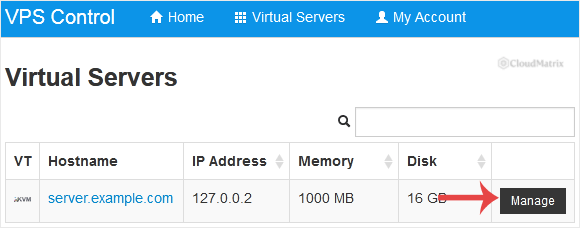
- Scroll down to the Hostname section, clear the field, and type the new fully qualified hostname. Then click Change.
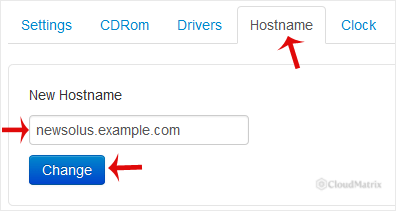
- SolusVM confirms that the virtual server hostname was changed. That message means the panel's record was updated. It is not confirmation that anything inside the operating system changed.
- Restart the VPS so the change takes effect. Use a graceful restart, not a forced reset.
Why a restart is needed
The hostname is not a live setting that everything picks up automatically. The kernel holds a current hostname, and almost every long-running service reads it once, at start-up, and then caches it for the life of the process. A mail server builds its SMTP banner from the hostname when it starts. A web server may write it into log lines. Monitoring agents register themselves under it. Changing the name underneath those processes leaves you with a machine that reports two different identities depending on which one you ask, which is far more confusing to debug than a straightforward restart. A restart also lets you confirm that the new name actually survives a boot, which, as the next section explains, is not a given.
How to Set the Hostname Inside the Operating System
This is the step the panel cannot reliably do for you on a running virtual machine, and it is the one that matters to every piece of software on the server.
On a systemd-based Linux distribution
Almost every current Linux distribution uses systemd, including Debian, Ubuntu, Rocky Linux, AlmaLinux and Fedora. Connect over SSH as root or a user with sudo rights, then:
hostnamectl set-hostname server1.example.comThat writes /etc/hostname and sets the running kernel hostname in one step, which is why it is preferable to editing the file by hand. The older hostname server1.example.com command changes only the running value and is lost at the next boot.
Update /etc/hosts as well
This is the step people skip, and skipping it causes a genuinely irritating class of problem. Open /etc/hosts and make sure a line maps the server's IP address to both the fully qualified name and the short name, in that order:
203.0.113.10 server1.example.com server1Replace 203.0.113.10 with your VPS main IP address and the names with your own. Order matters: the first name after the address is the canonical one, and it is what hostname -f returns.
The reason this is not optional is that a large amount of software resolves its own hostname during start-up, and if that lookup has to go out to a DNS server it can be slow, and if it fails it can be very slow. The most visible symptom is sudo pausing for many seconds before every single command, because it is timing out on a lookup of a name nothing can resolve. A correct /etc/hosts line makes that lookup instant and offline.
The gotcha that undoes all of it: cloud-init
If your VPS was built from a cloud image, cloud-init is probably installed, and by default it re-applies the hostname it was given at every boot. You set the name, restart, and find the old one back, with nothing in your own configuration to explain it. To make your change permanent, tell cloud-init to leave the hostname alone by adding this line to /etc/cloud/cloud.cfg:
preserve_hostname: trueCheck whether cloud-init is present at all before worrying about it:
command -v cloud-init && cloud-init --versionA DHCP client can do the same thing for the same reason. If your VPS gets its address by DHCP rather than a static configuration, the DHCP server can supply a hostname that overwrites yours at lease renewal. Most VPS platforms hand out static addressing, so this is the rarer of the two causes, but it is worth knowing about when a hostname keeps reverting and cloud-init is not installed.
Hostnames, Mail and Reverse DNS
If the VPS will never send email, you can treat the hostname as a label and move on. If it will send email, even just notifications from a web application, this section is the reason the article exists.
What receiving mail servers check
When your server connects to another mail server, it introduces itself with an EHLO command containing its own name. RFC 5321 requires that name to be a fully qualified domain name. The receiving server then, routinely, checks three things that all need to agree:
- The PTR record. A reverse lookup of your IP address should return your hostname. An IP address with no PTR at all, or with a generic provider-assigned PTR full of the IP address in dotted form, is treated as a strong spam signal by most large mail providers.
- The forward record. An A record for that hostname should resolve back to the same IP address. A PTR pointing at a name that does not resolve, or resolves elsewhere, is worse than no PTR at all. The two matching is called forward-confirmed reverse DNS.
- The EHLO name. The name your server announces should be the same fully qualified name. A server that announces
localhost.localdomain, or a bare short name, or an IP address, is very likely to be refused.
Get one of those three wrong and you are not blocked outright so much as quietly penalised: mail is accepted but scored into spam folders, and the delivery failures are invisible from your side. That is why this is worth doing before the server starts sending, not after complaints arrive.
The order to do it in
- Create the A record first. In the DNS for your domain, add an A record for the hostname pointing at the VPS main IP address. Let it propagate before continuing.
- Change the hostname in SolusVM and inside the operating system, as described above.
- Request the PTR record. You cannot set this yourself. Reverse DNS lives in the
in-addr.arpazone for the IP block, and that zone is controlled by whoever owns the addresses, which is the provider of the VPS, not you. Some SolusVM installations expose a reverse DNS field to end users; many do not. If yours does not, ask for the PTR through the support channel in your VPS welcome email, quoting the IP address and the exact hostname you want it to return. - Update the mail server's own configuration. Mail software keeps its own copy of the name and does not follow the system hostname automatically. In Postfix that is
myhostnameand usuallymyoriginin/etc/postfix/main.cf; in Exim it is the primary hostname setting. Restart the mail service afterwards. - Reissue any TLS certificate that covers the old hostname, including the certificate the mail server presents for STARTTLS. A certificate for the old name on a server now calling itself something else will produce trust warnings.
How to Verify the Change Actually Worked
"The panel shows the new name" is not verification. Once the VPS is back up, check from inside the server:
hostnamectl status
hostname -f
hostnamectl status prints the static hostname, which is the persistent one from /etc/hostname, alongside the transient one. Both should be your new name. hostname -f should print the full name, server1.example.com, not the short server1. If it prints the short form, your /etc/hosts line has the names in the wrong order.
Then check DNS from anywhere, forward and reverse:
dig +short A server1.example.com
dig +short -x 203.0.113.10
The first should return your VPS main IP address. The second should return your hostname with a trailing dot. If either is empty, the corresponding record does not exist yet.
If the server sends mail, check the banner it presents. From another machine:
openssl s_client -starttls smtp -connect server1.example.com:25 -crlfThe 220 greeting line should contain your new hostname, and the certificate presented should be valid for it. If the banner still shows the old name, the mail service was not restarted or still has the old name in its own configuration.
Finally, restart the VPS one more time and re-run hostname -f. This catches cloud-init or DHCP quietly reverting the change, which is the failure mode that otherwise surfaces weeks later during an unrelated reboot.
What a Rename Can Break
Changing a hostname on a server that has been in service for a while is a bigger event than it looks, because a surprising number of things store the name rather than looking it up. Before renaming a production machine, check for these:
- TLS certificates. Any certificate issued for the old hostname stops matching. This includes web server certificates, mail certificates and control panel certificates.
- Software licences. Some commercial software, including several control panels, ties a licence to the hostname or the IP address. A rename can invalidate the licence until it is reissued.
- Monitoring, backup and log systems. Agents commonly register under the hostname. After a rename the old host stops reporting and a new one appears, so alerting rules and retention on the old identity need updating, and you may be left with a permanently "down" ghost host.
- Database grants. MySQL and MariaDB privileges are granted to
user@host. Grants written against the old hostname stop matching, which shows up as an application that suddenly cannot authenticate to a database on the same machine. - Clustered services that use node names. Software that identifies cluster members by hostname, such as message brokers and some database replication setups, can refuse to start or lose its data directory reference after a rename. Check the documentation for anything clustered before renaming.
- Scripts and configuration that hardcode the name. Cron jobs, backup destinations, rsync targets and firewall rules written against the old name will silently do the wrong thing.
If the machine is in production and any of the above applies, the safer sequence is to add the new name in DNS first, run both names in parallel where the software allows it, then retire the old name once nothing references it.
Troubleshooting
- The panel shows the new hostname but the operating system still reports the old one: expected behaviour on KVM and Xen HVM. The panel field is SolusVM's record and does not edit a running guest's configuration. Set the name inside the operating system with
hostnamectl set-hostnameas described above. - The hostname reverts to the old name after every reboot: something is re-applying it at boot. Check for cloud-init first and set
preserve_hostname: truein/etc/cloud/cloud.cfg. If cloud-init is not installed, check whether the DHCP client is supplying a hostname. - Every
sudocommand pauses for several seconds: the server cannot resolve its own hostname and is waiting for a DNS timeout. Add the correct line to/etc/hostsmapping the IP address to the fully qualified and short names. hostname -freturns the short name instead of the full one: in the/etc/hostsentry, the fully qualified name must come immediately after the IP address, with the short name after it.- SolusVM refuses the hostname you typed: the field validates the format. Use lowercase letters, digits, hyphens and dots only, supply a fully qualified name with at least one dot, and remove any trailing dot or whitespace.
- Mail is being accepted but lands in spam since the rename: reverse DNS almost certainly no longer matches. Check
dig +short -xagainst your IP address anddig +short Aagainst your hostname and confirm both point at each other, then confirm the mail server'sEHLOname matches too. - Mail is being rejected outright with a message about the HELO or EHLO name: the mail service still announces the old or a non-qualified name. Update the mail server's own hostname setting and restart it, rather than relying on the system hostname.
- The VPS does not come back after the restart: the hostname change is very unlikely to be the cause, but you will not be able to diagnose it over SSH. Open the VNC console in SolusVM, which shows the boot messages SSH cannot.
- A control panel or licensed application stopped working after the rename: its licence is probably keyed to the old hostname. Reissue the licence against the new name through the vendor, then restart the application.
If the hostname change is not sticking, or reverse DNS for your VPS needs to be updated and the panel gives you no way to do it, contact the team that runs the SolusVM master server for your VPS using the details in your VPS welcome email. Noiz clients can open a support ticket with the Noiz support team; include the main IP address of the VPS, the exact hostname you want, whether you need the PTR record set as well, and the output of hostname -f from inside the server.






