Your SolusVM control panel account carries its own email address, stored in the panel and independent of every other address attached to your service. This guide shows you how to change that address from inside the SolusVM client area, what the address is actually used for, and what it deliberately does not affect.
The distinction matters more than it first appears. The address you change here belongs to the panel account: the identity that signs in to SolusVM and receives the panel's own notifications. It is not a mailbox on your VPS, it is not the address your server sends outbound mail from, and it is not the contact address held on your hosting or billing account. Changing it in SolusVM changes it in SolusVM, and nowhere else.
Last reviewed: 27 July 2026, against the current SolusVM release. This guide is maintained by Noiz and is kept current against SolusVM. It complements, and does not replace, the official SolusVM documentation linked below.
Official Documentation Reference
- SolusVM 1 documentation (the vendor publishes this set as legacy documentation)
- Two-factor authentication in the SolusVM 1 client area
- SolusVM 2 quick start guide: customers
Which SolusVM are you looking at?
The procedure below describes the SolusVM 1 client area, the one with a My Account item in the top navigation bar and an Account Settings block on the page it opens. SolusVM 2 ships a rebuilt customer panel with different navigation, so if your panel looks nothing like the screenshots here, work from the SolusVM 2 customer documentation linked above instead. There the equivalent item is labelled Account rather than My Account, and the email address doubles as the login itself, so changing it also changes what you sign in with.
Prerequisites
- You can log in to the SolusVM control panel. The panel address and your username come from the welcome email sent when the service was set up.
- You can already read mail at the new address. Confirm that before you save, not after.
- If two-factor authentication is enabled on the account, have your authenticator app or an unused recovery code to hand.
What the SolusVM account email address is used for
Knowing what depends on this field tells you how much care the change deserves:
- Password recovery. A reset link for the panel account goes to this address. If it is wrong, you cannot recover the account yourself and have to ask the panel's administrator to correct it.
- Panel notifications. Alerts generated by SolusVM about your account and your servers are delivered here, including the VPS login alert if you have it switched on.
- Two-factor enrolment identity. When you enrol an authenticator app, SolusVM uses this address as the account label written into the app, and as the identifier in the manual enrolment step for anyone who types the secret key by hand instead of scanning the QR code.
What changing it does not do
This is where most support tickets on the subject actually start. Updating the panel account address does not:
- Create, rename or redirect any mailbox on the VPS. Mail hosted on the server is configured on the server, by whatever mail software you installed there.
- Change how the VPS identifies itself when it sends mail. That follows the server's hostname and its own mail configuration, not the panel profile.
- Change the root or administrator password of the operating system inside the VPS. That is a separate credential entirely.
- Change your SolusVM control panel password, or your username.
- Update the contact address held on your hosting or billing account. Where a provider's billing system provisioned the SolusVM account, the two records are created together but maintained separately from then on, so an address updated in one is not reflected in the other. Update both if you want invoices and panel alerts to reach the same inbox.
Change the account email address
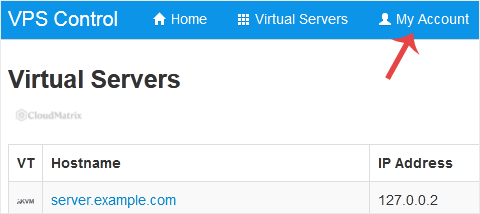
Step 1: Open My Account
- Log in to the SolusVM control panel.
- In the top navigation bar, click My Account.
Step 2: Enter the new address and save
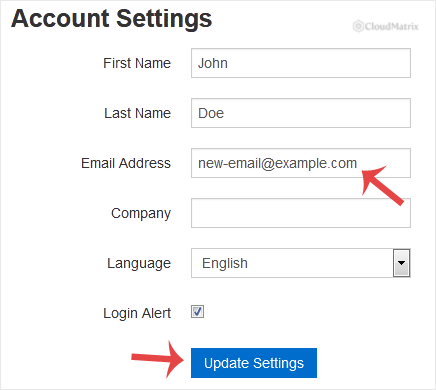
- Find the Account Settings block on the page.
- Replace the contents of the email field with the new address. Type it rather than pasting a fragment on top of the old value, so no stray characters survive at either end.
- If the same form also offers password fields, leave them empty. They are only there for people who want to change the password at the same time, and a blank entry leaves the existing password untouched.
- Click Update Settings. A success message confirms the change.
Confirm it worked
The success banner tells you the form submitted, not that the value stored is the one you meant. Two quick checks settle it:
- Reload My Account. The email field should redisplay the new address, character for character. Read it back rather than glancing at it, because a transposed letter in a familiar-looking domain is exactly the failure that survives a glance.
- Log out and log back in, then reload My Account once more. This proves the value was written to the account record rather than only echoed back into the form.
If you want proof that mail actually arrives at the new address, the cleanest trigger is to switch the VPS login alert on, log in once, and check the new mailbox including its spam folder. Avoid using a password reset as your test, because it invalidates the credential you are currently signed in with.
Things that catch people out
There is no confirmation email, so a typo is silent
SolusVM applies the change the moment you click Update Settings. It does not send a verification link to the new address first and wait for you to click it. A mistyped address therefore looks like a complete success while quietly sending every future reset link and alert somewhere you cannot read. This is the single reason to read the value back after saving.
Browser autofill on a form that also holds password fields
Password managers happily fill any password box they find on a settings page, including one you intended to leave alone. If your browser has populated those fields, clear them before saving. Submitting the form with an autofilled value can change the panel password to something you are not tracking, at which point you need the reset link that has just moved to a new address.
Your authenticator app keeps showing the old address
An authenticator entry stores the label it was given at enrolment, so the app carries on displaying the previous email address after you change it. That is cosmetic. The shared secret behind the six-digit codes has not changed, so the codes keep working and no re-enrolment is needed. Only remove and re-add the entry if the stale label genuinely confuses you, and if you do, save the fresh recovery codes SolusVM issues, since generating a new set invalidates any unused older codes.
Personal addresses on shared services
Where more than one person looks after the server, point the panel account at a shared or role address rather than an individual's mailbox. Panel alerts and reset links are worth very little if the only person who can read them has left, changed role or is on leave when something breaks.
Troubleshooting
Symptom: the form reports an invalid email address. Fix: the field accepts a single, complete address only. Remove any display name, angle brackets, trailing full stop, comma-separated second address or leading and trailing whitespace, then save again.
Symptom: the success message appears but the old address is back after a reload. Fix: your session may have expired between loading the page and submitting it, so the request was discarded. Log in again, go straight to My Account, make the change and save without leaving the page idle in between.
Symptom: nothing ever arrives at the new address. Fix: check the spam and quarantine folders first, then confirm the stored address on My Account letter by letter. If both look right, the receiving mail service may be rejecting or filtering the panel's mail, so try an address on a different provider to isolate which side is dropping it.
Symptom: you saved a wrong address and can no longer receive a reset link. Fix: as long as you are still logged in, correct the address immediately and verify it before logging out. If you have already been logged out, the account record can only be corrected by the administrator of the SolusVM installation.
Symptom: My Account is missing from the navigation bar, or the email field is present but read-only. Fix: the panel administrator can restrict what customers may edit, and some installations deliberately keep the address in sync with an upstream billing record. In that case the change has to be made in the upstream system, and the panel picks it up from there.
If you cannot log in at all, only the administrator of the SolusVM installation can update the address for you, so that request goes to whoever operates the panel for your service. Where that is a Noiz service, open a support ticket with the Noiz support team and include your SolusVM username and the address you want set. Never put a password in a support ticket.






