A reboot is the first thing most people reach for when a VPS starts misbehaving, and it is usually the right call after a kernel update, a stuck service or a configuration change that needs a clean start. This guide shows you both ways to restart a VPS on Noiz: from the Virtualizor end user panel, and from inside the server over SSH. It also explains the part that matters most and is almost never spelled out, which is the difference between a graceful restart and a forced reset, and why reaching for the wrong one can cost you data.
Last reviewed: 27 July 2026, against the current Virtualizor release. This guide is written for Noiz hosting and is kept current against Virtualizor. It complements, and does not replace, the official Virtualizor documentation linked below.
Official Documentation Reference
- Virtualizor: List VPS (end user panel)
- Virtualizor: Manage VPS (end user panel)
- Virtualizor Enduser API: Restart VM
- Linux manual page: shutdown(8)
Prerequisites
- An active VPS on Noiz, and the Virtualizor end user panel login that Noiz issued with it. The panel normally answers on port
4083, for examplehttps://your-server-hostname:4083. - For the SSH method: the VPS IP address, a working SSH client and root access (or an account with
sudo). - If you cannot recall your panel password, reset it first: How to Change the Password of Your Virtualizor Account.
Graceful Restart Versus Forced Reset
Both actions end with the server coming back up, so they look interchangeable. They are not.
- A graceful restart is issued from inside the operating system, normally with
shutdown -r now. The kernel tells every running service to stop in an orderly sequence. Databases flush their write buffers to disk and close their tables, web servers finish serving in-flight requests, mail queues are written out, and file systems are unmounted cleanly before the machine goes down. This is the safe default and the one you should use whenever you can reach the server. - A forced reset, sometimes called a hard reset or a power cycle, cuts the virtual machine off without warning. It is the equivalent of pulling the power lead out of a physical server. Nothing gets a chance to finish.
What a forced reset actually risks. Anything sitting in memory and not yet written to disk is lost. In practice that means recent database writes can disappear, MySQL or MariaDB may run crash recovery on the next boot (which on a large InnoDB dataset can take minutes, not seconds), file systems can come back dirty and trigger a lengthy consistency check, and files that were half written are left truncated. Uploads, session data and cache files are the usual casualties. In the worst cases a service refuses to start at all until you clear a stale lock file or repair a table by hand.
Where the Virtualizor controls sit. The buttons in the panel act on the virtual machine from the outside, at the hypervisor, rather than from inside the guest operating system. Depending on the virtualisation type and whether the guest is listening for ACPI power events, a panel Restart may not give your services time to shut down cleanly. Treat the panel as the fallback for when SSH is unreachable, not as the everyday reboot button.
Do not confuse Restart with Power Off. The same Virtualizor screen also offers Power Off, which is unambiguously a hard cut with no shutdown sequence at all. It is not a faster way to reboot. If you need to stop a VPS rather than restart it, use the shutdown options described in How to Forcefully or Gracefully Shut Down the VPS in Virtualizor, and bring it back with How to Start or Boot Your VPS in Virtualizor.
How to Restart a VPS From the Virtualizor Panel
Use this route when SSH is unreachable, when the server is unresponsive, or when you simply do not have a terminal to hand.
-
Log in to your Virtualizor end user panel.
-
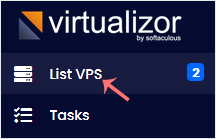
In the left sidebar, click List VPS. Newer Virtualizor builds group this under Virtual Servers and label it List All, but it is the same page.
-
Find the VPS you want to restart. Hover over its row and the line highlights, then click the Manage icon on that line. If you only have one VPS on the account, Virtualizor may take you straight to its management page.

-
On the management page, click the Restart icon in the row of power controls at the top right. Check the hostname and VPS ID on screen before you click, because it is easy to restart the wrong server when you manage several.

-
Confirm the action if you are prompted, then wait. Virtualizor displays a success message once the instruction has been carried out.
The gotcha most people hit: the confirmation message means Virtualizor accepted and issued the restart, not that your operating system has finished booting and your sites are back. The panel status can read Running while the guest is still working through its boot sequence. A small Linux VPS is usually reachable again within 20 to 60 seconds; allow considerably longer if a file system check runs after an unclean shutdown, if the server has a large database to recover, or if it runs Windows.
How to Restart a VPS Over SSH
This is the preferred method whenever the server still answers, because the shutdown is handled by the operating system itself.
-
Connect to the VPS with your SSH client, replacing the address with your own:
ssh [email protected] -
Issue the reboot:
shutdown -r nowIf you are logged in as a normal user rather than root, prefix it with
sudo. Without root privileges systemd refuses the request and reports that interactive authentication is required. On systemd distributionsrebootandsystemctl rebootdo the same job. -
Your SSH session will drop immediately, often with a broken pipe or connection closed message. That is the expected result of a successful reboot, not an error.
-
Wait, then reconnect and confirm the machine really did restart:
uptime -p
who -b
Useful Variations
- Give other users warning.
shutdown -r +5 "Rebooting for a kernel update"schedules the restart five minutes out and broadcasts the message to anyone logged in. Handy on a shared development box. - Cancel a scheduled restart.
shutdown -ccalls off a pending timed shutdown. - Check whether a reboot is actually needed. On Debian and Ubuntu, the presence of the file
/var/run/reboot-requiredafter updates means a restart is pending. On RHEL-family systems,needs-restarting -rtells you the same thing. Rebooting a production server for no reason is avoidable downtime. - Confirm your services come back on their own. A reboot only restores what is enabled at boot. Check with
systemctl is-enabled nginx(substituting your own service) and enable anything that is not, or you will find the server up and the website still down.
Troubleshooting
Symptom: the VPS shows as running but the website is unreachable. The machine booted, a service did not. Connect over SSH and check the state with systemctl status nginx or systemctl --failed, then enable and start whatever is missing.
Symptom: SSH is refused for a minute or two after the reboot. The boot sequence has not reached the SSH daemon yet. Wait 30 seconds and try again before assuming something is broken.
Symptom: shutdown -r now appears to hang and the server never goes down. A process is refusing to terminate and is blocking the shutdown. This is exactly the case the panel exists for: use the Virtualizor Restart control instead, accepting the risk described above.
Symptom: Virtualizor reports that the operation could not be completed. The VPS may be suspended, locked or mid-task (a backup or migration will block power actions). Wait for any running task to finish and try again. If the error persists, open a ticket with Noiz rather than repeatedly forcing the action.
Symptom: the server takes many minutes to come back after a forced reset. It is almost certainly running a file system consistency check or database crash recovery. Do not reset it again, as interrupting recovery is how a slow boot turns into a damaged one. Watch what it is doing on the console instead: How to Access VPS via VNC in Virtualizor.
Related Articles
- How to Forcefully or Gracefully Shut Down the VPS in Virtualizor
- How to Start or Boot Your VPS in Virtualizor
- How to Access VPS via VNC in Virtualizor
- How to Change the Password of Your Virtualizor Account
If your VPS does not come back after a restart, or you are not sure whether a forced reset is safe in your situation, open a support ticket from your Noiz client area before you try again. The Noiz team can reach the console and the hypervisor directly and will get the server back up without risking your data.






