An FTP account you no longer want in use does not have to be deleted. DirectAdmin lets you suspend it instead, which blocks the login while keeping the account, its password and its directory settings intact. This guide shows you how to suspend an FTP account on your Noiz DirectAdmin hosting, what actually changes when you do, and how to switch it back on later.
Last reviewed: 27 July 2026, against the current DirectAdmin release and its Evolution interface. This guide is written for Noiz hosting and is kept current against DirectAdmin. It complements, and does not replace, the official DirectAdmin documentation linked below.
Official Documentation Reference
Prerequisites
- Your DirectAdmin login details, as supplied in your Noiz welcome email.
- At least one additional FTP account already created. See How to Create an FTP Account in DirectAdmin.
- A quick check that nothing automated still uses the credentials. Suspension takes effect immediately, so anything relying on that login stops working the moment you click.
Suspend or Delete: Which One You Want
DirectAdmin offers two ways to take an FTP account out of service, and they are not interchangeable.
- Suspend is reversible. The account stays in the list, keeps its username, its password and its home directory, and simply cannot log in. One click puts it back exactly as it was.
- Delete is permanent. The account and its credentials are removed and the username is released. There is no undo, so restoring access means creating the account again from scratch and re-entering the new details everywhere they were used.
Suspend is the right choice for a contractor between jobs, a seasonal upload account, a login you suspect is being misused, or a test of whether anything still depends on an account before you get rid of it. Delete is for accounts that are finished for good: see How to Remove an FTP Account in DirectAdmin.
Neither action touches your files. An FTP account is a way in, not the content itself. Suspending or deleting one leaves everything in its home directory exactly where it is, and a website served from that directory carries on working normally. If you want files removed, do that separately in File Manager.
Security note: if you are suspending because the credentials may have leaked, change the password as well. A suspended account still holds its old password, so that password becomes valid again the moment the account is unsuspended. See How to Change an FTP Account Password in DirectAdmin.
How to Suspend an FTP Account
- Log in to your DirectAdmin account.
- In the Account Manager section, click FTP Management. If you cannot see it, type
FTP Managementinto the navigation filter box, then click the result when it appears.
- In the list of FTP Accounts, select the account you want to suspend by ticking the checkbox alongside it.
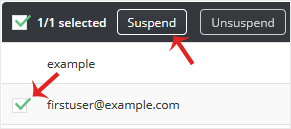
- Click Suspend.
DirectAdmin confirms the change and the account is flagged as suspended in the list. Nothing else needs restarting.
What Changes Once the Account Is Suspended
- New logins fail. Anyone connecting with that username gets a login failure from the FTP server, usually reported as a
530response or a plain "login incorrect" message in the client. - An open session may linger. A connection that was already established can stay alive until it finishes, disconnects or times out. If a transfer is in progress and you need access cut immediately, disconnect at the client as well.
- Nothing is lost. The username, password and home directory are all retained, ready for when you unsuspend.
- Automation breaks quietly. Deployment scripts, off-site backup jobs, code editors with a saved site profile, and CMS plugins that upload over FTP will all start failing. These often surface as a failed build or a missing nightly backup rather than an obvious FTP error, so it is worth listing what uses the account before you suspend it.
How to Unsuspend the Account
Follow exactly the same path: Account Manager > FTP Management, select the account, then click Unsuspend. Access is restored straight away, with the same password as before.
Troubleshooting
Symptom: the row has no Suspend option. That is almost certainly your main FTP account, the one that shares your DirectAdmin username. It is tied to the hosting account itself rather than being an extra account you created, so it is not handled the same way. To cut off access to it, change its password instead.
Symptom: the user says they can still connect. Check three things. An already open session can survive the change until it drops; they may be connecting with a different FTP account, such as the main one; or they may be using SFTP over SSH, which is a separate service from FTP and is not affected by suspending an FTP account.
Symptom: something broke right after suspending. Unsuspend the account to restore service, then work out what was using it before you try again. A short suspension is a useful way to discover undocumented integrations, but only if you can reverse it quickly.
Symptom: FTP Management is not in the menu. Confirm you are logged in at user level rather than reseller or admin level, and that your hosting plan includes FTP accounts. If it still does not appear, contact Noiz support.
Related Articles
- How to Create an FTP Account in DirectAdmin
- How to Change an FTP Account Password in DirectAdmin
- How to Remove an FTP Account in DirectAdmin
If you are unsure which FTP accounts are still in use, or you suspect an account has been compromised and want it dealt with quickly, open a ticket through the Noiz client area. The Noiz support team can review the FTP accounts on your hosting and suspend, rotate or remove them for you.






