Renaming an email address in DirectAdmin changes the part of the address in front of the @ sign, so [email protected] can become [email protected] without deleting the mailbox and starting again. DirectAdmin handles this from the same dialog used to change a mailbox password, which is why the option is labelled Change Password/Username rather than "rename".
This guide is for Noiz customers on DirectAdmin hosting. Before you begin, read the warning below: a rename is not cosmetic, it replaces the address people send to.
Last reviewed: 27 July 2026, against the current DirectAdmin release and its Evolution interface. This guide is written for Noiz hosting and is kept current against DirectAdmin. It complements, and does not replace, the official DirectAdmin documentation linked below.
Official Documentation Reference
- DirectAdmin documentation: Email
- DirectAdmin documentation: Dovecot, user level
- DirectAdmin documentation: Email troubleshooting
Prerequisites
- Your DirectAdmin login details for your Noiz hosting account.
- An existing email account on the domain. If you need to create one first, see How to Create an Email Account in DirectAdmin.
- Access to every device and mail client that currently collects mail for the address, because each one has to be updated afterwards.
Read This Before You Rename
A rename changes the address itself, not just a display label. Once you save it:
- The old address stops existing. Anything sent to it after the change is rejected and the sender receives a bounce message. DirectAdmin does not create a forwarder for you.
- The mailbox login username changes. On Noiz hosting the username for IMAP, POP3 and SMTP is the full email address, so every mail client, phone and tablet using the account has to be updated or it will keep failing to authenticate.
- Only the part before the
@can change. The domain is fixed by the domain the account belongs to. To move a mailbox to a different domain, create a new account on that domain instead. - Existing messages stay with the account. DirectAdmin renames the account in place rather than creating an empty one, so stored mail carries across. Confirm this in webmail before you delete anything or reconfigure a device.
- Other settings that point at the old address break silently. Forwarders, catch-all delivery, autoresponders, mailing lists, website contact forms, WordPress administrator and SMTP settings, and password recovery on third-party accounts all keep pointing at an address that no longer exists.
If people outside your organisation still write to the old address, the safer pattern is to create the new account first, then set the old address up as a forwarder to it for a handover period, and only remove the forwarder once the traffic has stopped. You cannot do both at once with the same name: a forwarder and a mailbox cannot share a local part on the same domain, so the rename has to happen before the old name can be reused as a forwarder.
Rename the Email Address
1. Log In to DirectAdmin
Log in to your DirectAdmin account using the details supplied by Noiz when the hosting was set up.
2. Open E-mail Accounts
In the E-mail Manager section, click E-mail Accounts. You can also type E-mail Accounts into the navigation filter box at the top of the menu and click the result when it appears.

3. Find the Account in the List
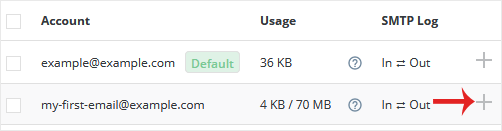
Under the Account list, locate the email address you want to rename. A plus icon sits at the right-hand end of its row.
4. Open the Change Password/Username Dialog
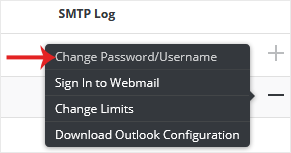
Click the plus icon and choose Change Password/Username.
5. Edit the Username
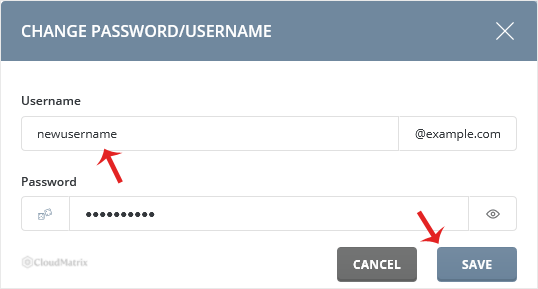
In the Username field, replace the existing name with the new one. This is the part before the @ only. Use lowercase letters, numbers, full stops, hyphens and underscores; avoid spaces and accented characters, which cause trouble with some sending mail servers.
The same dialog carries the password fields. If you are prompted to set a password while renaming, note the password you enter, because the mail client will need it along with the new username. If you only wanted to change the password and not the name, leave the username untouched and see How to Change an Email Account's Password in DirectAdmin.
6. Save
Click Save. The account list refreshes and the address appears under its new name.
After the Rename
- Sign in to webmail with the new full email address and confirm the existing messages and folders are present. See How to Access Your Email From DirectAdmin.
- Update the account settings in every mail client and on every phone or tablet. Change the username in both the incoming and the outgoing server settings, not just one of them.
- Send a test message to the new address from an outside account, and send one out from it, so both directions are proven.
- If mail sent to the old address still matters, create a forwarder from the old name to the new address and give correspondents a deadline to update their address books.
- Update anywhere the old address was used as a contact or login: website forms, application configuration, invoices, signatures and social profiles.
Troubleshooting
Symptom: the mail client keeps asking for the password after the rename. The username has changed, not only the password. Enter the full new email address as the username in both the incoming and outgoing server settings, then re-enter the password.
Symptom: senders receive a bounce saying the address does not exist. This is expected once the old name is gone. Create a forwarder using the old local part pointing to the new address to catch mail during the changeover.
Symptom: DirectAdmin refuses to save the new name. A mailbox, forwarder, alias or system account with that name already exists on the domain, or the name contains a character that is not allowed. Choose a different name, or remove the conflicting item first.
Symptom: webmail shows an empty mailbox after the change. Log out of webmail completely, close the tab, then sign in again using the new full address. A session held open across the rename can still be pointing at the old account name.
Symptom: a website or application stopped sending mail. Its SMTP configuration still uses the old username. Update the SMTP username and password in the application settings.
Need a Hand?
If the rename does not go to plan, or mail stops flowing after the change, open a ticket with the Noiz support team from your client area. Include the domain, the old address, the new address and the exact error your mail client shows, and Noiz can check the mail server logs for that mailbox directly.






