Webmail lets you read and send mail from your Noiz mailbox in an ordinary browser, with nothing to install and nothing to configure. This guide shows you the two ways to reach it from DirectAdmin: a one-click sign in from inside the control panel, and a direct sign in using the mailbox address and password.
Last reviewed: 27 July 2026, against the current DirectAdmin release and its Evolution interface. This guide is written for Noiz hosting and is kept current against DirectAdmin. It complements, and does not replace, the official DirectAdmin documentation linked below.
Official Documentation Reference
- DirectAdmin Docs: Webmail (covers one-click, or single sign-on, webmail login).
- DirectAdmin Docs: Autodiscover information for mail clients (for setting the same mailbox up in a desktop or phone mail app).
- Roundcube User Guide (what the webmail interface itself can do once you are signed in).
Prerequisites
- A Noiz hosting plan on DirectAdmin, and the DirectAdmin sign-in URL and credentials from your Noiz welcome email. DirectAdmin normally answers on port
2222, for examplehttps://yourdomain.com:2222(replaceyourdomain.comwith your own domain). - At least one mailbox already created. If you have not made one yet, see How to Create an Email Account in DirectAdmin.
- For Method 2 only: the mailbox password. If it has been lost, see How to Change an Email Account's Password in DirectAdmin.
Which Method Should You Use?
Both methods open the same mailbox in the same webmail application. The difference is who is signing in and what they hold:
- Method 1 (one-click) suits you, the account holder. You are already signed in to DirectAdmin, so DirectAdmin hands you straight through to the mailbox without asking for the mailbox password again. This is handy when you administer several mailboxes and do not memorise each password.
- Method 2 (direct sign in) suits everyone else, and suits you when you are away from the control panel. A staff member who has a mailbox but no DirectAdmin login uses this route, and so does any device where you would rather not sign in to the control panel at all.
Method 1: One-Click Sign In From DirectAdmin
Step 1: Open the E-mail Accounts page
Sign in to DirectAdmin. In the E-mail Manager section, click E-mail Accounts. If you cannot see the section, type E-mail Accounts into the navigation filter box at the top of the sidebar and the item will appear.

Step 2: Expand the mailbox row
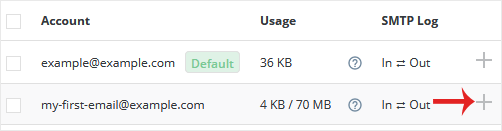
The Account list shows every mailbox on the domain. Each row carries a plus icon on the right-hand side, which reveals the per-mailbox actions.
Step 3: Sign in to webmail
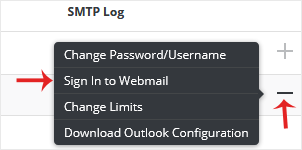
Click the plus icon, then click Sign In to Webmail.
Step 4: Allow the popup
Webmail opens in a new tab or window, so your browser may block it the first time and show a popup notice in the address bar. Allow the popup and you are taken straight into the mailbox, with no password prompt.
This pass-through is DirectAdmin's single sign-on feature, added in DirectAdmin 1.59.0. It works by issuing a short-lived, one-time token, which is why the resulting webmail address is useless as a bookmark: return to DirectAdmin and click Sign In to Webmail again each time.
Method 2: Sign In to Webmail Directly
Step 1: Open webmail
From inside DirectAdmin, look in the Extra Features section and click the Roundcube icon, or type Webmail into the navigation filter box.

You do not have to go through the panel at all. Once you know the webmail address for your domain, bookmark it and share it with the person who owns the mailbox. Many DirectAdmin servers publish a shortcut at webmail.yourdomain.com; if that address does not resolve for your domain, open webmail once through DirectAdmin and copy the address from your browser's address bar.
Step 2: Enter the mailbox credentials
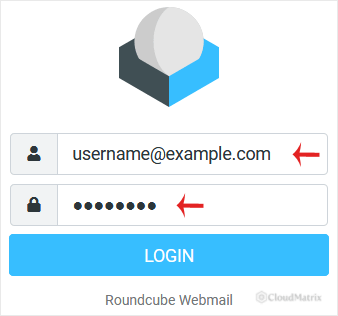
Enter the full email address as the username, for example [email protected], and then the mailbox password. Entering only the part before the @ is the single most common reason a correct password is rejected.
Step 3: Click Login
Click Login. You can now read, reply to, forward and file mail, and manage folders, contacts and an out-of-office reply, entirely in the browser.
A Note on SquirrelMail
Older guides and older screenshots offer a choice between SquirrelMail and Roundcube at this point. Noiz servers now offer Roundcube only. SquirrelMail has not had a maintained release in many years, and DirectAdmin's own documentation now describes it as outdated and installs Roundcube on new servers, so it was retired rather than left running unpatched. If you have an old SquirrelMail bookmark, replace it: the mailbox, the folders and the mail are unchanged, only the interface in front of them differs.
Webmail Is Not a Substitute for a Mail Client
Webmail is ideal for occasional access, for a machine that is not yours, and for confirming quickly that mail is arriving at the server rather than being lost in transit. For daily use on your own devices, connect the mailbox to a proper mail client over IMAP instead. IMAP keeps the mail on the server and mirrors the same folders across your laptop and phone, so nothing is trapped on one device. DirectAdmin lists the exact incoming and outgoing server settings for each mailbox in the E-mail Accounts page.
One caution if you are migrating a domain to Noiz: webmail always shows you the mailbox on the server your domain's DNS currently points at. If mail seems to be missing, check where the domain's MX records resolve before assuming it has been deleted.
Troubleshooting
Symptom: clicking Sign In to Webmail does nothing. The browser blocked the new window. Look for a blocked-popup icon in the address bar, allow popups for the DirectAdmin address, then click the link again.
Symptom: "Login failed" or "Invalid username or password" in Roundcube. Use the full email address as the username, not the mailbox name on its own. If it still fails, reset the mailbox password in DirectAdmin and try the new one immediately, so a saved password in the browser cannot overwrite what you typed.
Symptom: the webmail link worked yesterday but not today. You bookmarked a one-click sign-in URL. Those tokens expire by design. Bookmark the plain webmail sign-in page instead, or start from DirectAdmin each time.
Symptom: the mailbox is not in the Account list. Check the domain selector at the top of DirectAdmin. On accounts holding several domains, the list only shows mailboxes for the domain currently selected.
Symptom: you can read mail but sending fails. That usually points at a sending limit or an outbound block rather than at webmail. Check the mailbox's sending limit first, then contact Noiz support if the limit is not the cause.
Symptom: the browser warns the connection is not private. Do not enter the password. Reach webmail through DirectAdmin instead, and let Noiz support know which address produced the warning.
Need a Hand?
If webmail will not accept a password you know is correct, or mail is reaching the server but not reaching you, open a ticket with Noiz support from the client area. Include the full mailbox address and the exact wording of any error, and the Noiz team will check the mailbox on the server directly.






