This guide shows you how to create a new email account (a mailbox) on a Noiz hosting plan that uses the DirectAdmin control panel. A mailbox is a real, self-contained account with its own password, its own storage and its own inbox, which is different from a forwarder (which only redirects mail to somewhere else) and different from a catch-all (which sweeps up mail sent to addresses that do not exist).
DirectAdmin calls this area E-mail Manager, and you may also see it referred to as "Email Manager" or "Mail Accounts" in older guides. The steps below are the same either way.
Last reviewed: 27 July 2026, against the current DirectAdmin release and its Evolution interface. This guide is written for Noiz hosting and is kept current against DirectAdmin. It complements, and does not replace, the official DirectAdmin documentation linked below.
Official Documentation Reference
- DirectAdmin Docs: E-mail overview
- DirectAdmin Docs: Autodiscover and autoconfig for mail clients
- DirectAdmin Docs: Reducing your sending spam score
- DirectAdmin Docs: E-mail troubleshooting
Prerequisites
- A Noiz hosting plan on DirectAdmin, and the DirectAdmin login details from your welcome email.
- The domain you want the address on already added to the account. If you have several domains on the plan, note which one the new address belongs to.
- Room left in your plan for another mailbox. Plans cap both the number of email accounts and the total disk space, and a mailbox draws from the same disk allocation as your website files.
- A safe place to record the new password, such as a password manager. DirectAdmin does not show a password again after the account is created.
Create the Email Account
Step 1: Log in to DirectAdmin
Sign in to DirectAdmin using the panel URL, username and password from your Noiz welcome email. Make sure you are at User level rather than Reseller or Admin level. If the top of the screen shows a level switcher, set it to User Level, because the E-mail Manager only appears there.
Step 2: Open E-mail Accounts
In the E-mail Manager section, click E-mail Accounts. If you prefer to search rather than scroll, type E-mail Accounts into the navigation filter box at the top of the page and the option appears immediately.

Step 3: Click Create Account
The E-mail Accounts page lists every mailbox that already exists on the domain. Click Create Account at the top right of the page.
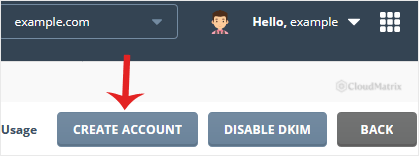
If you host more than one domain on the plan, check the domain selector at the top of the page first. DirectAdmin creates the mailbox on whichever domain is currently selected, and moving an address between domains later means creating it again and migrating the mail.
Step 4: Enter the username and password
In the Username field, type only the part that goes before the @ sign, for example my-first-email. DirectAdmin appends the domain for you, so the finished address reads [email protected] (replace yourdomain.com with your own domain).
Then set a password. Click the Generate Random Password icon if you would rather DirectAdmin produce a strong one for you.
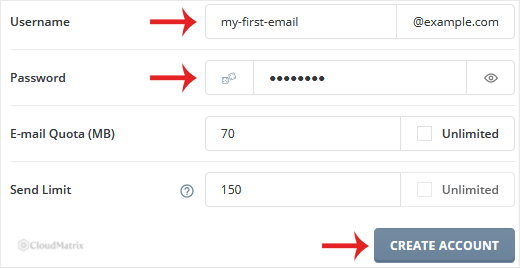
A few things worth knowing before you commit to a name:
- Use a long, unique, random password. Mailboxes are the single most attacked part of any hosting account, because a working mailbox password lets an attacker send spam through the server and read password reset emails for every other service you own. Never reuse a password you already use elsewhere.
- Keep the username simple. Lower case letters, numbers, dots, hyphens and underscores are safest. Avoid spaces and accented characters, because some sending systems mishandle them.
- Role addresses attract spam. Generic addresses such as
info@,sales@andadmin@are guessed by spammers constantly. They are perfectly fine to use, but expect more junk on them than on a personal address, and never use one as the login for something sensitive. - You cannot rename a mailbox later. DirectAdmin has no rename function for email accounts, so a typo means deleting the account and creating it again.
Step 5: Set the quota and send limit, then create the account
Adjust the email quota and the Send Limit, or leave them at their defaults, then click Create Account.
- Quota is the maximum size of this mailbox in megabytes. In DirectAdmin a value of
0means unlimited, which in practice means limited only by the total disk space on your plan. Setting a real number on each mailbox is the safer choice, because one runaway mailbox then cannot fill the whole account and take your website offline with it. - Send Limit is the maximum number of messages this address may send per day. It exists to contain the damage if the password is ever stolen, so leaving a sensible limit in place protects the server's sending reputation and, by extension, your own deliverability. Raise it only if the address genuinely needs to send more, for example a shop sending order confirmations.
Once you click Create Account, copy the new address and password somewhere safe straight away. DirectAdmin stores the password as a hash and cannot show it to you again, so if you lose it you will need to set a new one.
After the Mailbox Exists
The mailbox is usable immediately through webmail on the same server. Sending and receiving from the outside world also depends on your domain's DNS, so:
- The domain's MX records must point at your Noiz DirectAdmin server for mail from other people to arrive. If the domain's DNS is managed somewhere else, or its email is still pointed at a previous provider, the mailbox will exist but stay empty.
- SPF and DKIM should be in place before you send in volume, otherwise recipients are far more likely to treat your mail as spam.
- Always connect over the secure ports. For a mail client, use IMAP on port
993with SSL/TLS and SMTP on port465with SSL/TLS, with authentication switched on and your full email address (not just the username) as the login name, unless your Noiz welcome email states otherwise.
Troubleshooting
Symptom: "Cannot create e-mail account" or a limit error. Your plan's email account limit or disk quota is already reached. Delete a mailbox you no longer use, reduce another mailbox's quota, or ask Noiz support about a larger plan.
Symptom: the address exists but receives nothing. Mail for the domain is being delivered elsewhere. Check that the domain's MX records point at your Noiz DirectAdmin server, and allow for DNS propagation after any change.
Symptom: the mail client refuses the password. Log in to webmail with the same details first. If webmail works, the client is at fault: confirm the login name is the full email address, that SSL/TLS is enabled, and that SMTP authentication is turned on.
Symptom: sending stops partway through the day. The daily Send Limit for that address has been reached. Raise it if the volume is legitimate, and treat an unexpected limit hit as a possible sign that the mailbox has been compromised.
Symptom: the mailbox fills up quickly. Raise the quota, clear out large attachments, or empty the Junk and Trash folders. Bear in mind that mailbox storage comes out of the same disk allocation as your website.
Related Guides
- How to Change an Email Account's Password in DirectAdmin
- How to Change the Email Account Disk's Quota in DirectAdmin
- How to Access Your Email From DirectAdmin
Need a Hand?
If the mailbox will not create, mail is not arriving, or you are not sure whether your domain's MX records point at the right place, open a support ticket from your Noiz client area with the full email address and the exact error you see. On a managed plan, Noiz will create the mailbox and confirm the mail routing for you.






