Almost every dynamic website needs a database behind it. WordPress, Joomla, Magento, Laravel and most custom PHP applications all expect a MySQL or MariaDB database to be waiting for them before installation begins. This guide shows you how to create one from your DirectAdmin control panel on Noiz hosting, and explains the two things that catch people out afterwards: the account name prefix DirectAdmin adds to the database name, and which host name your application should connect to.
Last reviewed: 27 July 2026, against the current DirectAdmin release and its Evolution interface. This guide is written for Noiz hosting and is kept current against DirectAdmin. It complements, and does not replace, the official DirectAdmin documentation linked below.
Official Documentation Reference
- DirectAdmin: MariaDB and MySQL, including remote access hosts and server-level behaviour.
- DirectAdmin: phpMyAdmin, for working inside a database once it exists.
- DirectAdmin: database backup, restore and recovery.
Prerequisites
- An active Noiz hosting account on a DirectAdmin server, plus your DirectAdmin username and password. Both are in your Noiz welcome email, along with the control panel address to log in at.
- A free database slot on your hosting package. Each plan allows a set number of databases, and the counter includes any you created earlier and forgot about.
- Somewhere safe to record the credentials, ideally a password manager. The database password is shown to you once, at creation, and is not retrievable afterwards.
Creating the Database
Step 1: Open MySQL Management
Log in to DirectAdmin. In the Account Manager section of the menu, click MySQL Management. If the menu is long, type MySQL Management into the navigation filter box at the top of the sidebar and the entry will filter into view.

Step 2: Start a new database
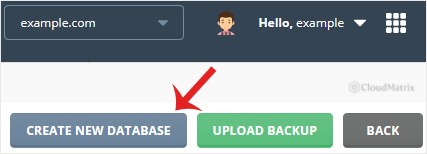
The MySQL Management page lists every database on your account. Click Create New Database at the top right of the page.
Step 3: Fill in the Create Database form
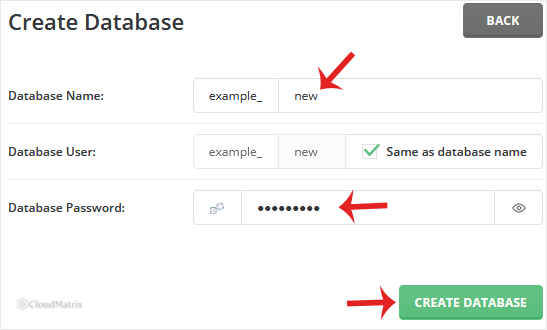
DirectAdmin asks for three things:
- Database Name: type only the suffix you want. The greyed-out box to its left already contains your account name and the underscore that DirectAdmin adds automatically.
- Database User: leave Same as database name ticked and DirectAdmin creates a matching user and grants it full rights on the new database in one step. Untick it only if you want a differently named user.
- Database Password: type one, or click the generator icon at the left of the field to have DirectAdmin produce a strong random password. The eye icon at the right of the field reveals the value so you can copy it accurately.
Click Create Database.
Step 4: Record the credentials before you leave the page
The confirmation screen shows the finished database name, the user name and the password. Copy all three somewhere safe now. DirectAdmin stores the password as a hash, so nobody at Noiz can read it back to you later. If it is lost, the only route forward is to set a new one, which is covered in How to Change a Database Password in DirectAdmin.
Understanding the Account Name Prefix
This is the single most common source of confusion, so it is worth being precise about it.
DirectAdmin prefixes every database and every database user with your account name and an underscore. If your account name is example and you type shop into the form, the database that actually exists on the server is example_shop, and the matching user is example_shop. The prefix is not optional and cannot be removed. It is what keeps your databases separate from every other account on a shared server.
Three practical consequences follow:
- Use the full name everywhere. In
wp-config.php,configuration.php, a Laravel.envfile or any installer, enterexample_shop, notshop. A plainshopproduces an "Unknown database" or "Error establishing a database connection" message. - Migrations need the connection details rewritten. A site moved from another host almost certainly used a different account name, so its old database name will not exist here. Import the data, then update the site's configuration file to the new name, user and password. The table contents and table names do not change, only the connection details.
- Mind the length. MySQL and MariaDB cap identifiers at 64 characters, and the prefix counts towards that limit. Keep the suffix short and stick to letters, numbers and underscores. Other characters are either rejected by the form or become awkward to quote in SQL and shell commands later.
Connecting Your Application
Once the database exists, an application hosted on the same Noiz server connects with these four values:
- Database host:
localhost. This is correct for anything running on your own hosting account, which covers virtually every website install. Do not use your domain name or the server's IP address. - Database name: the full prefixed name, for example
example_shop. - Database user: the full prefixed user name.
- Password: the one you set or generated in step 3.
Connecting from your own PC, from a desktop tool or from a server elsewhere is a different matter. Remote MySQL access is blocked by default, and it stays blocked until the connecting IP address is added to the database user's Allowed Hosts list in MySQL Management. Treat this as a last resort rather than a convenience: a database reachable from the open internet is a far larger target than one reachable only from its own web server. For routine work on the data itself, use phpMyAdmin from inside DirectAdmin, which needs no remote access at all.
Troubleshooting
Symptom: the Create New Database button is missing, or creation fails with a limit message. Your package's database allowance is already used up. Delete a database you no longer need, or contact Noiz support about moving to a plan with a higher allowance.
Symptom: the form rejects the name you typed. The suffix contains a space, a full stop or another disallowed character, or the combined name exceeds 64 characters. Shorten it and use only letters, numbers and underscores.
Symptom: a database with that name already exists. Database names are unique per server, and your prefix makes them unique across accounts, so this means you have used the suffix before on this account. Check the list on the MySQL Management page before choosing another.
Symptom: "Error establishing a database connection" after installing your site. In nearly every case the configuration file is missing the account name prefix on the database name, the user name, or both. Check those first, then confirm the host is set to localhost and that the password was copied without a trailing space.
Symptom: the application connects but reports missing tables or permission errors. The database exists but its user has no rights on it, which happens if Same as database name was unticked and a user was created separately. Assign the privileges as described in How to Modify a Database User's Privileges in DirectAdmin.
Next Steps
- How to Create a New Database User in DirectAdmin, for adding a second user to an existing database.
- How to Modify a Database User's Privileges in DirectAdmin, for granting or restricting what a user may do.
- How to Change a Database Password in DirectAdmin, for when a password is lost or needs rotating.
If the database will not create, or an application still refuses to connect after you have checked the prefix and the host, open a ticket from your Noiz client area with the database name and the exact error message. Noiz support can confirm what exists on the server and get the connection working with you.






