A database user is the account your website or application uses to log in to MySQL/MariaDB. Creating a database on its own is not enough: nothing can read or write to it until a user is attached to it. This guide shows you how to create a new database user in DirectAdmin on Noiz hosting, and covers the naming rules, password handling and connection details that trip people up afterwards.
DirectAdmin refers to this area as MySQL Management. You may also see it described as "database management" or "MySQL databases" in application install guides. It is the same screen.
Last reviewed: 27 July 2026, against the current DirectAdmin release and its Evolution interface. This guide is written for Noiz hosting and is kept current against DirectAdmin. It complements, and does not replace, the official DirectAdmin documentation linked below.
Official Documentation Reference
- DirectAdmin Docs: MariaDB / MySQL
- DirectAdmin Docs: Evolution skin
- MariaDB Knowledge Base: GRANT and privilege reference
Prerequisites
- An active Noiz hosting account on a DirectAdmin server, and your DirectAdmin login details.
- An existing database to attach the user to. If you have not created one yet, start with How to Create a Database in DirectAdmin.
- Somewhere safe to store the username and password, such as a password manager. The password is shown once and is not recoverable in plain text afterwards.
Create the Database User
Step 1: Log in to DirectAdmin
Sign in to your DirectAdmin account. If you are unsure of the control panel address for your hosting package, it is listed on your Noiz welcome email and in the Noiz client area under your hosting service.
Step 2: Open MySQL Management
In the Account Manager section, click MySQL Management. If you cannot see the icon, type MySQL Management into the navigation filter box at the top of the menu and click the result that appears.

Step 3: Select the database
From the list of databases, click the database you want to create the user for. Database names carry your account username as a prefix, in the form youruser_dbname, so pick carefully if you host several sites on one account.
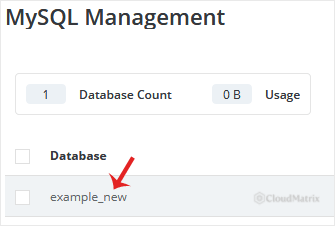
Step 4: Choose Create New User
Under Users, click Create New User. The existing users attached to this database are listed here too, so this is also the screen you return to if you need to change a password or remove an old user later.
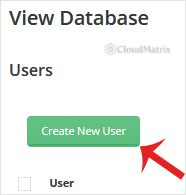
Step 5: Set the username and password
Enter the new username, then either type a password into the password field or click the Generate Random Password icon to have DirectAdmin create a strong one for you. Click Create to finish.
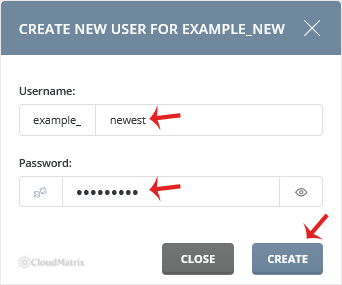
Copy the newly created database user details to a safe place before you leave the page.
What to Know Before You Use the New User
- The username is prefixed automatically. DirectAdmin prepends your account username, so a user you name
shopbecomes something likeyouruser_shop. Always use the full prefixed name in your application configuration, not the short part you typed. - Keep the suffix short. MySQL and MariaDB impose a maximum length on user names, and the prefix counts towards it. A short, descriptive suffix such as
wp,shoporcrmavoids the name being rejected or truncated. - The connection host is normally
localhost. When the website and the database live on the same Noiz server, your application connects usinglocalhostas the database host. Only use a hostname or IP address if you are connecting from somewhere else, and see the remote access note below. - Generated passwords are safer than invented ones. Database credentials sit in a plain text configuration file such as
wp-config.php, so they are only ever typed once. There is no benefit to a memorable password, and a long random one removes the risk of a brute force attempt against the database. - Avoid special characters that break configuration files. If you set the password yourself, characters such as
$,'and\can be interpreted by PHP or by shell scripts rather than passed through as part of the password. The generated password is the safer route. - Give each application its own user. If one site is compromised, a shared database user hands the attacker access to every database that user can reach. One user per application keeps the damage contained.
Set the Privileges
Creating the user attaches it to the database you opened it from. Review what the user is actually allowed to do before you put it into production: most applications need only the standard read and write privileges, and a user with fewer rights is a smaller target. To adjust them, follow How to Modify a Database User's Privileges in DirectAdmin.
Troubleshooting
Symptom: The application reports "Access denied for user". Check that you used the full prefixed username, that the password was copied without a leading or trailing space, and that the host is set to localhost. A password containing a character your configuration file treats as special is the most common cause when everything else looks correct.
Symptom: The username is rejected as too long. Shorten the part you type. The account prefix and the underscore both count towards the database engine's limit.
Symptom: The user connects but cannot create or alter tables. The privileges granted are too narrow for what the application is doing, typically during an installation or an upgrade. Adjust them using the privileges guide linked above.
Symptom: An external tool or a remote server cannot connect. Database users are restricted to connections from the server itself by default. Remote connections require an access host entry for the database and an open route to the MySQL port, which Noiz keeps closed by default for security. Open a support ticket describing what needs to connect and from where, and Noiz will advise on the safest way to do it.
Removing a Database User
Deleting a database user does not delete the database or its data, so it is safe to remove users you no longer need. Do it from the same Users list under the database. Retiring the credentials of a decommissioned site or a departed developer is good housekeeping and takes seconds.
Need a Hand?
If you are unsure which privileges an application needs, or a database connection is failing after a migration, open a support ticket from the Noiz client area with the database name and the exact error message. Noiz support can check the user, its privileges and the server side of the connection for you.






