A feature list in WHM is a named set of cPanel features (File Manager, Cron Jobs, Email Filters, and so on) that you attach to a hosting package. Deleting a list you no longer use keeps the Feature Manager tidy and stops stale lists being picked by mistake when a package is created. This guide is for Noiz reseller and dedicated customers who have WHM access.
Last reviewed: 27 July 2026, against the current stable release of cPanel & WHM. This guide is written for Noiz hosting and is kept current against cPanel & WHM. It complements, and does not replace, the official cPanel documentation linked below.
Official Documentation Reference
- WHM Feature Manager (full field reference)
- WHM Edit a Package (reassigning a package to a different feature list)
Prerequisites
- A WHM login for your Noiz reseller or dedicated account.
- A reseller-created feature list you want gone. The built-in
defaultanddisabledlists are part of WHM and cannot be deleted. - A quick check of which packages currently point at the list. See the warning below before you delete anything.
Before You Delete: What Happens to Packages Using the List
This is the part the button does not tell you. A feature list is not owned by a package, it is referenced by it. When the list disappears, any package still pointing at it falls back to the default feature list, and every account created on that package from then on inherits the default feature set instead of the one you designed.
In practice that means features you had deliberately switched off can quietly come back, and features you had switched on for a premium package can quietly go away. Existing accounts keep working, but their available cPanel icons change to whatever default allows, which is the kind of thing that surfaces as a confused support ticket a week later rather than as an error on screen.
To avoid it, do this first:
- Go to Packages >> Edit a Package.
- Open each package in turn and look at the Feature List setting.
- Any package pointing at the list you are about to remove should be reassigned to another list, or to
defaultdeliberately, and saved.
Once no package references the list, deleting it has no side effects at all. If you are removing a list because you want a different feature set instead, create the replacement list first, reassign the packages to it, and only then delete the old one. See How to Create a Feature List in WHM.
Remove the Feature List
1. Log in to WHM
Sign in to WHM with your reseller or root credentials.
2. Open Feature Manager
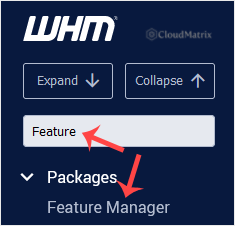
Go to Packages >> Feature Manager, or type Feature Manager into the menu filter box at the top left and click the result.
3. Select the List to Remove
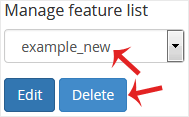
Under Manage feature list, choose the feature list you want to remove from the drop-down. Check the name carefully, because WHM does not show you which packages use it at this point.
4. Click Delete
Click Delete and confirm. WHM removes the list immediately, and the drop-down refreshes without it.
The feature list has now been removed. Deleting a list never deletes a package or an account, it only removes the named feature set.
Troubleshooting
Symptom: The list you want is not in the drop-down. It has either already been deleted, or it belongs to a different reseller account. A reseller only sees the feature lists they own, plus the built-in ones.
Symptom: Delete is greyed out or refuses. You have selected default or disabled. These are built into WHM and cannot be removed. If you want to change what the default set allows, edit it rather than trying to delete it.
Symptom: Customers report cPanel icons appearing or disappearing after the deletion. A package was still pointing at the deleted list and has fallen back to default. Recreate the feature list with the settings you want, then reassign the affected packages under Packages >> Edit a Package.
Symptom: You need to change features for one account only, not for a whole package. Deleting or editing a feature list is the wrong tool for that. See How to Enable/Disable Features of cPanel Account From WHM.
Related Articles
- How to Create a Feature List in WHM
- How to Enable/Disable Features of cPanel Account From WHM
- How to Delete a Package in WHM
If you are unsure which packages reference a feature list, or an account has lost features after a change, open a ticket from your Noiz client area and the Noiz support team will check the package and feature list mapping on your server for you.






