Every mailbox on a DirectAdmin account carries a send limit: a cap on how many messages that address is allowed to send in a day. This guide shows you where to change it, and, just as importantly, explains what the number actually controls so you set it to something useful rather than guessing.
The limit you set on an individual mailbox is a ceiling within the allowance your hosting plan already has. You can lower it, and you can raise it up to the maximum the server administrator permits, but you cannot push a single mailbox past the account-wide allowance.
Last reviewed: 27 July 2026, against the current DirectAdmin release and its Evolution interface. This guide is written for Noiz hosting and is kept current against DirectAdmin. It complements, and does not replace, the official DirectAdmin documentation linked below.
Official Documentation Reference
- DirectAdmin Docs: E-Mail maintenance and customisation
- DirectAdmin Docs: Preventing outgoing spam (how send limits are enforced)
- DirectAdmin Docs: Reducing sending spam score
Prerequisites
- Your DirectAdmin login details, supplied by Noiz when the hosting account was set up.
- At least one mailbox already created on the domain. If you have not created one yet, see How to Create an Email Account in DirectAdmin.
- The sending allowance that applies to your hosting plan. If you are not sure what it is, ask Noiz support before you start rather than discovering it when a change silently fails to take effect.
What the Send Limit Actually Controls
Before you change the number, it is worth knowing what it counts. Getting this wrong is the usual reason a mailbox keeps hitting its limit even after it has been raised.
- It is a daily cap, not a total. The counter resets, so a mailbox that stops sending will start working again on its own once the day rolls over. You do not need to do anything to unblock it.
- Every send route counts against the same allowance. Webmail, Outlook or Thunderbird, a phone's mail app, and any website script or plugin authenticating as that address over SMTP all draw from one pool.
- Recipients matter, not just messages. One message addressed to fifty people is not one send. Treat a mailing list as consuming a large share of the allowance, not a single unit of it.
- The mailbox limit sits under an account-wide ceiling. The server keeps a separate cap covering everything sent by your hosting account. If you set one mailbox to a very high figure, that mailbox still stops when the account total is reached, so raising one address can quietly starve the others.
- The limit exists to contain damage. If a mailbox password is ever compromised, the send limit is what stops a spam run at a few hundred messages instead of a few hundred thousand, and it is what protects the sending reputation of every other domain on the platform. That is why the ceiling is enforced rather than advisory.
Changing the Send Limit
1. Log in to DirectAdmin
Sign in to your DirectAdmin account using the details Noiz provided.
2. Open E-mail Accounts
In the E-mail Manager section, click E-mail Accounts. If you cannot see the section, type E-mail Accounts into the navigation filter box at the top of the sidebar and the option will appear. Click it.

3. Find the mailbox in the account list
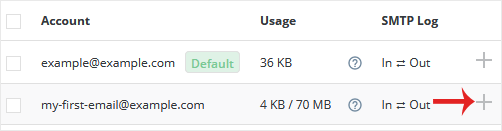
Under the Account list, each email address appears on its own row with a plus icon on the right-hand side.
4. Open Change Limits
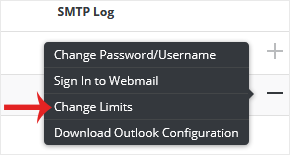
Click the plus icon for the address you want to change and choose Change Limits.
5. Set the new send limit
Adjust the Send Limit field to the figure you need. The value shown in the screenshot below is only an example of what the field looks like in use; it is not a Noiz limit and it is not a recommendation. Set it to what your own plan allows and what the mailbox genuinely needs.
If an Unlimited option is available and your plan permits it, you can select that instead. Where the option is greyed out or missing, your hosting plan has a fixed ceiling and the field is capped accordingly.
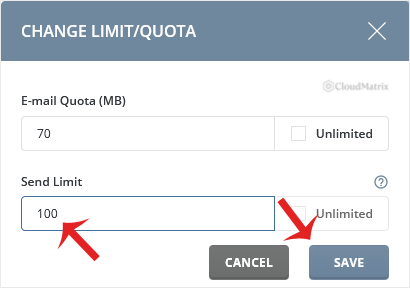
The same dialog also holds the mailbox disk quota. If you need to adjust that at the same time, see How to Change the Email Account Disk's Quota in DirectAdmin.
6. Save
Click Save. The new limit applies immediately to messages sent from that point onward. It does not retroactively clear a mailbox that has already hit the old limit today, so if the address is currently blocked, expect it to resume after the daily counter resets.
Choosing a Sensible Number
Higher is not better. A send limit set far above what a mailbox realistically needs removes the only automatic brake on a compromised account.
- Ordinary staff mailbox: a modest daily figure covers normal correspondence comfortably. Most people never come close.
- Website or application sender (contact forms, order confirmations, password resets): size it against actual traffic and leave headroom for a busy day, not for a hypothetical one.
- Newsletters and bulk mail: do not solve this with a large send limit. Shared hosting mail is not built for bulk campaigns, and pushing volume through it damages deliverability for your own domain. Use a dedicated bulk email service and keep the hosting mailbox for individual correspondence.
You can see what a mailbox is actually sending in the E-mail Manager section, under E-mail Usage. Check the real figures before deciding a limit is too low.
Troubleshooting
Symptom: the new limit will not save, or reverts to a lower figure. You have asked for more than your hosting plan allows. The account-wide ceiling wins. Contact Noiz support to discuss the allowance on your plan.
Symptom: mail still stops sending after raising the limit. The account-wide daily total has most likely been reached by the other mailboxes on the account, not by this one. Review usage across all addresses rather than raising a single mailbox further.
Symptom: a mailbox burns through its limit unexpectedly. This is the classic signature of a compromised password or an insecure website script being abused as a relay. Change the mailbox password immediately, check for a script sending on that address, and contact Noiz support. Raising the limit in this situation makes the problem worse.
Symptom: messages send fine but land in recipients' spam folders. That is a deliverability issue, not a limit issue, and raising the send limit will not help. SPF, DKIM and DMARC records for the domain are what determine whether receiving servers trust your mail.
Need a Hand?
If you are unsure what allowance your plan carries, or a mailbox is hitting its limit and you cannot see why, contact Noiz support through the client area. On managed plans Noiz will review the sending pattern on the account, confirm the ceiling that applies, and advise whether a higher limit or a different approach is the right fix.






