DirectAdmin lets you download a copy of any MySQL or MariaDB database on your hosting account straight from the control panel, without needing shell access or a separate export tool. This guide shows you how to do it on your Noiz DirectAdmin hosting, explains the difference between the .sql and .gz download formats, and covers what the dump does and does not contain so that your backup is actually restorable when you need it.
If you have seen this feature called "database export", "SQL dump" or "mysqldump" elsewhere, it is the same thing. DirectAdmin simply wraps it in a one-click download.
Last reviewed: 27 July 2026, against the current DirectAdmin release and its Evolution skin. This guide is written for Noiz hosting and is kept current against DirectAdmin. It complements, and does not replace, the official DirectAdmin documentation linked below.
Official Documentation Reference
- DirectAdmin Docs: MariaDB and MySQL
- DirectAdmin Docs: MySQL backup, restore and recovery
- DirectAdmin Docs: phpMyAdmin
Prerequisites
- Login details for your DirectAdmin account at User level.
- At least one database on the account. If you have not created one yet, see How to Create a Database in DirectAdmin.
- Enough free disk space locally for the download. Uncompressed dumps of busy sites can be several hundred megabytes.
Download the Database Backup
1. Log in to DirectAdmin
Sign in to your DirectAdmin account. Make sure you are at User level, not Reseller or Admin level. Database downloads live at User level, because databases belong to a hosting account rather than to the server as a whole.
2. Open MySQL Management
In the Account Manager section, click MySQL Management. If you cannot see it on the dashboard, type MySQL Management into the navigation filter box at the top of the menu and click the result that appears.

3. Expand the database and choose a download format
The page lists every database on your account, along with its size and the users linked to it. On the right-hand side of each database row there is a plus (+) toggle. Click it to expand the row, then choose Download as SQL or Download as GZ.
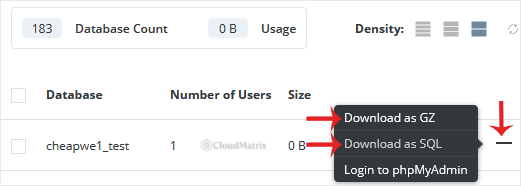
Depending on which DirectAdmin build your server is running, the same two options may instead appear inside the database detail panel after you click the database name. The wording and the resulting file are identical either way.
4. Save the file
Your browser prompts for a download. Save the file somewhere sensible and, ideally, somewhere backed up. The filename follows the database name, so you will get something like yourdomain_wp.sql or yourdomain_wp.sql.gz, where yourdomain_wp is an example database name to replace with your own.
SQL or GZ: Which Format to Choose
- Download as SQL gives you a plain-text
.sqlfile. It is human readable, you can open it in a text editor to check a table or fix a stray value, and most import tools accept it directly. It is also the largest option. - Download as GZ gives you the same dump, gzip-compressed. Database dumps are highly repetitive text, so compression commonly cuts the size by 80 to 90 per cent. Choose this for anything but a very small database, and especially if your connection is slow or metered.
To unpack a .gz file on macOS or Linux:
gunzip yourdomain_wp.sql.gzOn Windows, 7-Zip and similar archive tools open .gz files natively. Note that a gzip file is a single compressed file rather than a folder, so you get one .sql file back out.
What the Dump Contains, and What It Does Not
This is the part that catches people out at restore time. The download is a dump of that one database: the table structures and the rows inside them. It does not include:
- The database user or its password. Database users are separate objects in DirectAdmin. If you restore this dump onto a fresh account, you must create the user again and link it to the database, then update your application's configuration file with the new credentials.
- Your website files. A database backup on its own will not restore a site. Pair it with a file backup of
public_html, or take a full account backup from Create/Restore Backups in DirectAdmin, which bundles files, email and databases together. - Other databases on the account. Each database is downloaded individually. If your account runs several sites, repeat the process for each one.
Also worth knowing: DirectAdmin prefixes database names and database usernames with your account username, in the form account_dbname. If you restore into an account with a different username, the prefix changes and every reference to the old name in your application config needs updating.
Verify the Backup Before You Trust It
A backup you have never checked is a guess, not a backup. Two quick sanity checks:
- Check the file size. A dump measured in bytes rather than kilobytes almost always means the export failed or the database is empty. Compare it against the size DirectAdmin reports for the database in MySQL Management.
- Look at the top and bottom of the file. A complete dump starts with header comments and
CREATE TABLEstatements, and ends with a dump-completed line. If the file simply stops mid-statement, the export was truncated and should be taken again.
head -n 20 yourdomain_wp.sql
tail -n 5 yourdomain_wp.sql
Troubleshooting
Symptom: The download stalls, times out or produces a truncated file on a large database. Very large exports can exceed the web server's response window. Use the GZ option to reduce transfer time, or take a full account backup from Create/Restore Backups instead, which is generated server-side and then downloaded as a single archive.
Symptom: You cannot find MySQL Management in the menu. Confirm you are logged in at User level rather than Reseller or Admin, and use the navigation filter box to search for it. If it is genuinely absent, MySQL access may not be enabled on your hosting package; contact Noiz support to confirm.
Symptom: The dump imports but the site shows garbled accented characters. Open the .sql file in an editor that handles UTF-8 correctly and make sure the import tool is set to the same character set the original database used. Re-saving a dump in a different encoding is a common cause of mangled text.
Symptom: The restored site cannot connect to the database. The dump does not carry users or passwords across. Recreate the database user, grant it access to the restored database, and update the credentials in your application's configuration file.
Keep the Download Safe
A database dump is plain text containing everything in your database, which for most content management systems includes user records, order data and hashed passwords. Treat it as sensitive:
- Never leave a dump inside
public_htmlor any other web-accessible folder, where it can be found and fetched by anyone who guesses the filename. - Store it on encrypted storage, and delete old copies you no longer need.
- If you must send one to a developer, use a link that expires rather than email.
Related Articles
If a database will not download, an import fails, or you would like Noiz to take and verify a restore on your behalf, open a support ticket from your Noiz client area with the database name and a description of what you are seeing. Noiz support can check server-side backups and assist with restores on managed plans.






