Unsuspending a cPanel account in WHM lifts a suspension and puts the account back into normal service: the website loads again instead of the Account Suspended page, cPanel and FTP logins work, and mail delivery resumes. Nothing is restored from backup, because nothing was deleted. Suspension only switches an account off. This guide is for Noiz reseller and dedicated customers who have WHM access.
Last reviewed: 27 July 2026, against the current stable release of cPanel & WHM. This guide is written for Noiz hosting and is kept current against cPanel & WHM. It complements, and does not replace, the official cPanel documentation linked below.
Official Documentation Reference
- WHM Manage Account Suspension (full field reference and interface limitations)
- What Happens When You Suspend an Account (exactly which services stop)
- Account Suspension Versus Bandwidth Limiting and Account Termination
- WHM List Suspended Accounts (finding every suspended account at once)
Prerequisites
- A WHM login for your Noiz reseller or dedicated account.
- The username or primary domain of the account you want back in service.
- Confidence that whatever caused the suspension has been dealt with. Read the next section before you click anything.
Deal With the Cause First
Unsuspending is a ten second job. Deciding whether to unsuspend is the part worth thinking about, because an account that goes back online with the original problem still present usually ends up suspended again, sometimes within the hour.
- Suspended for non-payment. If your billing system suspended the account automatically, unsuspending it by hand in WHM does not tell the billing system anything. The account status in billing stays as suspended, and the next automation run can simply suspend it again. Settle or write off the invoice and unsuspend from the billing side, so that both systems agree.
- Suspended for abuse, spam or a compromise. Clean the account first. Rotate the cPanel and email passwords, remove the malicious files, and update the outdated plugin or theme that let it in. Putting a compromised account straight back online tends to produce a second suspension plus a damaged sending reputation.
- Suspended for resource usage. Confirm the account is under its disk and inode limits before restoring it, otherwise the first thing the customer sees is a site that loads and immediately breaks on writes.
If you are unsuspending purely because a customer has paid or an investigation has closed, none of this applies and you can go straight to the steps below.
Unsuspend the Account
1. Log in to WHM
Sign in to WHM with your reseller or root credentials.
2. Open Manage Account Suspension
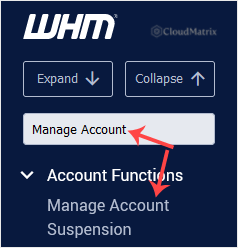
Go to Account Functions >> Manage Account Suspension, or type Manage Account into the menu filter box at the top left and click the result when it appears.
3. Select the Suspended Account
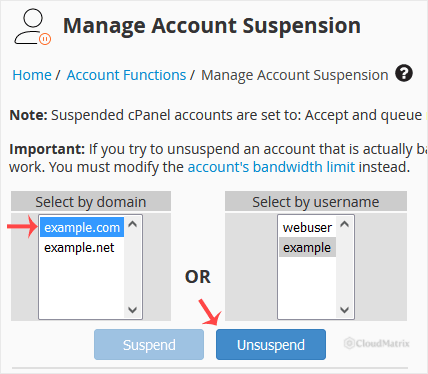
Pick the account under Select by domain or Select by username, whichever you know. Both lists cover the same accounts.
WHM colour codes this list, and the colour is the quickest way to confirm you have the right account. Active accounts are shown in white or plain text. Suspended accounts are shown in red. When you are unsuspending, red is exactly what you are looking for. If the account you expected to fix is not red, it is not currently suspended, and whatever is wrong with it has another cause.
4. Click Unsuspend
Leave Retain Service Proxying unticked unless you specifically set service proxying up for this account and want it kept. Almost nobody needs it, and the safe default is to leave it alone.
Click Unsuspend. WHM restores the account and reports success, or shows an error explaining why it could not.
What Happens the Moment You Unsuspend
The change is immediate on the server, and no data has to be restored:
- The Account Suspended page stops being served and the real site loads again.
- The cPanel and FTP passwords start working again. Suspension does not change the customer's password, it invalidates the stored hash, so unsuspension brings the original password back. There is no need to issue a new one.
- Incoming mail is accepted again, and cron jobs, databases and shell access return to whatever state they were in before the suspension.
The one thing that does not come back is mail that arrived while the account was suspended. Depending on how the server is configured to treat mail for suspended accounts, those messages were either queued, bounced or rejected outright. Anything rejected or bounced is gone, and the sender will have received a failure notice. It is worth telling the customer to expect a gap rather than letting them discover it.
Troubleshooting
Symptom: Unsuspend fails, or WHM says only a root user can unsuspend this account. The account was locked when it was suspended, using the option that prevents resellers from unsuspending. That is deliberate, and it is usually set when the suspension came from the server administrator rather than from you. Open a ticket with Noiz support rather than trying to work around it.
Symptom: The account is not in the list at all. You are signed in as a reseller and the account belongs to a different reseller, or it has been terminated rather than suspended. Termination deletes the account and its data, and there is nothing to unsuspend.
Symptom: The account is not shown in red, but the site is still down. It is not suspended. Check for a bandwidth limit instead. Bandwidth limiting and suspension are separate mechanisms in WHM, and Manage Account Suspension will not clear a bandwidth block. Use Account Functions >> Unsuspend Bandwidth Exceeders for that, or check DNS and the site's own error logs if bandwidth is not the issue.
Symptom: The suspended page still appears after a successful unsuspension. It is almost always cached, either in the browser or at a CDN in front of the site. Do a hard refresh, try a private window, and purge the CDN cache if the domain sits behind one.
Symptom: The account is suspended again a few hours later. Something automated is putting it back. That is normally a billing system acting on an unpaid invoice, or an abuse rule that has re-triggered because the underlying problem was never fixed.
Related Articles
- How to Suspend a cPanel User in the WHM Account
- How to Limit Bandwidth Usage of cPanel User From WHM
If an account will not unsuspend, keeps re-suspending, or you are not sure why it was suspended in the first place, open a ticket from your Noiz client area. The Noiz support team can read the suspension reason and the server logs for that account and tell you exactly what triggered it.






