A Certificate Signing Request (CSR) is a one-off block of encoded text you hand to a Certificate Authority (CA) when you buy an SSL/TLS certificate. Once the CA has issued your certificate, the request itself has done its job, but cPanel keeps storing it. This guide shows you how to delete a CSR you no longer need from your Noiz cPanel account, and explains exactly what deleting one does and does not affect.
Last reviewed: 27 July 2026, against cPanel & WHM version 134 (current release tier). This guide is written for Noiz hosting and is kept current against cPanel. It complements, and does not replace, the official cPanel documentation linked below.
Official Documentation Reference
- cPanel Documentation: SSL/TLS interface, covering the Private Keys, Certificate Signing Requests and Certificates sections.
- cPanel Documentation: SSL/TLS Status, the interface that reports certificate and AutoSSL coverage per domain.
Deleting a CSR Does Not Break Your Live Certificate
This is the single point worth understanding before you click anything. Three separate items live in the cPanel SSL/TLS interface, and they are stored independently of one another:
- Private key: the secret half of the key pair. Your live HTTPS depends on this.
- Certificate Signing Request: the request you sent to the CA. It is derived from the private key, but nothing serves traffic from it.
- Certificate: the signed file the CA returned. This is what browsers actually receive.
Deleting a CSR removes only the request. An SSL certificate that is already issued and installed keeps working exactly as before, because it is paired with the private key rather than with the request. Visitors see no change, and nothing needs reinstalling.
The item you must not casually delete is the private key. Removing a key that an installed certificate depends on will break HTTPS on that domain, and the certificate cannot be reinstalled without it. Keys are listed under Private Keys (KEY) on the same page, so take care that you are working in the Certificate Signing Requests section and not the one above it.
When to Keep a CSR Instead
Deleting a CSR is safe, but it is not always convenient. Keep the request if any of the following apply:
- The CA has not issued the certificate yet. Validation is still in progress and the request may need to be resubmitted.
- You expect to reissue the certificate, for example to add a domain or replace a lost copy. Several CAs ask for the original CSR during a reissue, and some renewal flows accept it as well.
- You maintain records of what was submitted for an organisation-validated or extended-validation certificate.
A CSR cannot be recovered once deleted. You can always generate a fresh one, but a new request is tied to a new key pair unless you deliberately reuse the existing key, and that means the CA has to reissue rather than simply renew.
Prerequisites
- A cPanel hosting account with Noiz, and your cPanel login details from the welcome email or the Noiz client area.
- A copy of the CSR text saved locally if you might need it again. See How to Retrieve a CSR from cPanel to fetch the text before you remove it.
How to Delete a CSR in cPanel
Step 1: Open the SSL/TLS Interface
Log in to your cPanel account. In the Security section, click SSL/TLS.

Step 2: Open the Certificate Signing Requests Manager
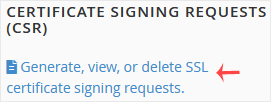
Under Certificate Signing Requests (CSR), click Generate, view, or delete SSL certificate signing requests.
Step 3: Identify the Correct Request
Under Certificate Signing Requests on Server, cPanel lists every CSR the account has generated, with the domains each one covers and the date it was created.
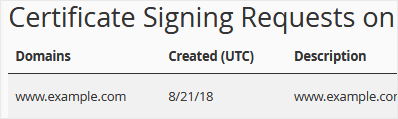
Check the domain column carefully before going further. Accounts that have been through a few certificate purchases often hold several near-identical requests for the same domain, and the creation date is usually the only thing that distinguishes them. If you are unsure which one the CA holds, open the request and compare it against the copy you submitted rather than guessing.
Step 4: Delete the Request
Click Delete in the Actions column for the request you want to remove, then click Delete again to confirm.
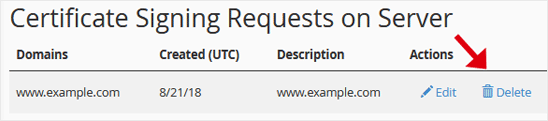
The CSR is removed immediately and is no longer stored on the server. Your private keys and installed certificates are untouched.
Troubleshooting
Symptom: you deleted the wrong CSR. There is no undo, and cPanel keeps no copy. If the certificate it relates to is already installed, nothing is broken and you can carry on. If the CA still needs it, generate a replacement using the same private key so the CA can reissue against the existing key pair. See How to Generate a Certificate Signing Request in cPanel.
Symptom: the Certificate Signing Requests list is empty. Either no CSR was ever generated in cPanel, or the certificate on the domain was issued automatically by AutoSSL, which never creates a CSR. Both are normal.
Symptom: HTTPS broke shortly after you tidied up this page. A deleted CSR is not the cause. Check whether a private key or certificate was removed at the same time, and confirm the domain's status under SSL/TLS Status. Restoring service means reinstalling the certificate together with its matching key.
Symptom: the CA asks for the CSR during renewal and you no longer have it. Ask the CA whether they will accept a new request. Most will reissue against a fresh CSR at no extra cost within the certificate's validity period, though the certificate must then be reinstalled once they return the new file.
Related Guides
Need a Hand?
If you are clearing out old certificate material and are not certain which keys or requests are still in use, send Noiz support your domain name before deleting anything. Noiz can confirm what the live certificate depends on, so the tidy-up removes only the clutter. Most Noiz-hosted sites are covered by automatically issued and renewed certificates that need no CSR at all, and Noiz support can tell you whether yours is one of them.






