ionCube Loader is the runtime component that allows PHP to execute files protected by the ionCube Encoder. If you run commercial software that ships as encoded PHP, such as licensed billing systems, booking engines, or paid themes and plugins, the application will refuse to load until the loader is present for the exact PHP version serving your site.
On Noiz DirectAdmin hosting, ionCube Loader is available as a tick-box extension inside the CloudLinux Selector, so you can enable it yourself from the control panel without a support request and without shell access. This article covers the ionCube-specific steps and the version-matching traps that catch most people. For the general mechanics of the extension list, see How to Enable or Disable PHP Extensions Using the CloudLinux Selector in DirectAdmin.
Last reviewed: 27 July 2026, against the current DirectAdmin and CloudLinux Selector releases. This guide is written for Noiz hosting and is kept current against DirectAdmin. It complements, and does not replace, the official documentation linked below.
Official Documentation Reference
- ionCube Loaders, the vendor's list of loaders and the PHP branches each one supports.
- CloudLinux OS: PHP Selector, how per-account PHP version and extension selection works.
- CloudLinux OS: bundled PHP extensions, which extensions ship with each alternative PHP build.
Prerequisites
- An active Noiz DirectAdmin hosting account and your control panel login.
- The PHP version your encoded application actually requires. The vendor's documentation or the encoded file's own error message will state it.
- A few minutes of tolerance for a PHP version change, because switching versions can affect other sites on the same account.
Enable ionCube Loader
-
Log in to your DirectAdmin account.
-
In the Extra Features section, click Select PHP version. If you cannot see it, type Select PHP into the navigation filter box and click the result.

-
Click the Extensions tab.
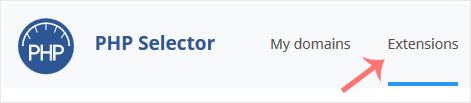
Note: if the Extensions page returns an error mentioning the native PHP version, your account is still set to the server's native PHP build. Native PHP is not managed by the Selector and its extension set cannot be edited from here. Switch to any non-native (alternative) PHP version on the Current PHP version tab first, then return to Extensions.
-
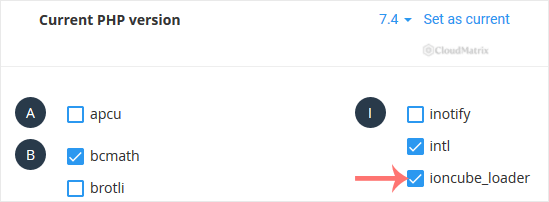
Tick ioncube_loader. The change saves as soon as you tick it, and a confirmation message appears.
-
Confirm the success message reads that the module ionCube Loader has been saved.

Confirm the loader is really active
A saved tick-box confirms the setting, not the running state of your website. Verify it from the web server's point of view:
- Create a file called
info.phpin your website's document root containing<?php phpinfo();. - Visit
https://yourdomain.com/info.phpin your browser, replacingyourdomain.comwith your own domain. - Search the page for ionCube. An active loader appears as its own section, and the PHP version shown at the top of the page is the version the loader is attached to.
- Delete
info.phpas soon as you are finished. It exposes your server configuration to anyone who guesses the filename.
Do not rely on php -v over SSH for this check. Command-line PHP can run a different version and a different configuration from the one serving your website, so it can report the loader as absent when your site has it, or present when your site does not.
Version matching, the part that actually breaks
Almost every ionCube support ticket comes down to a version mismatch rather than a missing tick-box.
- Extensions are per PHP version. The Selector stores the extension list separately for each PHP version. Enable ionCube Loader under PHP 8.2, later switch the account to PHP 8.3, and the loader will not be enabled under the new version. Re-tick it after any PHP version change.
- Encoded files are locked to the PHP branch they were encoded for. A file encoded for PHP 7.4 will not run on PHP 8.x even with a perfectly healthy loader installed, and the resulting error usually complains about the file rather than the loader. Ask your software vendor which PHP branch their build targets and set that version, rather than assuming the newest available version is correct.
- ionCube support lags new PHP releases. ionCube publishes a loader per PHP branch, and a brand new PHP branch often has no loader for a while. If
ioncube_loaderis missing from the extension list for one PHP version but present for another, that is the reason. Check the ionCube loaders page linked above and pick a supported version. - Check which PHP version the site is genuinely using. If your account also has a PHP version set per domain in Domain Setup, the version serving the site may not be the one you were editing in the Selector. The
phpinfo()check above settles it.
Troubleshooting
- Symptom: the Extensions tab shows a native PHP version error. Your account is on native PHP. Switch to an alternative PHP version on the Current PHP version tab, then open Extensions again.
- Symptom:
ioncube_loaderdoes not appear in the list at all. No loader exists for the PHP version currently selected. Change to a PHP version that ionCube supports and check the list again. - Symptom: the tick-box is set but
phpinfo()shows no ionCube section. Confirm you are testing the same PHP version you edited, then reload the page after a minute so any cached PHP process is recycled. - Symptom: the site reports that a file was encoded for a different PHP version. The loader is working correctly. Your PHP version does not match the one the file was encoded for, so change the PHP version to the branch your vendor targets.
- Symptom: enabling the loader breaks an unrelated site on the same account. Extension and PHP version settings are account-wide unless a per-domain PHP version is in place. Move the encoded application to its own hosting account, or ask Noiz support about a per-domain arrangement.
Getting help
If ioncube_loader is missing across every PHP version available to you, or an encoded application still refuses to load after the loader is confirmed active in phpinfo(), open a ticket with Noiz support from the client area. Include your domain name, the PHP version shown in phpinfo(), and the exact error text the application produces, as that error normally identifies the PHP branch the vendor encoded for.






