This guide shows you how to turn APIC, ACPI and VNC on or off for a VPS in Virtualizor, the panel Noiz VPS clients use to manage their servers. All three live on the same VPS Configuration screen and are set with a tick box each, so the clicking takes about thirty seconds. The part worth reading is what each one actually does, because two of them decide whether you can shut your server down cleanly and whether you can still reach it when the network is broken.
The product is Virtualizor, not "Virtualizer". You will see the misspelling in older notes and forum posts, and it is the same panel.
Last reviewed: 27 July 2026, against the current Virtualizor release and its end-user panel. This guide is written for Noiz hosting and is kept current against Virtualizor. It complements, and does not replace, the official Virtualizor documentation linked below.
Official Documentation Reference
- Virtualizor End User: VPS Configuration
- Virtualizor End User: VPS Management
- Virtualizor End User: VNC
Prerequisites
- Your Virtualizor end-user panel URL and login details, which are in your Noiz VPS welcome email.
- An active Noiz VPS service.
- A maintenance window. The new settings only take effect after the VPS is power cycled, so plan for a short outage.
What Each Setting Does
These are properties of the virtual machine itself, not of the operating system installed on it. They describe what hardware the hypervisor presents to your server, which is why a change only lands once the virtual machine is rebuilt from its configuration at the next power cycle.
ACPI
ACPI is the Advanced Configuration and Power Interface. In a virtual machine it is the mechanism that lets the hypervisor press a virtual power button, and it is what makes a graceful shutdown possible. When you click Stop or Restart in Virtualizor, the panel sends an ACPI power event to the guest. The operating system sees it, stops its services in order, flushes buffered writes to disk and powers itself off properly.
With ACPI disabled there is no way to deliver that signal. The graceful Stop button appears to do nothing at all, and the only thing left that works is Power Off, which cuts the machine dead and risks the database corruption and dirty file systems that a clean shutdown exists to avoid. Unless you have a specific reason not to, leave ACPI enabled. The related shutdown behaviour is covered in How to Forcefully or Gracefully Shut Down the VPS in Virtualizor.
APIC
APIC is the Advanced Programmable Interrupt Controller, the virtual hardware that routes interrupts to the processor. It is what allows a virtual machine to use more than one CPU core sensibly and it feeds the timer sources the guest relies on to keep accurate time. Any modern Linux or Windows guest expects it to be there.
Disabling APIC is a compatibility measure for genuinely old operating systems that misbehave with a virtual APIC. On anything current it tends to produce the opposite of a fix: interrupts funnel through a single legacy controller, additional cores go unused or perform badly, and the guest clock drifts. Leave it enabled unless support has told you otherwise for a specific guest.
VNC
VNC gives you a virtual console attached to the VPS, the equivalent of standing in front of the server with a monitor and keyboard plugged in. It works independently of the operating system's own networking, which is exactly why it matters: it is how you get in when SSH is refusing connections, when a firewall rule has locked you out, when the network configuration is wrong, or when the machine is sitting at a boot menu or a file system repair prompt that no remote service is up to answer.
Turning VNC off closes that door. Do it only if you have a policy reason to, and be clear that you are removing your own out-of-band recovery route. Using the console once it is enabled is covered in How to Access VPS via VNC in Virtualizor.
Enable or Disable APIC, ACPI and VNC
- Log in to your Virtualizor end-user panel.
- From the left-hand menu, click List VPS.
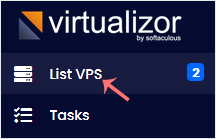
- Hover over the row for the VPS you want to change. The row highlights. Click the Manage icon on that row.

- Open the Settings tab and choose VPS Configuration.
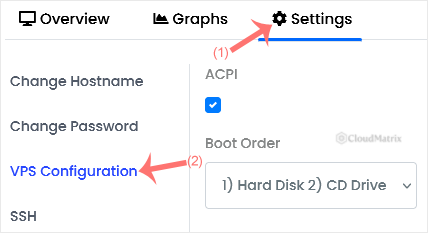
- Tick the box beside VNC, ACPI or APIC to enable it, or clear the box to disable it. The three are independent of each other, so you can change one and leave the rest alone.
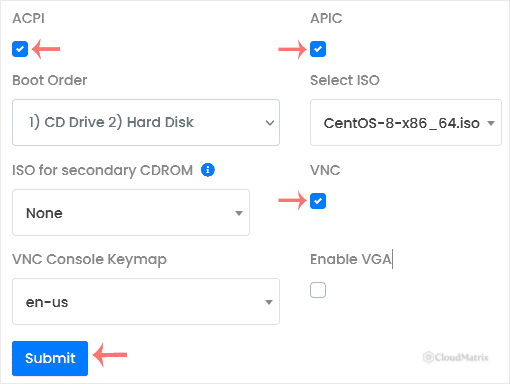
- Click Submit. Virtualizor saves the change against the VPS configuration.
- Power cycle the VPS so the change takes effect. Use Stop and then Start from the panel, or the panel's Restart.
The Gotchas Worth Knowing
- A reboot from inside the operating system is not enough. Running
rebootover SSH restarts the guest but the virtual machine keeps running with the hardware definition it was created with, so your new setting is ignored. The machine has to be stopped and started, or restarted from Virtualizor, for the configuration to be read again. - ACPI is only half the story. Enabling it lets the hypervisor deliver the shutdown signal, but something inside the guest has to listen for it. Full server distributions handle this through systemd, and it works out of the box. Minimal or container-style images sometimes ship without any ACPI handler at all, and on those a graceful shutdown is still ignored even with the box ticked. If that is what you are seeing, install
acpidin the guest and try again. - These settings belong to hardware virtualisation. They describe emulated hardware, so they are meaningful on a fully virtualised VPS. If your service uses container-based virtualisation, the container shares the host kernel and has no virtual power controller or graphics device of its own, so some or all of these boxes will simply not be on the screen. That is normal, not a fault.
- Disabling VNC does not tighten security in any general sense. The console is already behind your Virtualizor login. Turning it off removes your emergency access, not an exposed service, so the practical result is usually that a future lockout becomes a support ticket rather than a five-minute fix.
- Check the state before you assume. A tick box that already looks the way you want it means there is nothing to change. Submitting an unchanged form and rebooting achieves an outage and nothing else.
Troubleshooting
Symptom: the setting was submitted but nothing behaves differently. The VPS has not been power cycled since the change, or it was rebooted from inside the operating system rather than from the panel. Stop it and start it again from Virtualizor.
Symptom: the graceful Stop is still ignored with ACPI enabled. Either the guest has no ACPI handler installed, or the operating system is too badly hung to respond to anything. Install acpid for the first case. For the second, a forced Power Off is the remaining option, and the server may run a file system check on the way back up.
Symptom: VNC opens to a black screen. That is usually a healthy server whose console has blanked after boot. Press Enter and wait for the login prompt to redraw. If it stays black, the guest may be sending its output to a serial console instead of the graphics device.
Symptom: the VNC option is ticked but the console still will not connect. Confirm the VPS is actually running, then power cycle it, because the console device is attached when the virtual machine is created.
Symptom: the clock drifts or extra cores appear idle after APIC was disabled. Re-enable APIC and power cycle. Those are the classic symptoms of a modern guest running without a proper interrupt controller.
Symptom: one or more of the tick boxes is missing. The VPS is on a virtualisation type that does not expose that setting, or it has been locked at host level. Open a ticket and Noiz support will confirm which applies.
Related Guides
- How to Access VPS via VNC in Virtualizor
- How to Forcefully or Gracefully Shut Down the VPS in Virtualizor
Need a Hand?
If a setting will not save, a tick box you expect is not on the screen, or your VPS stopped responding to a graceful shutdown after a change, open a support ticket from your Noiz client area. The support team can check the virtual machine definition on the host node and confirm what the VPS was actually built with.






