This guide shows you how to create a MySQL/MariaDB database in Plesk on your Noiz hosting account. Databases store the content and settings for applications such as WordPress, Joomla, and most other content management systems, so you will usually create one before installing or connecting an app.
Last reviewed: 27 July 2026, against Plesk Obsidian 18.0 (latest stable). This guide is written for Noiz hosting and is kept current against Plesk. It complements, and does not replace, the official Plesk documentation linked below.
Official Documentation Reference
Prerequisites
- A Noiz hosting subscription with at least one website (domain) already added in Plesk.
- Access to your Plesk account.
Create the Database
1. Log in to your Plesk account.
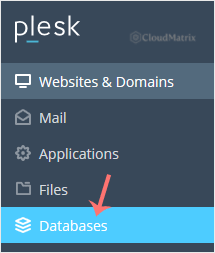
2. Click on Databases from the sidebar menu.
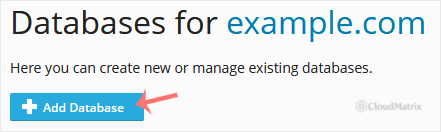
3. Click on Add Database.
4. Under Add a Database, fill in the following details:
- Database name: A short, meaningful name, such as
blog. Plesk usually prefixes the name automatically to keep it unique on the server. - Related site: Choose the appropriate website from the drop-down menu. This links the database to the correct subscription.
- Users: Uncheck Create a database user, then confirm with OK.
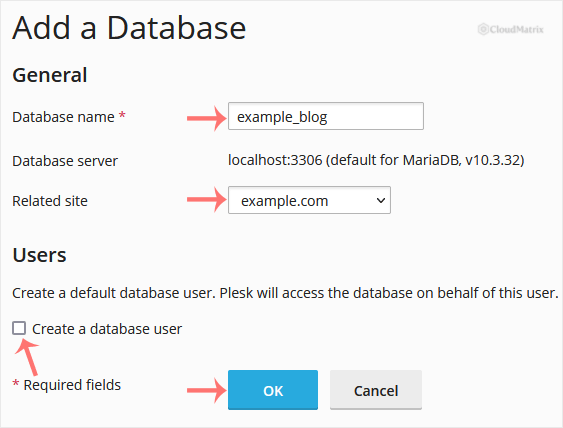
A success message is displayed, confirming that your database has been created.
Add a Database User
The steps above create an empty database only. Before an application can read from or write to it, the database needs a user account with a username and password. That is why you unchecked Create a database user here: it keeps user creation as a separate, deliberate step so you control the credentials your application will use.
To add a user to your new database, follow How to Create a New Database User in Plesk.
Troubleshooting
The Related site drop-down is empty: You need at least one website added to your subscription before you can create a database. Add the domain in Plesk first, then return to this step.
You cannot see the Databases option: Confirm you are logged in to the correct subscription. If your hosting plan does not show a Databases section, contact Noiz support to check that database provisioning is enabled on your plan.
If you get stuck at any point, the Noiz support team is happy to help. On managed plans, Noiz can create and configure the database for you.






