A database repair is the first thing to try when a site backed by MySQL or MariaDB starts throwing table errors after a crash, a power event or a full disk. DirectAdmin exposes this as a one-click Repair action inside MySQL Management, so you do not need shell access or a MySQL client to run it. This guide shows you how to run the repair on your Noiz hosting account, and, just as importantly, tells you when a repair will and will not help.
Last reviewed: 27 July 2026, against the current DirectAdmin release and its Evolution interface. This guide is written for Noiz hosting and is kept current against DirectAdmin. It complements, and does not replace, the official DirectAdmin, MariaDB and MySQL documentation linked below.
Official Documentation Reference
- MariaDB: REPAIR TABLE, what the statement actually does and which storage engines accept it.
- MySQL Reference Manual: REPAIR TABLE, including the repair options and their limitations.
- MySQL Reference Manual: InnoDB Recovery, how InnoDB recovers itself and why it is not repaired the same way.
- MariaDB: InnoDB Recovery Modes, the server-level options an administrator uses when InnoDB will not start cleanly.
- DirectAdmin Documentation, the vendor's own panel reference.
Prerequisites
- A Noiz hosting account on a DirectAdmin server, with your DirectAdmin username and password to hand. These are in your Noiz welcome email and in the Noiz client area.
- At least one MySQL or MariaDB database on the account.
- A current backup or export of the database. A repair rewrites table files in place, so take the backup before you run it, not after.
Before You Repair: Know Which Storage Engine You Are On
This is the single most useful thing to understand about database repair, and it is the reason many people conclude that the Repair button is broken when it is doing exactly what it should.
REPAIR TABLE only works on a small set of storage engines: MyISAM, ARCHIVE and CSV. If a table uses any of those, DirectAdmin's Repair action can genuinely rebuild the index and data files and recover the table.
InnoDB is not repaired this way. InnoDB has been the default engine in MySQL and MariaDB for well over a decade, so almost every modern application database, WordPress, WooCommerce, Joomla, Magento, Laravel and so on, is InnoDB. When you run Repair against an InnoDB table you will typically get a note back saying the storage engine does not support repair, and the table status will be reported as OK or note rather than repaired. That is not a failure of the panel. InnoDB simply does not use the file layout that REPAIR TABLE knows how to fix.
InnoDB instead recovers itself automatically from its redo log every time the database server starts after an unclean shutdown, which covers the overwhelming majority of crash scenarios without anyone touching anything. When InnoDB corruption survives that automatic recovery, the fix is a table rebuild or a restore from backup, and on a genuinely damaged tablespace it can require the server to be started in a special recovery mode. That last step is a server-level operation, so open a ticket with Noiz support rather than attempting it.
A mixed database is common on older sites: the application's own tables may be InnoDB while a legacy plugin table is still MyISAM. Selecting the whole database and repairing it is safe in that case. The MyISAM tables get repaired and the InnoDB tables are skipped with a note.
When a Repair Is the Right Tool
- Errors of the form
Table './dbname/tablename' is marked as crashed and should be repaired. Incorrect key file for table, or index errors reported after the server ran out of disk space.- A table that reads inconsistently, returns the wrong row counts, or errors on a specific query after an unexpected reboot.
When a Repair Will Not Help
- Error establishing a database connection. That is a credentials, hostname or service problem, not corruption. Check the database user, password and host in your application's configuration file first.
- Slow queries or a sluggish site. That is an optimisation and indexing question. See checking and optimising a database in DirectAdmin.
- Missing or wrong data after an application change. Repair fixes file structure, not content. Restore from a backup instead.
Repair a Database in DirectAdmin
1. Log in to your DirectAdmin account.
2. In the Account Manager section, click MySQL Management. If you cannot see it, type MySQL Management into the navigation filter box at the top of the sidebar and the option will appear. Click it.

3. From the list of databases, tick the checkbox next to the database you want to repair. You can select more than one, and the selection counter at the top of the list confirms how many are selected.
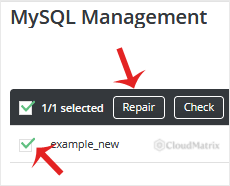
4. Click Repair.
A report displays once the repair finishes. It lists every table in the selected database along with its result.
Reading the Report
OK, the table was checked or repaired and is sound.Table is already up to date, nothing needed doing.The storage engine for the table doesn't support repair, the table is InnoDB. See the storage engine section above.errororwarninglines with a message, note the exact wording. That text is what Noiz support needs in order to help you.
Practical Notes
- Repair locks the table while it runs. On a large table the site can appear to hang or return errors for the duration. Run repairs during a quiet period rather than at peak traffic.
- Check before you repair. The Check button next to Repair is read-only and tells you whether anything is actually wrong, without rewriting anything. It is the safer first move.
- A repair can lose rows. On a badly damaged MyISAM table, rebuilding the index files may drop rows that cannot be recovered. This is why the backup is a prerequisite and not a suggestion.
- Fix the cause, not just the symptom. Repeated MyISAM corruption almost always points at something underneath: a disk that filled up, a process being killed under memory pressure, or repeated unclean shutdowns. If you find yourself repairing the same table more than once, raise it with Noiz support so the underlying cause can be found.
- Consider converting to InnoDB. If a legacy MyISAM table keeps crashing, converting it to InnoDB gives you crash-safe recovery, row-level locking and transactions. Do the conversion from a backup and test the application afterwards, since a small number of older applications still depend on MyISAM behaviour such as full-text search on very old MySQL versions.
Troubleshooting
Symptom: The Repair button returns immediately with no visible change. The tables are almost certainly InnoDB, which does not support this operation. Run Check to confirm the table state, then look at InnoDB recovery or a restore from backup.
Symptom: The repair fails partway through with a disk or temporary file error. A repair needs free disk space to build the new index files. Clear space on the account, then run it again.
Symptom: The repair reports OK but the site still shows a database error. The problem is not table corruption. Check the database credentials in the application's configuration file, and check that the database user still has privileges on the database.
Symptom: The database does not appear in the list at all. You are likely logged in under a different DirectAdmin user, or the database belongs to another account on the server.
Need a Hand?
If the repair does not clear the error, or the report contains messages you would rather not act on alone, open a ticket from the Noiz client area with the database name and the exact text of the report. Noiz support can inspect the table at server level, run recovery steps that are not available inside the panel, and restore from backup where that is the safer route. On managed plans, Noiz handles the whole recovery for you.






