If a domain on your cPanel account has been pinned to a specific PHP version and you want it to follow the server default again, you do not pick a version number. You set the domain back to inherit. This guide explains what "default" means inside cPanel, how to reset one domain or several at once, and what a reset deliberately leaves untouched.
If instead you want to move a domain onto a particular PHP version, see How to Change the PHP Version on Your Domain in cPanel. This article covers the opposite move: giving up the per-domain override and going back to the baseline.
Last reviewed: 27 July 2026, against the current cPanel & WHM stable release and its MultiPHP Manager interface. This guide is written for Noiz hosting and is kept current against cPanel. It complements, and does not replace, the official cPanel documentation linked below.
Official Documentation Reference
- cPanel Documentation: MultiPHP Manager for cPanel
- cPanel Documentation: MultiPHP INI Editor for cPanel
- cPanel Documentation: MultiPHP Manager for WHM (resellers and server administrators)
- PHP: Supported Versions and End-of-Life Dates
Prerequisites
- Access to the cPanel account that owns the domain.
- The MultiPHP Manager icon present in the Software section. If it is missing, the feature has been restricted at server level and Noiz support can make the change for you.
- A recent backup of the site, or at least the confidence that you can restore it, in case the default version is not compatible with the application.
What "Default" Actually Means in cPanel
cPanel does not store a per-domain instruction that says "use the default". It stores the special value inherit. A domain set to inherit takes whichever PHP version the server administrator has set as the system default, and it keeps following that default forever, including after the server is later moved onto a newer PHP release.
A domain pinned to an explicit version such as ea-php74 behaves the other way round. It stays on that exact version and ignores every future default change, which is exactly how sites end up stranded on a PHP release that no longer receives security fixes. That is the single best reason to reset a domain to inherit once the reason for the override has gone away.
Typical reasons to reset:
- You pinned an older version to keep a legacy plugin or theme working, and the application has since been updated.
- A migration from another host brought per-domain PHP overrides across with it, and they no longer match anything.
- A site broke after an experiment with a newer version and you want the known baseline back.
- You want the domain to track the supported version automatically rather than being maintained by hand.
Reset a Single Domain to the Default PHP Version
1. Log in to your cPanel account.
2. In the Software section, click on MultiPHP Manager.

3. Scroll down to the domain list at the bottom of the page. Tick the checkbox to the left of the domain you want to reset. Open the PHP Version drop-down menu on the right, select inherit, then click Apply.
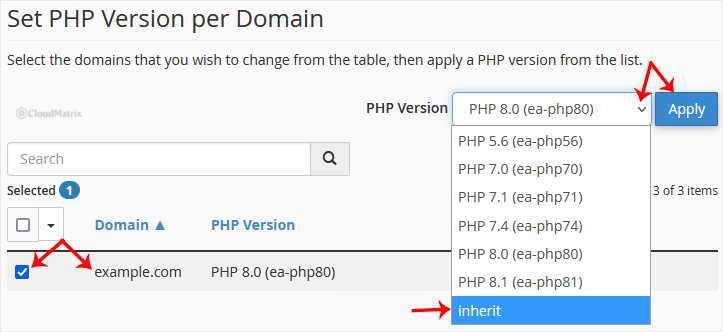
4. A confirmation message appears within a few seconds and the PHP Version column for that domain changes to show inherit, usually alongside the version it currently resolves to. The change is live immediately; there is nothing to restart.
Reset Several Domains at Once
The domain list is a multi-select. Tick the checkbox beside each domain you want to reset, or use the checkbox in the table header to select every domain on the account, then choose inherit once and click Apply. cPanel applies the same setting to every selected entry in a single pass.
Be deliberate about the select-all option. The list includes addon domains, parked domains and subdomains, so a bulk reset can move a staging subdomain or a legacy application onto the default version at the same time as the site you actually meant to change. If any of those still need an explicit version, reset the rest first and leave the exceptions pinned.
Confirm the Domain Is Back on the Default
The PHP Version column in MultiPHP Manager is the authoritative answer and is normally all you need. If you want to see the version the site itself reports, upload a single-line file containing <?php phpinfo(); to the domain's document root, load it in a browser, read the version at the top of the page, then delete the file straight away. Leaving a phpinfo page in place publishes your server configuration to anyone who finds it.
What a Reset Does Not Change
Setting a domain to inherit changes the PHP version and nothing else. These stay exactly as they were:
- Custom PHP settings. Values you changed in MultiPHP INI Editor, such as
memory_limit,upload_max_filesizeormax_execution_time, survive the reset and continue to apply on the new version. Clear them separately in MultiPHP INI Editor if you want a genuinely clean baseline. - PHP-FPM. Whether the domain runs PHP-FPM is a separate switch in MultiPHP Manager and is not touched by a version reset.
- Handler lines in
.htaccess. If a previous host or an application wroteAddHandlerorAddTypelines referring to a PHP version into the domain's.htaccess, those can override MultiPHP Manager entirely. This is the usual explanation when a domain keeps reporting the old version after a reset. - Application-level caches. Opcode caches and caching plugins can keep serving pages built under the previous version. Clear the site cache after switching.
Troubleshooting
There is no inherit entry in the drop-down menu: the option is hidden on some server configurations. In that case, set the domain to whichever version is shown as the system default at the top of the MultiPHP Manager page, or ask Noiz support to reset the domain for you so it genuinely inherits rather than being pinned to the same number.
The domain still reports the old version: check the domain's .htaccess file in File Manager for handler lines mentioning php, and remove or comment them out. Then reload the page with a hard refresh, because browsers cache aggressively.
The site errors or shows a blank page after the reset: the default version is newer than the code supports, or an extension the application relies on is not enabled on that version. Set the domain back to a working version for now, following How to Change the PHP Version on Your Domain in cPanel, and treat that as temporary. PHP versions past end of life stop receiving security fixes, so the real fix is updating the application.
The setting reverts on its own: an application, security plugin or deployment script is rewriting .htaccess and putting the handler back. Find what is regenerating the file before changing the version again.
Need a Hand?
If you are unsure which PHP version your site should be running, or a reset has broken something, open a support ticket from your Noiz client area. The support team can confirm the default version on your server, check the domain for stray handler rules, and put the site back on a version that works.






