Forwarding passes a message you have already received on to somebody else, with the original text carried underneath your own note. This guide shows you how to forward mail from a Noiz mailbox in Mozilla Thunderbird, how to choose between forwarding inline and forwarding as an attachment, and why that one choice decides whether a support desk or an IT team can actually trace the message you sent them.
Last reviewed: 27 July 2026, against Mozilla Thunderbird 153 ESR ("Meadow"), the current extended support release. This guide is written for Noiz hosting and is kept current against Thunderbird. It complements, and does not replace, the official Thunderbird documentation linked below.
Official Documentation Reference
- Thunderbird Help for the full support library.
- Keyboard shortcuts including the forward shortcut used below.
- How to use attachments for what happens to files when a message is passed on.
- Thunderbird 153 ESR release notes if your menus do not match the screenshots below.
Prerequisites
- Thunderbird installed, with your Noiz mailbox already added. If it is not, follow How to set up your existing email address in Thunderbird first.
- A working outgoing (SMTP) connection. A forward is a brand new outgoing message, so it needs the same authenticated SMTP settings that sending a normal message does.
- The message you want to forward fully downloaded. On an IMAP account that syncs headers only, open the message once while online before forwarding it.
Forward a Single Message
- Open Thunderbird and click the Inbox of the account that holds the message.
- Select the message in the message list. In the message header, at the top right of the reading pane, Thunderbird shows Reply, Reply All, Forward, Archive, Junk and Delete. Click Forward. The keyboard shortcut is
Ctrl+Lon Windows and Linux, orCmd+Lon macOS.
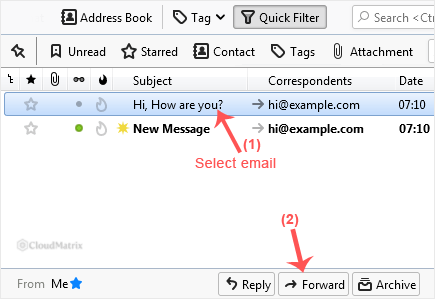
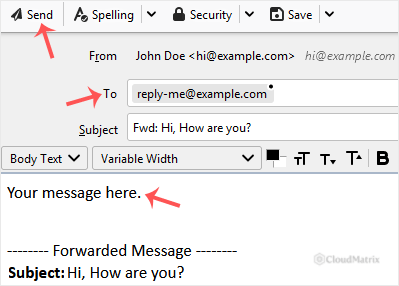
- A compose window opens with the subject already prefixed
Fwd:and the original message quoted below the cursor. Type the recipient address in the To field, for example[email protected]. - Type your own note above the quoted text. Leave the subject line and the quoted original alone. The recipient needs the original wording, the original sender and the original date to make sense of why you sent it.
- Check the From dropdown if you have more than one mailbox in Thunderbird. A forward is sent from whichever identity is shown there, and a Noiz mail server will only accept outgoing mail from an address the signed in mailbox is allowed to send as.
- Click Send. A copy is filed in that account's Sent folder.
Inline or as an Attachment
Thunderbird can forward a message in two very different ways, and the difference matters more than it looks.
- Inline pastes the original text into the body of your new message. It is easy to read, and it is what most people expect. Files attached to the original are re-attached to your forward. What it does not carry is the original message headers: the sending server, the delivery path, the authentication results and the message ID are all rewritten as your message.
- As attachment sends the original untouched as a
.emlfile clipped to a short covering message. Every original header survives intact, which is exactly what is needed to trace where a message really came from.
The practical rule: forward inline for ordinary correspondence, and forward as an attachment whenever the message itself is the evidence. Reporting spam, phishing, a spoofed sender or a mail that arrived late or never arrived at all is useless as an inline forward, because the information needed to investigate is stripped out before it reaches the support desk.
Change the Default
Go to Settings, open Composition, and set Forward messages to Inline or As Attachment under the General options. Inline is the sensible default for daily use.
Override It for One Message
Right click the message in the message list, choose Forward As, then pick Inline or Attachment. This ignores the default for that message only, so you do not need to change your settings back and forth. There is more detail in How to Forward an Email as an Attachment.
Forward Several Messages at Once
Hold Ctrl and click each message you want, or click the first and Shift click the last for a run of them, then click Forward. Thunderbird builds one outgoing message with every selected message attached to it as a separate .eml file, whatever your inline setting says. That is the right behaviour for handing a batch of messages to somebody who needs to examine them, but bear in mind the recipient needs a proper mail client to open .eml files. Some webmail interfaces will only offer to download them.
What Forwarding in Thunderbird Does Not Do
Forwarding in Thunderbird is manual and one message at a time. It only happens while you are sitting at the computer with Thunderbird open.
- To pass every incoming message on automatically, set up a forwarder on the mail server instead, in your hosting control panel. See How to Set Up Email Forwarding in Plesk or How to Set Up Email Forwarding in ISPConfig, depending on the panel your hosting uses. A server side forwarder runs whether your computer is on or not.
- Think twice before auto-forwarding everything to a free mailbox. When a server forwards mail on to another provider, the message arrives at the destination from your server rather than from the original sender, which breaks SPF alignment and can break DMARC for that message. Large providers frequently mark blanket-forwarded mail as spam or reject it outright, and the bounces come back to your mailbox. Collecting the mail directly with an IMAP client, or with the other provider's own fetch tool, avoids the problem entirely.
- Thunderbird message filters can forward automatically, but only while Thunderbird is running and connected. Filters are covered in How to Organise Your Email with Folders and Filters in Thunderbird.
Troubleshooting
Symptom: recipients say your forwards arrive as an unreadable .eml file. Your default is set to As Attachment. Change it in Settings then Composition, or right click the message and use Forward As then Inline for that one message.
Symptom: the attachments on the original message are missing from your forward. The message was not fully downloaded when you forwarded it. This is common on IMAP accounts set to synchronise headers only, and on messages read while offline. Open the message fully while connected, then forward it again.
Symptom: sending fails with a relay or authentication error. The outgoing server is either not authenticating or the address in the From dropdown does not belong to the mailbox Thunderbird signed in with. Pick the matching identity, and confirm the outgoing server settings against How to set up your existing email address in Thunderbird.
Symptom: the forward is rejected as too large. A forward re-sends the entire original, attachments included, so a message that arrived close to the size limit will exceed it once your note and the quoting are added. Remove the heavy attachments from the compose window and send them as a download link, or use Thunderbird's Filelink feature.
Symptom: the forwarded message lands in the recipient's spam folder. The forward carries the original's content, links and images along with it, so anything that scored badly the first time scores badly again. Forwarding as an attachment usually gets it through, because the suspect content is inside the .eml file rather than in the body of your message.
Getting Help
If a forward will not leave your Noiz mailbox, or mail you forward keeps bouncing back, open a ticket in the Noiz client area with the exact error text from Thunderbird and the date and time of the attempt. On managed plans the Noiz team will match that against the mail server logs and tell you precisely where the message stopped. If you are reporting spam or a phishing attempt, forward it as an attachment so the original headers reach the Noiz team intact.