This guide shows you how to remove an existing domain redirect from your Noiz hosting account using the Redirects tool in cPanel. Use it when a domain or subdomain is still forwarding visitors to an address you no longer want, and you need traffic to load the site's own content again.
A redirect created in cPanel is a rule that tells the web server to send anyone who requests one URL straight on to another. Removing the rule stops that forwarding. It does not delete the domain, its files, or its email, so it is safe to remove a redirect you no longer need.
Last reviewed: 27 July 2026, against cPanel & WHM (Jupiter interface, current stable). This guide is written for Noiz hosting and is kept current against cPanel. It complements, and does not replace, the official cPanel documentation linked below.
Official Documentation Reference
Prerequisites
- Access to your cPanel account (your Noiz welcome email contains the login details, or reach cPanel from the Services area of the Noiz client area).
- An existing redirect on the domain or subdomain you want to restore. If you created the forwarding rule yourself, this is the reverse of How to Redirect Your Website to Any Page or External Domain.
Remove the Redirect
1. Open the Redirects tool
Log in to your cPanel account. In the Domains section, click Redirects.

2. Find the redirect and remove it
Scroll to the bottom of the page. Under Current Redirects, find the domain or subdomain you want to restore and click Remove on that row.
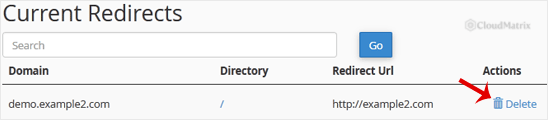
3. Confirm the removal
cPanel asks you to confirm. Click Remove Redirect once more to finish.

The redirect is now gone from the Current Redirects list, and requests to the domain will load its own content instead of forwarding elsewhere.
Troubleshooting
Symptom: the site still redirects after removal. A permanent (301) redirect is cached aggressively by web browsers, so your browser may keep forwarding you even though the rule is gone. Test the address in a private or incognito window, clear your browser cache, or try a different device to confirm the change. Search engines and other caches can also hold on to a 301 for a while.
Symptom: the redirect is not listed under Current Redirects. Only redirects created with the cPanel Redirects tool appear here. If the forwarding was added another way, for example a rule written directly into the site's .htaccess file or a redirect set on a subdomain, remove it there instead. See How to Redirect a Page to Another Page or Website Using htaccess for editing .htaccess rules.
Symptom: a whole domain still points to the wrong place. That is usually DNS, not a cPanel redirect. Check the domain's DNS records and nameservers. Noiz client hosting uses ns1.noiz.co.za and ns2.noiz.co.za.
Need a Hand?
If a redirect will not clear or you are unsure which forwarding rule is in play, the Noiz support team can check it for you. Open a ticket from the Noiz client area and mention the affected domain.






