A redirect sends anyone who visits one web address straight on to another. You can point your whole domain at a different site, send a single old page to its new home, or forward a folder such as /blog to somewhere else entirely. This guide shows you how to set one up with the Redirects tool in cPanel, and how to choose between a permanent and a temporary redirect.
Last reviewed: 27 July 2026, against cPanel & WHM's Jupiter interface (latest stable). This guide is written for Noiz hosting and is kept current against cPanel. It complements, and does not replace, the official cPanel documentation linked below.
Official Documentation Reference
Prerequisites
- You can log in to your cPanel account. Noiz sends your login details when your account is set up, and you can also open cPanel from your Noiz client area.
- The domain you want to redirect is added to the account and its DNS points at the server. A redirect only takes effect once visitors are actually reaching this server for that domain.
Add a Redirect in cPanel
- Log in to your cPanel account.
- In the Domains section, click Redirects.

- Under Add Redirect, fill in the details and choose the options you want:
- Type: choose Permanent (301) or Temporary (302). See the note below on which to pick.
- https?://(www.)?: pick the domain from the drop-down list. Leave the text box next to it empty to redirect the whole domain, or type a folder or page name (for example
old-page.htmlorblog) to redirect just that path. - Redirects to: enter the full destination address, including
https://, for examplehttps://www.yourdomain.com/new-page.html. - www. redirection: choose whether the redirect fires for the
wwwversion of the address, the non-wwwversion, or both. Redirect with or without www. is the safest choice for most sites. - Wild Card Redirect: tick this to forward every sub-path to the matching path on the destination, so
yourdomain.com/anythinglands ondestination.com/anything. Leave it unticked to send every request to the single destination address.
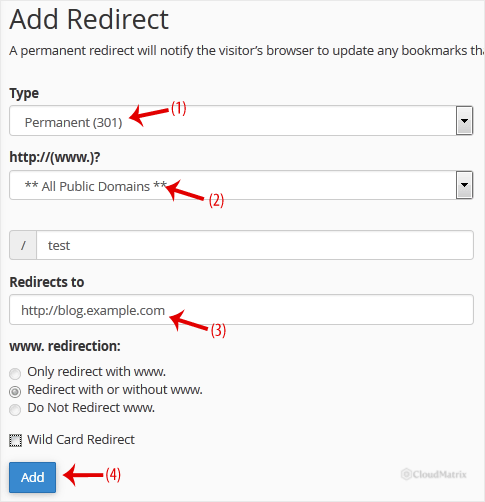
- Click Add. cPanel confirms the redirect and it takes effect straight away.

Permanent (301) or Temporary (302)?
The type you choose tells browsers and search engines how to treat the move:
- Permanent (301) means the address has moved for good. Search engines pass the old page's ranking on to the new address, so this is the right choice when you have retired a page or moved a site. Browsers cache a 301 aggressively, which is worth knowing: once a visitor's browser has followed one, it may keep going to the destination even after you delete the redirect. Clear the browser cache, or test in a private window, when you are checking your work.
- Temporary (302) means the move is short-lived, for example while a page is under maintenance. Search engines keep the original address indexed and browsers do not cache it, so it is the safer choice whenever you plan to undo the redirect later.
How the Redirect Is Stored
cPanel writes each redirect as a rule in the .htaccess file for the domain. That has two practical consequences. Redirects only work on domains served by Apache on this account, which covers standard Noiz cPanel hosting. And if you edit .htaccess by hand, take care not to remove the redirect rules cPanel added, or delete them there if you want to remove a redirect that way.
Remove a Redirect
To undo a redirect, return to Domains » Redirects, find it in the Current Redirects list at the bottom of the page, and click Delete next to it. Because of the browser caching mentioned above, test the result in a fresh private window rather than the browser you set the redirect up in.
Troubleshooting
- The redirect does not fire at all: confirm the domain's DNS points at this server. If visitors are being served by another host, a redirect set here never runs. On Noiz hosting the client nameservers are
ns1.noiz.co.zaandns2.noiz.co.za. - It still redirects after you deleted it: your browser has cached a 301. Test in a private or incognito window, or clear the cache, and it will behave correctly.
- Only the www or only the non-www version redirects: revisit the www. redirection setting and choose Redirect with or without www. so both forms are covered.
- You get a redirect loop: the destination points back to the address being redirected. Check that Redirects to is a different address from the one in the top row, and that a Wild Card Redirect is not folding the destination back onto itself.
Need a redirect that the Redirects tool cannot express, such as forwarding based on the requested path or query string? Open a ticket from your Noiz client area and the support team will help you set it up.






