Every FTP account on a subscription is a separate login into your website's files, so unused accounts are extra attack surface worth clearing out. If you have created more FTP users than you need, this guide shows you how to remove the ones you no longer use in Plesk, the control panel Noiz runs on its South African hosting.
Last reviewed: 27 July 2026, against Plesk Obsidian 18.0 (latest stable). This guide is written for Noiz hosting and is kept current against Plesk. It complements, and does not replace, the official Plesk documentation linked below.
Official Documentation Reference
- Plesk Obsidian Customer Guide (see the Websites & Domains and FTP access sections).
Prerequisites
- A Plesk login for the subscription that holds the domain whose FTP accounts you want to manage.
- Confirmation of which FTP accounts are safe to remove. If an account is still used by an application, deployment script, or scheduled transfer, removing it will break that connection.
Removing an FTP Account in Plesk
- Log in to your Plesk control panel.
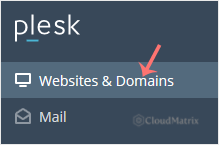
- Click Websites & Domains in the sidebar menu.
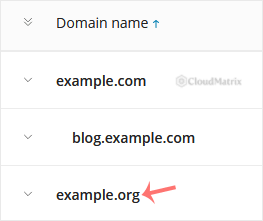
- In the list of domain names, click the domain you want to work with.
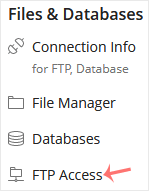
- Under Files & Databases, click FTP Access.
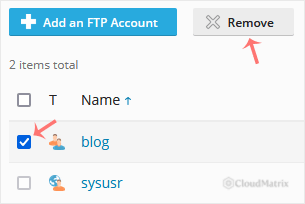
- Tick the checkbox next to each FTP account you want to delete, then click Remove.
- Confirm with Yes to remove the selected FTP accounts.
Good to Know
- Removing an FTP account revokes login access only. It does not delete your website files. The account can no longer connect, but everything it could previously reach stays in place.
- The subscription's main system user is not in this list. Only the additional FTP accounts you created appear here, so you cannot accidentally remove the primary login that Plesk ties to the hosting subscription.
- Update anything that depended on the account. If a removed account was used by a backup job, an automated deployment, or a third-party service, give that tool fresh credentials for a remaining account so its transfers do not start failing.
If you are on a Noiz managed hosting plan and are unsure which FTP accounts are safe to remove, open a support ticket from your Noiz client area and the team will confirm before anything is deleted.






