A subdomain redirect (also called forwarding) sends every visitor who requests your subdomain straight to another address, so the subdomain never serves its own content. When you no longer need that behaviour, you remove the redirect by switching the subdomain's hosting type back to standard website hosting. This guide shows you how to do that in Plesk. It is the reverse of setting up a redirect, so use it whenever a subdomain should serve its own files again instead of forwarding elsewhere.
Last reviewed: 27 July 2026, against Plesk Obsidian 18.0 (latest stable). This guide is written for Noiz hosting and is kept current against Plesk. It complements, and does not replace, the official Plesk documentation linked below.
Official Documentation Reference
- Plesk Obsidian Customer Guide (website and domain management)
Prerequisites
- A Noiz Plesk hosting account you can sign in to.
- A subdomain that is currently configured as a redirect or forwarding (its hosting type shows Forwarding).
Remove the redirect
1. Sign in to your Plesk account.
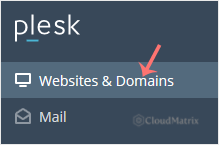
2. Click Websites & Domains in the sidebar menu.
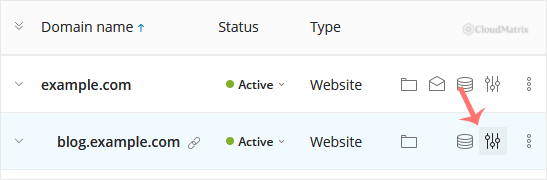
3. Find the subdomain in the list of Domain names, then click the  Hosting Settings icon in that subdomain's row.
4. Next to Hosting type (currently showing Forwarding), click the Change link.

5. Under Hosting type, select Website hosting from the drop-down menu, then click OK to confirm.
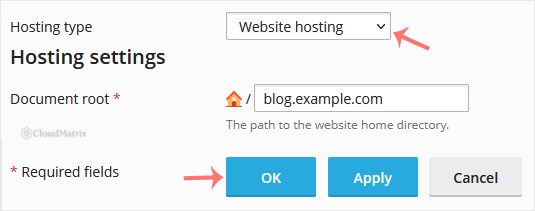
The redirect is now gone. The subdomain will serve content from its own document root instead of forwarding visitors to the previous destination.
After you switch to website hosting
- Empty subdomain? If the subdomain was only ever a redirect, its document root will have no website in it yet. Upload your files (or install an application) so visitors see content rather than a default placeholder page.
- Caching: Browsers and intermediate caches often remember redirects aggressively. If you still land on the old destination, clear your browser cache or test in a private window before assuming the change did not take.
- DNS unchanged: Removing the redirect only changes how Plesk handles requests for the subdomain. It does not alter your DNS records, so the subdomain keeps pointing at the same server.
Troubleshooting
The subdomain still redirects after the change: this is almost always browser or DNS caching. Retest in a private window or a different browser. If it persists, confirm in Plesk that the hosting type now reads Website hosting and not Forwarding.
No Change link next to Hosting type: make sure you opened the subdomain's Hosting Settings and not the parent domain. Each subdomain has its own hosting type.
Need a hand? If you are on a Noiz managed plan, contact Noiz support and the team will remove the subdomain redirect for you.






