A subdomain lets you run a separate section of your website under your main domain, for example blog.yourdomain.com or shop.yourdomain.com, without registering a new domain name. Each subdomain gets its own folder on the server, so you can host a completely separate site, application or staging environment under it. This guide shows you how to add a subdomain from your Plesk control panel on Noiz hosting.
Last reviewed: 27 July 2026, against Plesk Obsidian 18.0 (latest stable). This guide is written for Noiz hosting and is kept current against Plesk. It complements, and does not replace, the official Plesk documentation linked below.
Official Documentation Reference
- Plesk Obsidian Customer Guide. The Websites & Domains section covers subdomains, document roots and hosting settings in depth.
Prerequisites
- An active Noiz hosting plan with a Plesk login.
- A domain already present in your Plesk subscription. A subdomain is always created under an existing domain.
Add a Subdomain
- Log in to your Plesk account.
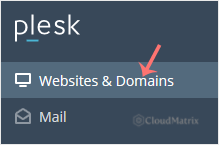
- Click Websites & Domains in the sidebar menu.
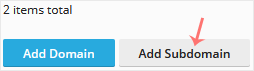
- Click Add Subdomain.
- Enter a Subdomain name and choose the parent domain from the Domain field. Plesk suggests a document root path automatically. You can leave it as the default or point it at an existing folder.
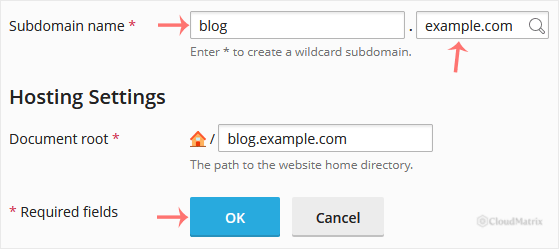
- Click OK.
Once the subdomain is created, it appears under Websites & Domains, where you can manage its files, DNS, email and SSL/TLS settings in the same way as a normal domain.
What to Do Next
- Upload your content. A new subdomain's document root starts empty apart from a placeholder page, so upload your site into that folder using File Manager or FTP.
- Secure it with HTTPS. A subdomain needs its own certificate. Open the subdomain's SSL/TLS Certificates and issue a free Let's Encrypt certificate so that
subdomain.yourdomain.comloads over HTTPS. - Allow for DNS. When your domain uses the Noiz nameservers (
ns1.noiz.co.zaandns2.noiz.co.za), the DNS record for the subdomain is created for you automatically. If your DNS is hosted elsewhere, add an A or CNAME record for the subdomain and allow time for it to propagate.
Troubleshooting
The subdomain shows the default Plesk page: no content has been uploaded yet, or the document root points at the wrong folder. Check the document root under the subdomain's Hosting Settings.
The subdomain will not load, or the browser warns about the certificate: DNS may still be propagating, or the subdomain has no SSL certificate yet. Issue a Let's Encrypt certificate for the subdomain and try again.
If you are on a managed Noiz plan and would prefer the Noiz team to add or configure a subdomain for you, open a support ticket from your client area and the team will take care of it.






