This guide shows you how to remove a website (domain) from your hosting subscription in Plesk on your Noiz hosting. Use it when you no longer need to host a particular domain or subdomain, for example after moving a site elsewhere or retiring a project.
Removing a website is permanent. It deletes the domain's hosting configuration and content from the server, so read the Before You Begin section and take a backup first.
Last reviewed: 27 July 2026, against Plesk Obsidian 18.0 (latest stable). This guide is written for Noiz hosting and is kept current against Plesk. It complements, and does not replace, the official Plesk documentation linked below.
Official Documentation Reference
- Plesk Obsidian Customer Guide. See the Websites and Domains section for the full domain management reference.
Before You Begin
When you remove a website, Plesk deletes everything tied to that domain on the server. That typically includes:
- All files in the domain's document root (its
httpdocsfolder and any subfolders). - Databases used only by that website.
- Email accounts and their mailbox contents for the domain.
- Subdomains, DNS records, and any SSL/TLS certificates issued for the domain.
There is no undo, so download a backup of anything you may want to keep before you continue. If you only want to take the site offline temporarily rather than delete it, suspend the subscription instead of removing the website.
Main domain versus additional domain. The steps below remove an additional domain or subdomain from a subscription. The primary domain that a subscription was created under cannot be removed on its own. To remove that, you delete the whole subscription from the Subscriptions page, or contact Noiz support.
Prerequisites
- Access to your Plesk control panel for the subscription that holds the domain.
- A current backup of any files, databases, or email you want to keep.
Remove a Domain in Plesk
- Log in to your Plesk account.
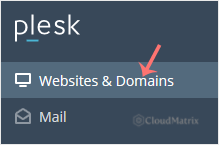
- Click Websites & Domains in the sidebar menu.
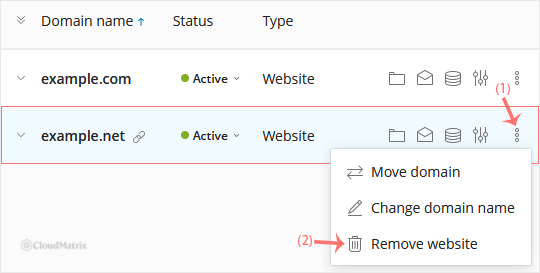
- In the list of domains, click the More icon
 next to the domain you want to remove, then choose Remove Website.
- Confirm with Yes to remove the domain. Plesk deletes the website and its associated content from the server.
Good to Know
- Removing a website in Plesk only removes the hosting for the domain. It does not cancel the domain registration. If you also want to give up the domain name, manage that separately with your domain registrar.
- If the domain kept live email, update your MX and other DNS records after removal so mail is no longer routed to a server that no longer hosts the domain.
- If Remove Website is greyed out or missing, the domain is likely the subscription's primary domain. In that case, remove the subscription from the Subscriptions page instead, or ask Noiz support to handle it.
If you are on a managed Noiz plan and would prefer the team to remove a domain, migrate its data first, or delete a full subscription, contact Noiz support through your client area and the team will assist.






