This guide shows you how to remove a database user from your hosting account in Plesk. A database user is the login (a username and password) that a website or application uses to connect to a MySQL or MariaDB database. Removing a user deletes only that login: the database and its data stay in place. Deleting the database itself is a separate action.
Last reviewed: 27 July 2026, against Plesk Obsidian 18.0 (latest stable). This guide is written for Noiz hosting and is kept current against Plesk. It complements, and does not replace, the official Plesk documentation.
Before you remove a user
Removing a database user is immediate and cannot be undone, so check that the user is not still in use:
- If a live website or application still connects with this user's credentials, it will lose access to the database and is likely to show a connection error until you point it at a different user.
- Removing the user does not delete the database or any of its tables. Your data remains, but nothing can connect to it until at least one user is assigned.
- If you are unsure which user a site relies on, check the database connection details in the application's configuration file (for example
wp-config.phpfor WordPress) before removing anything.
Remove a database user in Plesk
1. Log in to your Plesk account.
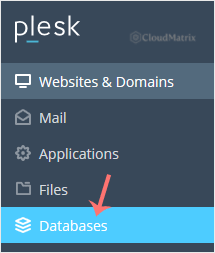
2. Click Databases in the sidebar menu.
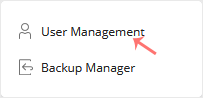
3. Click User Management in the right sidebar.
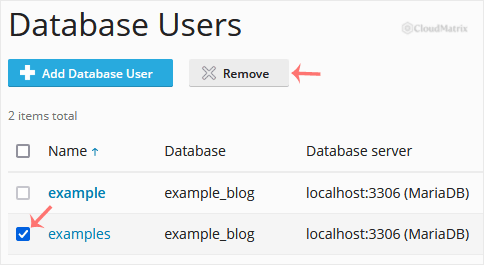
4. Under Database Users, tick the box next to the user you want to remove, then click Remove.
5. A confirmation box appears. Click Yes to remove the user.
Troubleshooting
A website stopped working after removing the user: the site was almost certainly connecting with the credentials you removed. Create a new database user for that database, update the application's configuration with the new username and password, then reload the site.
The Remove button is greyed out or missing: your hosting plan or access level may not allow removing that user. Contact Noiz support if you need it removed.
If you would like Noiz to handle database changes for you, or you are on a managed plan, contact the Noiz support team and they will take care of it.






