Plesk can generate a full backup (a "dump") of a single database and download it straight to your computer. A dump is a plain-text .sql file that contains both the structure (tables, indexes) and the data of the database, so it can be used to restore the database later or to move it to another server. This guide shows you how to export and download a database dump from Plesk on Noiz hosting.
Last reviewed: 27 July 2026, against Plesk Obsidian 18.0 (latest stable). This guide is written for Noiz hosting and is kept current against Plesk. It complements, and does not replace, the official Plesk documentation linked below.
Official Documentation Reference
- Plesk Obsidian Customer Guide (see Websites & Domains → Databases for exporting and importing database dumps).
Prerequisites
- Access to your Plesk account on Noiz hosting.
- The database you want to back up already exists in Plesk.
- Enough free space on your Plesk subscription for the dump file, which is created on the server before it is downloaded.
Export and Download the Database Dump
1. Log in to your Plesk account.
2. Open Databases from the left sidebar menu. Depending on your Plesk view, you may find it under Websites & Domains instead.
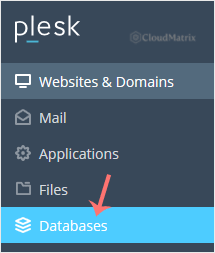
3. In the list of databases, find the database you want to back up.
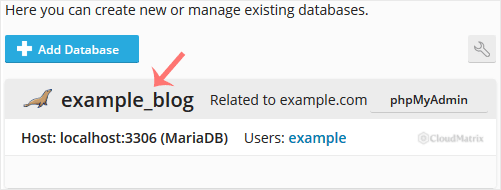
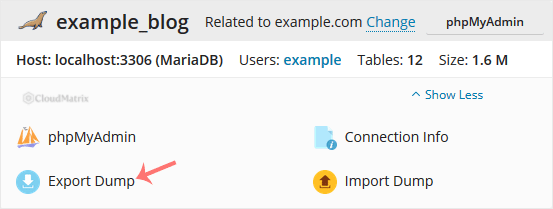
4. Select the database, then click Export Dump. A dialogue box opens.
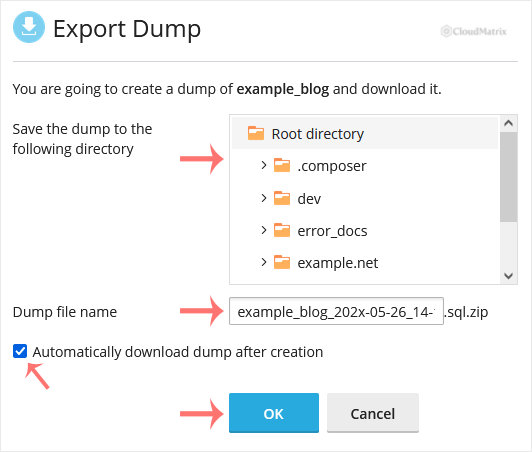
5. Choose the server directory where the dump will be stored. Tick Automatically download the dump after creation so that the file is sent to your browser once it is ready, then confirm with OK.
Once the dump has been generated, your browser prompts you to download it. Save the .sql file somewhere safe on your computer.
Good to Know
- One database per dump. Export Dump backs up a single database at a time. Repeat the steps above for each database you need.
- The dump is stored on the server first. Even with the automatic download ticked, Plesk writes the file into the chosen server directory before sending it to your browser. On a large database this uses temporary disk space, so make sure your subscription has room. You can delete the server copy afterwards if you only need the local download.
- Restoring is the reverse. To bring a dump back in, use Import Dump in the same Databases screen and upload the
.sqlfile. Importing into an existing database can overwrite its current data, so restore into an empty or freshly created database if you are unsure. - Prefer a browser tool instead? You can also export a database from phpMyAdmin (reachable via the database's management link in Plesk), which gives you finer control over which tables and formats are exported.
Need a Hand?
If a dump fails to generate, downloads as an empty file, or you are not sure which database powers your site, Noiz support can help. Open a ticket from your Noiz client area and the team will assist with the export or take a backup on your behalf.






