If you have forgotten your Plesk password, or you simply want to change it, you can reset it yourself from the Plesk login page. This guide walks you through requesting a reset link by email and setting a new password. It applies to any Plesk account hosted with Noiz.
Last reviewed: 27 July 2026, against Plesk Obsidian 18.0 (latest stable). This guide is written for Noiz hosting and is kept current against Plesk. It complements, and does not replace, the official Plesk documentation linked below.
Official Documentation Reference
Prerequisites
- Your Plesk login URL. For a Noiz-hosted account this is usually your server hostname on port
8443, for examplehttps://yourserver.noiz.co.za:8443, or the address shown in your Noiz welcome email. - Access to the email address registered on your Plesk account, because the reset link is sent there and nowhere else.
- Your Plesk username, if you prefer to request the reset by username rather than by email.
Reset Your Plesk Password
- Open your Plesk login URL in your browser.
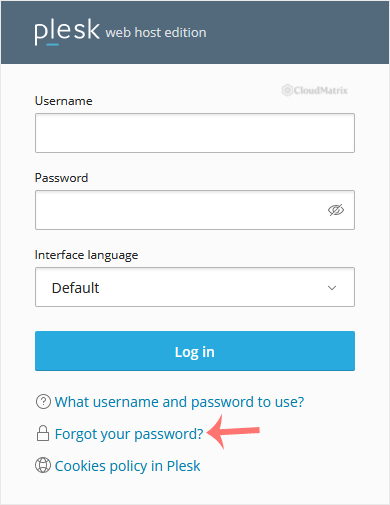
- Click Forgot your password? below the login form.
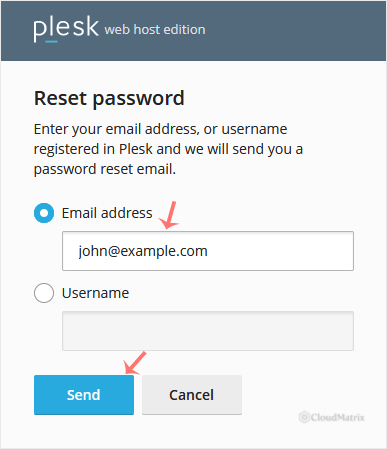
- On the Reset password page, enter your email address. Alternatively, choose the Username option, type your username, then click Send.
- Check the inbox of your registered email address for the password reset message, then open it and click the reset link. If nothing arrives within a few minutes, check your spam or junk folder.
- Enter a new password, or click Generate to have Plesk create a strong one for you. Click the view password (eye) icon to reveal the value so you can copy and store it safely.
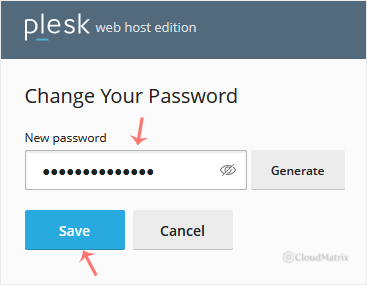
- Click Save.
Once the password is saved, return to the Plesk login page and sign in with your username and the new password.
Troubleshooting
No reset email arrives: the message is sent only to the email address registered on the account, so confirm you entered the correct address or username. Check your spam or junk folder, and allow a few minutes for delivery before requesting the link again.
The reset link says it is invalid or has expired: Plesk password reset links are single use and time limited. Request a fresh link from the login page and use the most recent email, ignoring any earlier ones.
Plesk rejects the new password as too weak: the server enforces a password strength policy. Use a longer password that mixes upper and lower case letters, numbers and symbols, or click Generate to let Plesk produce a compliant one.
You no longer have access to the registered email address: the self-service reset cannot be completed without it. Contact Noiz support so the team can verify your identity and restore access.
Need a Hand?
If you cannot reset your password yourself, or you are on a managed Noiz plan and would prefer the team to handle it, open a support ticket from your Noiz client area. Noiz support can verify your account and reset your Plesk password for you.






