Private nameservers (also called custom nameservers, branded nameservers or child nameservers) let you hand your clients ns1.yourdomain.com and ns2.yourdomain.com instead of your provider's nameservers. This guide shows you how to set them in WHM, and, just as importantly, what has to be in place at your domain registrar first so that they actually resolve.
You need this article if you have a reseller, VPS or dedicated server with WHM access. If you are on Noiz shared hosting and simply need the nameservers to point a domain at your account, you do not need private nameservers at all: use ns1.noiz.co.za and ns2.noiz.co.za.
Last reviewed: 27 July 2026, against the current stable cPanel & WHM release. This guide is written for Noiz hosting and is kept current against cPanel & WHM. It complements, and does not replace, the official cPanel documentation linked below.
Official Documentation Reference
- WHM: Basic WebHost Manager Setup (the interface used in this guide)
- WHM: DNS Zone Manager (creating and editing the A records your nameservers need)
- WHM: Nameserver Selection (which DNS server software the machine runs)
- WHM: DNS Cluster (if your nameservers live on more than one machine)
- cPanel product versions and the release process
Prerequisites
- WHM access, either as root or as a reseller with the Basic WebHost Manager Setup privilege.
- A domain you control that will carry the nameserver hostnames, for example
yourdomain.com. Replace this placeholder with your own domain everywhere below. - Access to that domain's registrar control panel, so that you can register the nameserver hostnames as host records.
- The public IP address (or addresses) your nameservers will answer on.
Understand the Three Pieces First
This is where most private nameserver setups go wrong. Setting the values in WHM is only one of three pieces, and on its own it does nothing for the outside world. All three have to line up:
- Registration at the registrar. The hostnames
ns1.yourdomain.comandns2.yourdomain.commust be registered as host records (often labelled "register a nameserver", "child nameservers", "host records" or "glue records") against the parent domain, each mapped to an IP address. Without this the wider internet has no way to find your nameservers, because it would have to ask your nameservers where your nameservers are. - A records on the server. The DNS zone for
yourdomain.comon your server needs A records forns1andns2pointing at the same IPs you registered. Add AAAA records too if you serve IPv6. - The WHM setting. This tells WHM which nameservers to write into the DNS zones of accounts you create from that point on, and which nameservers to display to your clients.
Do the registrar step first if you can. Registrar host records can take up to 24 hours to appear in the registry, so starting there means the delay runs in the background while you finish the server side.
Set the Nameservers in WHM
1. Log in to WHM
Sign in at https://yourdomain.com:2087, or at the hostname or IP address Noiz supplied for your server. Use your root credentials, or your reseller credentials if you are a reseller.
2. Open Basic WebHost Manager Setup
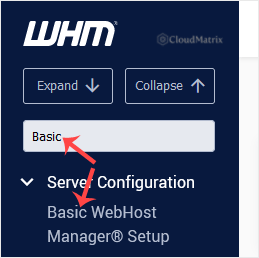
Go to Server Configuration » Basic WebHost Manager® Setup. The quickest route is to type Basic into the menu filter box at the top left of the WHM sidebar and click the result.
3. Choose Explicitly Set the Nameservers and enter your values
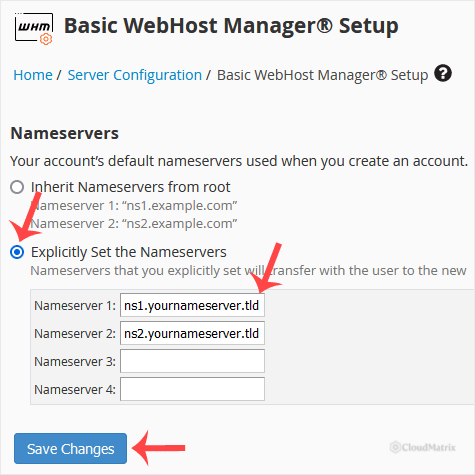
Scroll to the Nameservers section. Depending on your cPanel & WHM version and whether you are logged in as root or as a reseller, you will either see the nameserver fields straight away, or a selector that you must set first:
- Explicitly Set the Nameservers: choose this. It is the option that lets you type your own hostnames.
- Inherit Nameservers from root (resellers only): the reseller uses whatever the server owner has configured. Leave this if you do not have your own branded nameservers.
- Configure Automatically Based on IP Addresses or Disable Nameservers (root only): neither of these gives you branded nameservers.
Enter your hostnames in the Primary and Secondary nameserver boxes, for example ns1.yourdomain.com and ns2.yourdomain.com. The Tertiary and Quaternary boxes are optional and can be left empty. Then click Save Changes.
4. Configure the address records
Next to each nameserver field WHM offers a Configure Address Records control. Use it to create the A record (and the AAAA record, if you run IPv6) that maps each nameserver hostname to its IP address. WHM writes these into the DNS zone for yourdomain.com on the server.
If the zone for yourdomain.com is not hosted on this server, WHM cannot create the records for you. Add them manually wherever that zone actually lives, whether that is another server or an external DNS provider.
Register the Nameservers at Your Registrar
Log in to the registrar that holds yourdomain.com and find the section for registering nameservers. The wording varies by registrar, but look for "Register a Nameserver", "Child Nameservers", "Host Records", "Private Nameservers" or "Glue Records".
Create one entry per nameserver:
ns1.yourdomain.compointing to your first IP addressns2.yourdomain.compointing to your second IP address
Once the host records exist, set the domain's own nameservers to ns1.yourdomain.com and ns2.yourdomain.com if you want the domain itself served by them. This is a separate field from the host record registration, and forgetting it is a common cause of "I registered them but nothing changed".
Note: some registries require two nameservers on distinct IP addresses and will reject a pair that shares one IP. If you only have a single IP, ask Noiz support about an additional address, or point the second nameserver at a secondary DNS service.
What This Setting Does and Does Not Do
- It applies going forward. The nameservers you save become the default written into DNS zones for accounts you create (or migrate in) after the change. Zones that already exist keep their old NS records until you update them.
- Existing accounts need updating separately. Edit each zone in WHM » DNS Functions » DNS Zone Manager, or ask Noiz support to run a bulk update across your accounts.
- The domains themselves still have to be pointed. A client's domain only starts using your nameservers once the NS records are changed at that domain's registrar.
- It does not create the DNS service. Your server must actually be running a DNS server. Check WHM » Service Configuration » Nameserver Selection if in doubt.
Verify the Setup
Give the change time to propagate, then confirm from a machine outside your server. Domain propagation commonly takes a few hours and can take up to 24 to 48 hours, depending on the previous TTL values and the registry involved.
dig +short ns1.yourdomain.com
dig +short ns2.yourdomain.com
dig +short NS yourdomain.com
dig @ns1.yourdomain.com yourdomain.com SOA
The first two should return your IP addresses. The third should list your nameserver hostnames. The last confirms your nameserver is answering authoritatively for the zone rather than merely being reachable.
Troubleshooting
Symptom: the nameservers resolve for you but not for clients. Your local resolver has cached the old answer, or propagation is still in progress. Test from an external DNS lookup service and wait out the TTL before changing anything else.
Symptom: the registrar rejects the host record with "nameserver already exists" or similar. The hostname is already registered, often from a previous setup. Edit the existing host record's IP address rather than creating a new one.
Symptom: dig NS yourdomain.com returns the old nameservers long after the change. The domain's NS delegation at the registrar was never updated, or the registry has not published it yet. Registering host records and delegating the domain are two separate actions.
Symptom: new accounts still get the old nameservers. Confirm you clicked Save Changes, and if you are a reseller confirm the selector is on Explicitly Set the Nameservers rather than inheriting from root.
Symptom: queries to the nameserver IP time out. A firewall is blocking DNS. Port 53 must be open on both UDP and TCP; blocking TCP breaks larger responses and zone behaviour even though small queries appear to work.
Need a Hand?
Private nameservers touch the registrar, the registry and the server at the same time, which makes them one of the easier things to get half right. If yours are not resolving, open a ticket from the Noiz client area with your domain name and the nameserver hostnames you configured, and the Noiz team will check the delegation and the server side together. On Noiz managed plans the team can set the whole chain up for you.






