Optimizing a database rebuilds its tables so that the space left behind by deleted and updated rows is reclaimed and the index statistics are refreshed. In phpMyAdmin this is a few clicks on the Structure page of a database, and it runs the same OPTIMIZE TABLE statement you would issue from the MySQL command line. You may also see it described as defragmenting a database, clearing overhead, or repairing table bloat; they all refer to the same operation.
This guide applies to any Noiz hosting account that offers phpMyAdmin, whichever control panel your account uses. The phpMyAdmin screens themselves are identical; only the icon you click to launch it differs between panels.
Last reviewed: 27 July 2026, against phpMyAdmin 5.2.3 (latest stable). This guide is written for Noiz hosting and is kept current against phpMyAdmin. It complements, and does not replace, the official phpMyAdmin and MySQL/MariaDB documentation linked below.
Official Documentation Reference
- phpMyAdmin documentation (docs.phpmyadmin.net)
- MySQL Reference Manual: OPTIMIZE TABLE (dev.mysql.com)
- MariaDB Knowledge Base: OPTIMIZE TABLE (mariadb.com)
Prerequisites
- Access to your hosting control panel (your Noiz welcome email contains the login details).
- A database on the account, and a database user with
SELECTandINSERTprivileges on the tables you want to optimize. The user created alongside the database normally has these already. - A recent database backup. Optimizing rebuilds each table, so take a copy first if the site is live and busy.
Optimize a database in phpMyAdmin
1. Open phpMyAdmin
Log in to your hosting control panel and, in the Databases section, click phpMyAdmin. Your panel signs you in automatically, so there is no separate phpMyAdmin password to remember.

2. Open the database you want to optimize
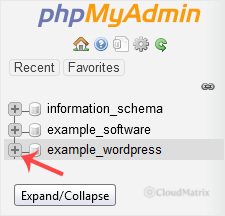
In the navigation panel on the left, click the expand arrow next to the database name (or click the database name itself) to open it. phpMyAdmin loads the Structure tab, listing every table in that database.
If the account holds several databases, check the name carefully before going further. Databases created through a control panel are usually prefixed with the account username, for example youracct_wp001, and the prefix is the quickest way to tell one site's database from another.
3. Select the tables and choose Optimize table
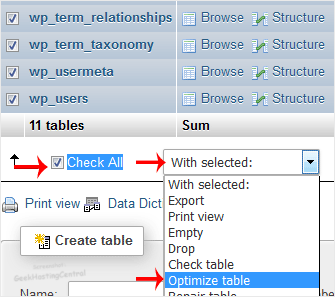
Scroll to the bottom of the table list and click Check all. In the With selected: drop-down immediately to the right of it, choose Optimize table. phpMyAdmin runs the statement straight away; there is no extra confirmation prompt.
You do not have to do the whole database. Ticking only the tables that show a figure in the Overhead column is often the better choice, because those are the only tables with space to reclaim. The summary row at the foot of the Structure page adds up the total overhead for the database, which is a useful before-and-after measure.
4. Read the results
phpMyAdmin returns a result row per table. A status of OK means the table was rebuilt successfully and the database is optimized.
On InnoDB tables, which is the default storage engine on current MySQL and MariaDB servers, you will also see a note reading Table does not support optimize, doing recreate + analyze instead. This is expected and is not an error. InnoDB maps OPTIMIZE TABLE to a table rebuild that reclaims free space in the clustered index and refreshes the index statistics, which is exactly what was wanted. As long as the status line says OK, the work was done.
When optimizing actually helps
Optimizing is worth doing after a large clear-out, not on a schedule for its own sake. Typical triggers are deleting thousands of post revisions, spam comments, expired transients, old orders, log rows, or session records. Deleting rows marks the space as reusable inside the table file but does not hand it back to the operating system; the rebuild is what actually returns it.
Two points are worth knowing before you expect a large drop in disk usage:
- Delete first, then optimize. Optimizing a table that still contains all its data will not shrink it. Clear the unwanted rows, then run the optimize pass.
- Space is returned to the filesystem only when each table has its own data file. Modern MySQL and MariaDB installations enable
innodb_file_per_tableby default, which is the case on Noiz shared hosting, so a rebuild does release the space back to the account's disk quota.
Routine daily or weekly optimizing is unnecessary and, on a large database, counterproductive: each pass rewrites the entire table. Once after a significant purge is the sensible cadence.
Troubleshooting
The page times out or the browser gives up on a large table: the statement continues running on the database server even though the browser connection has dropped. Wait a few minutes, reload the Structure page and check whether the overhead figure has fallen, rather than firing the optimize off a second time. For very large tables, optimize them one at a time instead of using Check all.
The result says the storage engine does not support optimize: some engines, such as MEMORY, have no rebuild operation. There is nothing to fix and nothing to reclaim on those tables.
An access denied or privileges error appears: the database user you are connected as is missing SELECT or INSERT on that table. Reassign the user to the database with full privileges in your control panel's database section, then try again.
Disk usage did not drop afterwards: check that the rows were genuinely deleted, and check whether the space is being used by something else in the account entirely, such as backups, mailboxes, or an error log, rather than by the database.
The site is slow and optimizing made no difference: table overhead is rarely the real cause of a slow site. Missing indexes, an unbounded query, an overloaded plugin, or an oversized options or postmeta table are far more common. Optimizing tidies storage; it does not rewrite a slow query.
Need a hand?
If you are on a managed Noiz plan and would rather Noiz optimize a database, investigate why one is growing, or look at slow queries behind a sluggish site, contact the Noiz support team through the client area and the team will assist.






