This guide shows you how to remove a user-level email filter in cPanel. A user-level filter belongs to a single mailbox and only acts on mail delivered to that address, so deleting one affects that mailbox alone. It does not touch the account-level (global) filters that apply to every mailbox on the account, nor the filters set on any other email address.
Deleting a filter is permanent and takes effect immediately. cPanel does not keep a copy of the rule, so if you might need the filter again, note its conditions and actions before you remove it.
Last reviewed: 27 July 2026, against cPanel & WHM (Jupiter theme, current stable). This guide is written for Noiz hosting and is kept current against cPanel. It complements, and does not replace, the official cPanel documentation linked below.
Official Documentation Reference
- cPanel: Email Filters (the interface used to create, edit and delete per-mailbox filters).
Prerequisites
- Access to your cPanel account.
- At least one existing email filter on the mailbox you want to change.
Deleting a User-Level Email Filter
- Log in to your cPanel account.
- In the Email section, click Email Filters.

- Under Filters by Users, cPanel lists every email account on the domain. Click Manage Filters next to the mailbox whose filter you want to remove.
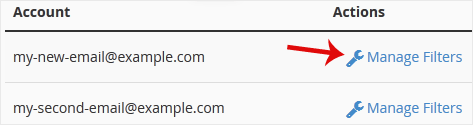
- Under Current Filters, find the filter you want to remove and click Delete next to it.
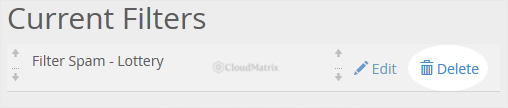
- Click Delete Filter to confirm. The filter is removed from that mailbox straight away.
Good to Know
- Only this mailbox is affected. User-level filters are separate from account-level (global) filters. Removing one here leaves the global filters and every other mailbox untouched.
- There is no undo. A deleted filter cannot be restored. To reinstate it later you have to recreate it by hand, so record the rule first if you are unsure.
- Mail already handled stays put. Deleting a filter only changes how future mail is treated. Messages the filter has already moved, redirected or discarded are not brought back.
Need a Hand?
If you are on a Noiz managed plan and would rather Noiz take care of it, open a support ticket from your client area and the team will remove the filter for you.






