A user-level email filter in cPanel sorts, redirects, or discards messages for a single email address on your account, without touching the other mailboxes. This guide shows you how to change a filter that already exists: adjust the rules it matches on, change what it does with a matching message, or rename it.
A user-level filter applies to one specific email account only. If you need a rule that applies to every address on the account, edit an account-level (global) filter instead.
Last reviewed: 27 July 2026, against cPanel & WHM (current stable release). This guide is written for Noiz hosting and is kept current against cPanel. It complements, and does not replace, the official cPanel documentation linked below.
Official Documentation Reference
Prerequisites
- A hosting plan that uses the cPanel control panel, and your cPanel sign-in details.
- An email account that already has at least one filter to edit.
Edit a User-Level Email Filter
- Log in to your cPanel account.
- In the Email section, click Email Filters.

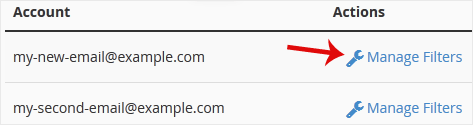
- Under Filters by Users, you see every email account on your hosting. Click Manage Filters next to the address whose filter you want to change.
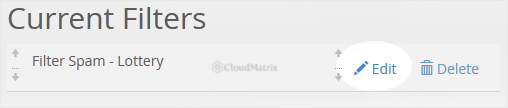
- Under Current Filters, click Edit next to the filter you want to change.
- Make your changes. You can rename the filter, adjust the matching rules (for example the field to check, such as Body or From, and the condition to match, such as contains), and change the action cPanel takes when a message matches, such as Discard Message or Deliver to Folder.
- Click Save.
Good to Know
- Filters run in order, from the top of the list downwards. Editing a filter does not move it. If your edited rule needs to run before another one, reorder the filters on the same Manage Filters page.
- Your changes apply to mail that arrives after you save. Messages already delivered to the mailbox are not re-filtered.
- Use the Filter Test box at the bottom of the Manage Filters page to paste a sample message and confirm the edited filter behaves the way you expect before you rely on it.
If you are on a managed Noiz plan and would like Noiz to review or fine-tune your email filtering, open a support ticket from your client area and the team will take care of it for you.






