Apache SpamAssassin is an automated mail filter that scores each incoming message and flags the ones that look like spam. It examines the headers and body of every email and applies a large set of statistical tests, so unsolicited bulk mail is caught before it clutters your inbox. This guide shows you how to switch it on in cPanel and how to send flagged mail to a separate Spam Box folder so you can review it rather than lose it.
In current cPanel versions this feature is listed as Spam Filters (older versions labelled it Apache SpamAssassin). Spam Box is the option that quarantines flagged mail in a dedicated Spam folder instead of leaving it in your inbox.
Last reviewed: 27 July 2026, against current cPanel & WHM, where Apache SpamAssassin appears as the Spam Filters feature. This guide is written for Noiz hosting and is kept current against cPanel. It complements, and does not replace, the official cPanel documentation linked below.
Official Documentation Reference
Prerequisites
- Access to your cPanel account.
- The Spam Filters feature available on your plan. If the toggles described below are greyed out, Apache SpamAssassin has been disabled at the server level; contact Noiz support and it can be enabled for your account.
Turn On Spam Filtering
- Log in to your cPanel account.
- In the Email section, click Spam Filters.
- Turn on the Process New Emails and Mark them as Spam toggle. When the toggle is on, Apache SpamAssassin scans every new message and marks anything that scores at or above the spam threshold. If the toggle is greyed out and cannot be moved, the filter is disabled at the server level.

On its own, this setting only marks spam. Marked messages still arrive in your inbox with spam headers added, so most people also switch on Spam Box below to keep flagged mail out of the way.
Move Flagged Mail to Spam Box
Spam Box collects messages that Apache SpamAssassin marks as spam into a separate Spam folder, keeping your inbox clean while letting you review anything that was caught by mistake.
- In the same Spam Filters interface, turn on Move New Spam to a Separate Folder (Spam Box).
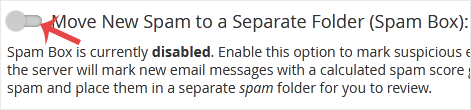
- From now on, flagged messages are delivered to the
Spamfolder rather than your inbox. You can open that folder in Webmail, or in any mail app connected over IMAP, to check for legitimate mail that was mistakenly flagged.
Spam Box keeps flagged mail, it does not delete it. The Spam folder counts towards your mailbox quota, so empty it from time to time to avoid filling your storage.
Adjust the Spam Threshold Score
Every message is given a spam score. The higher the score, the more spam-like the message. By default cPanel marks anything scoring 5 or above as spam.
- Lower the threshold (for example to 3 or 4) to catch more spam, at the risk of flagging some legitimate mail.
- Raise the threshold (for example to 7 or 8) to be less aggressive if genuine mail is being caught.
To change it, open Spam Threshold Score in the Spam Filters interface, choose a value, and save. Start with the default and only adjust it if you see too much spam getting through or too much good mail being flagged.
Auto-Delete (Optional)
The Automatically Delete New Spam (Auto-Delete) option permanently discards messages that score at or above a level you choose, with no copy kept anywhere. It is effective but unforgiving: anything wrongly flagged is gone for good. For most accounts Spam Box is the safer choice, because it lets you review flagged mail before deleting it. Only use Auto-Delete once you are confident the filter is not catching legitimate messages.
Troubleshooting
- The toggle is greyed out: Apache SpamAssassin is disabled at the server level and cannot be switched on from cPanel. Open a ticket with Noiz support to have it enabled for your account.
- Genuine mail is landing in the Spam folder: raise the Spam Threshold Score, or add the sender to the whitelist under Additional Configurations (For Advanced Users) in the Spam Filters interface. Check the
Spamfolder regularly until you are happy with the results. - Spam is still reaching the inbox: lower the Spam Threshold Score so more messages are flagged, and confirm the Process New Emails and Mark them as Spam toggle is on. You can also blacklist a persistent sender under Additional Configurations.
- Your mailbox is filling up: the
Spamfolder counts towards your quota. Empty it periodically, or set an Auto-Delete score once you trust the filter.
If you are unsure which settings suit your mail, Noiz support can review your Spam Filters configuration and recommend a threshold for your account. Open a ticket from your client area and include the email address you want reviewed.






