Deleting an FTP account removes a set of FTP login details from your hosting account. This guide shows you how to remove an FTP user in cPanel and, just as importantly, how to do it without deleting the files that account could reach.
An FTP account is only a login. The files it connects to live in your account's directories and are often shared with your website and with other FTP accounts. Removing the login does not have to remove the files, and in almost every case you want to keep them.
Last reviewed: 27 July 2026, against cPanel & WHM (current stable). This guide is written for Noiz hosting and is kept current against cPanel. It complements, and does not replace, the official cPanel documentation linked below.
Official Documentation Reference
Prerequisites
- Access to your cPanel account.
- The username of the FTP account you want to remove.
Delete the FTP account
- Log in to your cPanel account.
- In the Files section, click FTP Accounts.

- Scroll to the FTP Accounts list, find the account you want to remove, and click Delete next to it.
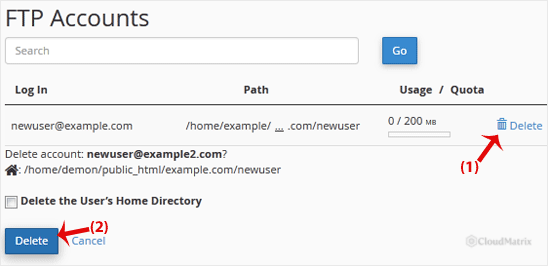
- cPanel asks you to confirm. Click Delete Account (labelled Delete FTP Account in some cPanel versions) to finish.
Important: do not delete the home directory
Warning: When you confirm, cPanel offers a second option that also deletes the account's home directory. Depending on your cPanel version this appears as a checkbox, Delete the user's home directory as well, or as a separate button, Delete Account and Files. Do not use it unless you are certain.
Choosing that option deletes every file and folder inside the FTP account's home directory. For an account pointed at your website, that can remove your live site. The files are removed from the server and cannot be recovered unless you restore them from a backup. To remove only the login and keep the files, always confirm with the plain Delete Account option.
Troubleshooting
Symptom: The FTP account you want has no Delete option. This is usually the main FTP account, which shares its login with your cPanel account and cannot be deleted on its own. It is listed under Special FTP Accounts and only offers configuration options.
Symptom: An application or device stops connecting after the deletion. Any software, backup job, or device that used those FTP credentials will now fail to log in. Create a fresh FTP account and update the connection details wherever they were saved.
If you are on a Noiz managed plan and would rather Noiz handle FTP changes for you, contact the Noiz support team and it will take care of the account for you.






