Webmail lets you read and send email straight from a browser, without setting up a mail app on your device. This guide shows you how to open cPanel Webmail for any email address on your hosting account, sign in, and start reading your mail.
Last reviewed: 27 July 2026, against current cPanel & WHM (v108 and later, which ships Roundcube as the webmail application). This guide is written for Noiz hosting and is kept current against cPanel. It complements, and does not replace, the official cPanel documentation linked below.
Official Documentation Reference
Prerequisites
- An email address already created on your cPanel hosting account.
- The full email address (for example
[email protected]) and its password. Webmail uses the address as the username, not just the part before the @.
Ways to Open Webmail
You can reach the Webmail login page in any of these ways. Replace yourdomain.com with your own domain.
- Go to
https://yourdomain.com/webmailin your browser. - Go to
https://webmail.yourdomain.com. - If your domain is not yet pointed at Noiz, browse to the server directly on the secure Webmail port:
https://your-server-hostname:2096. Ask Noiz support for the correct hostname if you are unsure. - If you are already signed in to cPanel, open Email Accounts, find the address, and click Check Email.
Sign In and Read Your Mail
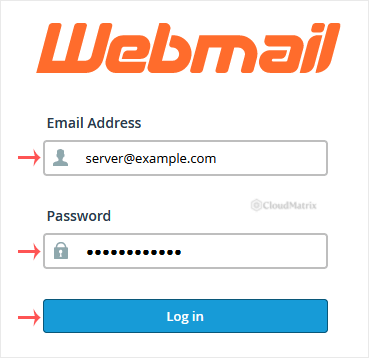
- Open one of the addresses above. At the login page, enter your full email address in the username field and your password, then click Log in.
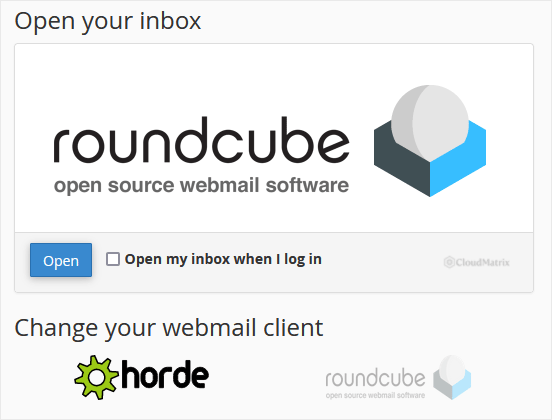
- After you sign in, cPanel opens the webmail application. On current cPanel servers this is Roundcube, the modern webmail client that ships with cPanel. If a chooser appears, click Open under Roundcube to start reading your mail.
Roundcube gives you a full inbox: read, reply, compose, manage folders, and search. Your webmail changes stay in sync with any mail app you also use on the same account, because both read the same mailbox on the server.
Skip the Chooser Next Time
If you would rather land in your inbox immediately instead of seeing the application page each time, set Roundcube as your default. From the Webmail interface, open the account menu (top right, shown by your email address) and choose Set as Default for Roundcube, or tick the option to open the default application automatically. After that, signing in takes you straight to your inbox.
Troubleshooting
- Login fails with correct password: make sure you entered the full email address as the username, including the domain after the @. Passwords are case-sensitive.
- Only Roundcube is offered, no Horde: this is expected. Horde was retired from cPanel and no longer ships with current versions, so Roundcube is the webmail client on your account.
- Browser warns the connection is not private on port 2096: this happens when you reach the server by its raw hostname before your own domain's certificate applies. Continue, or use
https://yourdomain.com/webmailonce your domain points at the server. - The Webmail page will not load: confirm your domain resolves to your Noiz hosting and that you are using
https://. If it still fails, contact Noiz support.
If you get stuck, Noiz support can confirm your mailbox settings and the correct server hostname for your account. Open a ticket from your client area and include the email address you are trying to reach.