An email account gives you a mailbox at your own domain, such as [email protected], that you can read in webmail or set up in Outlook, Apple Mail or your phone. This guide shows you how to create a new email account in cPanel on Noiz hosting, and explains the choices on the create screen so your mailbox is set up correctly the first time.
Last reviewed: 27 July 2026, against the current cPanel & WHM Jupiter interface. This guide is written for Noiz hosting and is kept current against cPanel. It complements, and does not replace, the official cPanel documentation linked below.
Official Documentation Reference
Prerequisites
- Your cPanel sign-in details, which are in your Noiz hosting welcome email or available from your Noiz client area.
- A domain that already points to your Noiz hosting. Email for a domain only works once that domain is added to the account and its DNS is pointed at Noiz.
Create the Email Account
- Log in to your cPanel account.
- In the Email section, click Email Accounts.

- Click + Create on the right-hand side of the Email Accounts page.
- Under Create an Email Account, fill in the details described below.
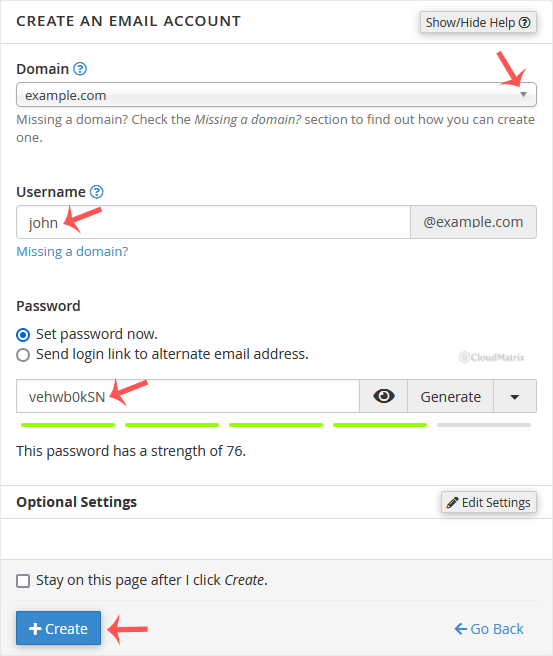
- Click Create.
What Each Field Means
- Domain: If the account holds more than one domain, choose the domain the mailbox should belong to from the drop-down. This is the part after the
@in the address. - Username: The part before the
@, for exampleinfo,salesor your first name. Together with the domain this becomes the full address, such as[email protected]. - Security: Choose Set password now and type a password, or click Generate to have cPanel create a strong one for you. cPanel shows a strength meter and will reject a weak password, so aim for a long mix of letters, numbers and symbols. Keep a note of the password; you will need it to log in to webmail and to set the mailbox up on a phone or mail app.
- Optional Settings: Click Edit Settings to expand this section. Under Storage Space, set a mailbox size in megabytes or tick Unlimited to let the mailbox grow up to the space available on your plan. You can also choose whether cPanel automatically creates folders for plus addressing (subaddresses such as
[email protected]).
After the Account Is Created
Once you click Create, the new mailbox appears in the list on the Email Accounts page, under the Account @ Domain column.
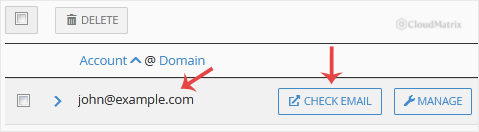
From the same list you can manage the mailbox at any time: use Manage to change the password or storage quota, Check Email to open webmail, or Connect Devices to see the incoming and outgoing server settings for setting the mailbox up in Outlook, Apple Mail or a phone.
Good to Know
- Reach your new mailbox straight away at
https://webmail.yourdomain.com, or by clicking Check Email next to the account. Sign in with the full email address and the password you set. - Set a sensible quota. Every mailbox shares the disk space on your hosting plan. A generous fixed quota is usually safer than Unlimited, because it stops one mailbox from filling the whole account if it is ever flooded with mail.
- The default address is not the same thing. Creating a mailbox does not change the domain's default (catch-all) address. Manage that separately under the Email section if you need to control where mail to unknown addresses goes.
Troubleshooting
cPanel will not accept the password: the strength meter has judged it too weak. Use a longer password with a mix of upper and lower case letters, numbers and symbols, or click Generate and copy the suggested one.
The domain you want is not in the drop-down: that domain has not been added to the account yet, or its DNS is not pointed at Noiz. Add the domain first, then create the mailbox.
New mail is not arriving: give DNS a little time to update after a domain is first pointed at Noiz, and check that mail is not being caught by a filter. If it still does not arrive, contact Noiz support.
Need a Hand?
If you are on a Noiz managed hosting plan and would like a mailbox created or configured for you, open a support ticket from your Noiz client area and the support team will set it up and confirm it is working.






