A subdomain is a separate section of your existing domain that lives under it, such as blog.yourdomain.com or shop.yourdomain.com. It works like an independent website (its own folder, its own content) while still belonging to your main domain, and it costs nothing extra to add. This guide shows you how to create one from cPanel on your Noiz hosting account.
Last reviewed: 27 July 2026, against cPanel & WHM (current stable, Jupiter theme). This guide is written for Noiz hosting and is kept current against cPanel. It complements, and does not replace, the official cPanel documentation linked below.
One important change to know first: cPanel now manages subdomains from its unified Domains interface. The old, dedicated Subdomains tool was consolidated into Domains in cPanel version 100, so on current accounts you create a subdomain simply by adding a domain that sits beneath one you already own. The steps below cover that current method, and also the legacy Subdomains screen you may still see on older cPanel builds.
Official Documentation Reference
Prerequisites
- An active Noiz hosting account with cPanel access.
- The parent domain (your primary domain, or an addon domain) already added to the account. A subdomain can only be created beneath a domain cPanel already knows about.
Create a Subdomain (Current cPanel)
- Log in to your cPanel account.
- In the Domains section, click Domains.

- Click Create A New Domain.
- In the Domain box, type the full subdomain you want, for example
blog.yourdomain.com(replaceyourdomain.comwith your own domain). Because the parent domain is already on the account, cPanel recognises the entry as a subdomain automatically. - Decide where the subdomain's files will live. By default, Share document root is ticked, which makes the subdomain serve the same files as its parent domain. To give the subdomain its own separate website, untick Share document root and confirm the Document Root path that cPanel suggests, such as
/home/user/blog.yourdomain.com.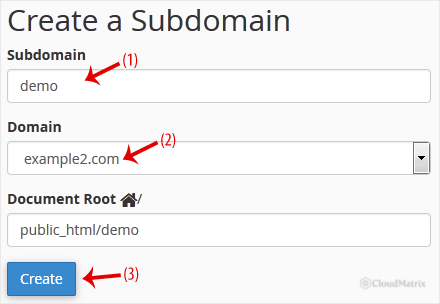
- Click Submit.
cPanel confirms that the subdomain has been created and, on Noiz hosting, adds the required DNS record for you automatically. Allow a short time for the change to propagate before the subdomain resolves in a browser.
Older cPanel: the Legacy Subdomains Tool
If your account is on an older cPanel version, you may still see a dedicated Subdomains icon in the Domains section instead of doing this from Domains > Create A New Domain. The result is identical. On that screen you type the subdomain into the Subdomain field, choose the parent domain from the drop-down list, let the Document Root populate (or edit it), and click Create.
After Creating the Subdomain
- Upload your content. If you gave the subdomain its own document root, that folder starts empty. Upload your site's files into it (via File Manager or FTP) or the subdomain will show an empty page or a "not found" error until you do.
- Shared versus separate content. If you left Share document root ticked, the subdomain shows exactly the same content as its parent domain. Untick it if you want the subdomain to be an independent site.
- DNS and nameservers. Subdomains resolve automatically only when the parent domain points at Noiz. Confirm the domain uses the Noiz nameservers
ns1.noiz.co.zaandns2.noiz.co.za.
Troubleshooting
- You cannot select or add the domain: the parent domain must already exist on the account. Add it first (as your primary or an addon domain), then create the subdomain beneath it.
- The subdomain shows the parent site's content: Share document root was left ticked. Remove the subdomain and recreate it with its own document root, or point it at a separate folder.
- The subdomain does not load yet: DNS changes can take a little time to propagate. Allow up to a few hours, and confirm the domain is using the Noiz nameservers above.
- You see a 404 or an empty page: the subdomain's document root has no files in it yet. Upload your website files into that folder.
If you would like Noiz to set up a subdomain for you, or if it is not resolving as expected, contact Noiz support from your client area and the team will assist.






