An add-on domain lets you host a completely separate website, with its own domain name, inside a single cPanel account. This guide shows you how to remove an add-on domain you no longer need, so it stops resolving to your hosting and frees the name up for use elsewhere.
Last reviewed: 27 July 2026, against cPanel & WHM (Jupiter theme, version 110 and later). This guide is written for Noiz hosting and is kept current against cPanel. It complements, and does not replace, the official cPanel documentation linked below.
Official Documentation Reference
- cPanel Domains interface (the current, merged tool)
- cPanel Add-on Domains (legacy tool, for older versions)
Prerequisites
- Access to the Noiz cPanel account that holds the add-on domain.
- The add-on domain must already exist in that account. If it lives in a different account, log in to that one instead.
Remove an Add-on Domain in cPanel
Current cPanel merges add-on domains, subdomains, and aliases into a single Domains interface, so add-on domains are now removed from there rather than from a separate tool.
- Log in to your Noiz cPanel account.
- In the Domains section, click Domains.
- Find the domain you want to remove in the list, then click Manage in its Actions column.
- Scroll to the bottom of the manage page and click Remove Domain.
- In the confirmation window, click Remove Domain again to confirm.
cPanel confirms the domain has been removed, and it no longer appears in the Domains list. Note that you cannot remove the account's main (primary) domain from here.
On Older cPanel Versions (the Add-on Domains Tool)
Older cPanel releases kept add-on domains in a separate Add-on Domains tool rather than the unified Domains interface. If your account still shows that tool, use these steps instead.
- In the Domains section of the cPanel home screen, click Addon Domains.

- Under Modify Addon Domain, find the domain you want to remove and click Remove.
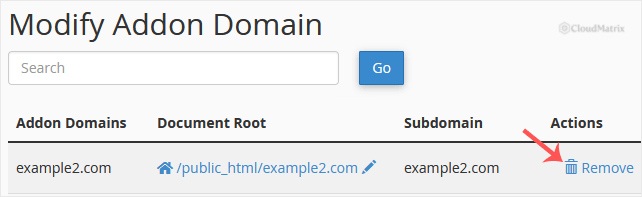
- Click Remove again in the confirmation prompt. A message confirms that the add-on domain has been removed.
What Removing a Domain Does and Does Not Delete
Removing an add-on domain is not a full clean-up on its own. Keep the following in mind:
- It removes the domain from cPanel and deletes its DNS zone, so the name stops resolving to your hosting.
- It does not delete the website files in the document root. If you no longer need them, delete them separately in File Manager.
- Email accounts, forwarders, and autoresponders on the domain are not removed automatically. Delete those from the Email Accounts and Forwarders tools if required.
- Databases and database users linked to the site are not removed.
- If you are moving the domain to another account or server, remove it here first. This avoids the common conflict where the destination refuses to add a domain that already exists elsewhere on the server.
Troubleshooting
The domain is not listed in Domains: it may sit in a different cPanel account, or it is the account's main domain, which cannot be removed from this interface.
cPanel says the domain already exists when you try to re-add it elsewhere: a leftover DNS zone or entry can remain on the server. Open a ticket and the Noiz support team can clear it for you.
The website still loads after removal: this is almost always browser or DNS caching. Clear your browser cache and allow time for DNS changes to take effect.
Need a Hand?
If you are not sure which account holds the domain, or you need a leftover DNS zone cleared after removal, the Noiz support team can help. Open a ticket from your Noiz client area.






