This guide shows you how to remove a domain alias from a cPanel account. An alias (historically called a parked domain) is a second domain name that shows the same website as your main domain. Removing it simply stops that extra name from pointing at your account; it does not cancel or delete the domain's registration, so you keep ownership of the name.
Last reviewed: 27 July 2026, against current cPanel & WHM (Jupiter theme). This guide is written for Noiz hosting and is kept current against cPanel. It complements, and does not replace, the official cPanel documentation linked below.
Official Documentation Reference
- cPanel Domains interface: create, manage and remove every domain type from one place.
Prerequisites
- Your cPanel sign-in details for the account that holds the alias. You can reach cPanel from the single sign-on link in your Noiz client area, or directly at your server hostname on port
2083. - The exact alias name you want to remove, so you do not remove the wrong domain.
Note: removal takes effect immediately. Any website content, redirect or email routing that relied on that extra name will stop working once it is gone, so confirm nothing important is still using it first.
Remove an Alias in cPanel
Recent cPanel versions merged the old Aliases, Addon Domains and Subdomains tools into a single Domains interface. On a current account, use this method.
- Log in to your cPanel account.
- In the Domains section, click Domains.
- Find the alias you want to remove in the list of domains.
- In the Actions column for that domain, click Manage.
- Scroll to the bottom of the management page and click Remove Domain.
- Confirm the removal when cPanel prompts you.
cPanel displays a success message once the alias has been removed.
Older cPanel Versions: the Aliases Interface
If your account still shows a separate Aliases tool rather than the unified Domains page, use these steps instead. The outcome is identical.
- Log in to your cPanel account.
- In the Domains section, click Aliases.
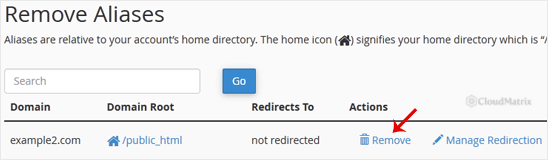
- Under Remove Aliases, find the domain name and click Remove.
- To confirm, click Remove Alias again.
You will see a message confirming that the alias has been removed.
Good to Know
- Your domain registration is untouched. Removing an alias only detaches the name from this cPanel account. You still own the domain and can point it elsewhere or add it back later.
- DNS may take time to catch up. If the old address still loads shortly after removal, allow for DNS caching and propagation before assuming something is wrong.
- Email and redirects tied to the alias stop. Because an alias shares your main domain's configuration, any mail delivery or redirect that depended on the alias name ends when you remove it.
If you are unsure whether a domain is set up as an alias, an addon domain or a subdomain, or you would prefer Noiz to make the change for you, open a support ticket from your Noiz client area and the team will handle it.






