An alias (cPanel's current name for what used to be called a parked domain) lets an extra domain name show the exact same website as your main domain. Use it to point both yourbrand.co.za and yourbrand.com at one site, to catch a common misspelling of your domain, or to reserve a name you have registered but not yet built out. This guide shows you how to add an alias in cPanel and explains how an alias differs from an addon domain and a subdomain.
Last reviewed: 27 July 2026. These steps follow the unified Domains interface that cPanel introduced in version 100, when the separate Aliases tool was merged into it. They remain current in the latest cPanel & WHM releases. This guide is written for Noiz hosting and complements, and does not replace, the official cPanel documentation linked below.
Official Documentation Reference
Prerequisites
- A cPanel account on Noiz hosting, and your cPanel login details.
- The domain you want to add already registered in your name.
- The domain pointed at the Noiz nameservers,
ns1.noiz.co.zaandns2.noiz.co.za, at its registrar. Until the domain resolves to Noiz, the alias will not load your website. Nameserver changes can take up to 24 to 48 hours to propagate.
Create a Domain Alias in cPanel
- Log in to your cPanel account.
- In the Domains section, click Domains.
- Click Create A New Domain.
- In the Domain box, type the domain you want to park, for example
yourdomain.com.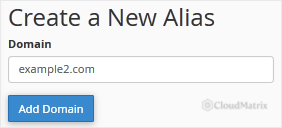
- Leave the Share document root (
.../public_html) with "yourmaindomain.com" box ticked. Sharing the document root is what makes the new domain an alias, so both names serve the same website. If you untick it and set a separate folder, cPanel creates an addon domain instead. - Click Submit.
The new domain now appears in your Domains list, marked as an alias, and serves the same website as your main domain.

Screens vary slightly between cPanel versions and themes, so the exact layout may differ from the images above, but the field and button names are the same.
Alias, Addon Domain or Subdomain?
cPanel lets you attach three kinds of domain to your account. Choosing the right one avoids duplicate content and wasted setup.
- Alias (parked domain): a second domain that shows the same website as your main domain. Best for alternative spellings, other extensions of your brand, or names you are simply holding.
- Addon domain: a completely separate website with its own folder, hosted under the same cPanel account. Choose this when the domain needs its own content.
- Subdomain: a section of your existing domain, such as
shop.yourdomain.com, with its own folder.
Troubleshooting
The alias does not load your website: confirm the domain's nameservers are set to ns1.noiz.co.za and ns2.noiz.co.za at the registrar, then allow time for DNS to propagate before testing again.
cPanel rejects the domain: the domain may already be added to another hosting account on the server, or it may not yet point to Noiz. A domain can be aliased on only one account at a time.
You want the alias to redirect rather than mirror the site: an alias always shows the same site. To send visitors to a different address instead, set up a redirect from the Domains list.
Need a hand?
If your alias will not resolve, or you are not sure which nameservers your domain currently uses, the Noiz support team can check it for you. Open a ticket from your Noiz client area and include the domain name you are trying to park.






