If you are looking for where to change how your cPanel interface looks, this guide explains the current position. The short version is that cPanel no longer offers individual users a theme or style picker. Since cPanel and WHM version 110 (released March 2023), the older paper_lantern theme and its per-user style switching were removed, and Jupiter is now the single standard cPanel interface. The overall look is set on the server by your hosting provider, so there is no drop-down inside your account for choosing a different theme.
Older tutorials (including earlier versions of this article) described a Theme drop-down in a General Information panel, or a Change Style tile under Preferences. Those belonged to paper_lantern and no longer appear in current cPanel.
Last reviewed: 27 July 2026, against the current stable release of cPanel and WHM. This guide is written for Noiz hosting and is kept current against cPanel. It complements, and does not replace, the official cPanel documentation linked below.
Official Documentation Reference
- cPanel Preferences interfaces (docs.cpanel.net)
- cPanel and WHM version 110 change log, documenting the paper_lantern removal (docs.cpanel.net)
Why the theme switcher is gone
For years cPanel shipped two interfaces: the older paper_lantern theme, which let each user pick a colour "style", and the newer Jupiter theme. In version 110, cPanel removed paper_lantern entirely, along with the style routing that powered the old switcher. Jupiter became the only theme, which means every cPanel account now presents the same, consistent interface.
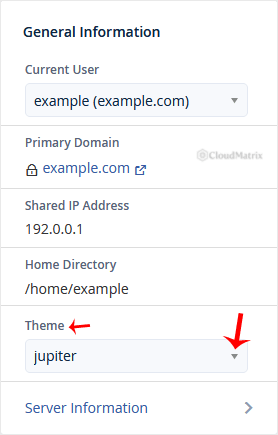
The screenshot below shows the retired paper_lantern Theme drop-down. It is kept here only so you can recognise it in old tutorials; this control no longer exists in current cPanel.
How your cPanel looks now
Your account uses the Jupiter theme. Its appearance, including any branding or colour styling, is configured at the server level by Noiz rather than per account, so there is no user setting to change it. If your cPanel looks different from a screenshot in an old article, that is almost always because the article predates Jupiter.
What you can still personalise
You cannot swap the theme, but a couple of genuine per-user options remain in the Preferences section of cPanel:
- Change Language displays the whole interface in a different language.
- Account Preferences and Contact Information control notification and contact settings. They adjust behaviour rather than appearance, but they are the other user-editable preferences.
Beyond those, the way to influence how your cPanel is presented is a request to your host.
Troubleshooting
A guide tells me to open a Theme or Change Style menu, but I cannot find it: that menu belonged to the paper_lantern theme, which cPanel removed in version 110. There is no replacement picker in Jupiter, so the guide is out of date.
I want a different look for cPanel on my Noiz hosting: theme and branding are set on the server, so raise it with Noiz support rather than looking for an in-account option.
Need a hand?
If you have a specific requirement for how cPanel is presented on your Noiz hosting, contact the Noiz support team through the client area and the team will advise on what is possible.






